Leveraging Generative AI to Boost Office Productivity

Generative AI tools like ChatGPT and CoPilot are revolutionising the way we approach office productivity. These tools are not only automating routine tasks but are also enhancing complex processes, boosting both efficiency and creativity in the workplace. In the modern fast-paced business environment, maximising productivity is crucial for success. Generative AI tools are at the forefront of this transformation, offering innovative ways to enhance efficiency across various office tasks. Here, we explore how these tools can revolutionise workplace productivity, focusing on email management, consultancy response documentation, data engineering, analytics coding, quality assurance in software development, and other areas.

Here’s how ChatGPT can be utilised in various aspects of office work:

  • Streamlining Email Communication – Email remains a fundamental communication tool in offices, but managing it can be time-consuming. ChatGPT can help streamline this process by generating draft responses, summarising long email threads, and even prioritising emails based on urgency and relevance. By automating routine correspondence, employees can focus more on critical tasks, enhancing overall productivity.
  • Writing Assistance – Whether drafting emails, creating content, or polishing documents, writing can be a significant drain on time. ChatGPT can act as a writing assistant, offering suggestions, correcting mistakes, and improving the overall quality of written communications. This support ensures that communications are not only efficient but also professionally presented.
  • Translating Texts – In a globalised work environment, the ability to communicate across languages is essential. ChatGPT can assist with translating documents and communications, ensuring clear and effective interaction with diverse teams and clients.
  • Enhancing Consultancy Response Documentation – For consultants, timely and accurate documentation is key. Generative AI can assist in drafting documents, proposals, and reports. By inputting the project’s parameters and objectives, tools like ChatGPT can produce comprehensive drafts that consultants can refine and finalise, significantly reducing the time spent on document creation.
  • Enhancing Research – Research can be made more efficient with ChatGPT’s ability to quickly find relevant information, summarise key articles, and provide deep insights. Whether for market research, academic purposes, or competitive analysis, ChatGPT can streamline the information gathering and analysis process.
  • Coding Assistance in Data Engineering and Analytics – For developers, coding can be enhanced with the help of AI tools. By describing a coding problem or requesting specific snippets, ChatGPT can provide relevant and accurate code suggestions. This assistance is invaluable for speeding up development cycles and reducing bugs in the code. CoPilot, powered by AI, transforms how data professionals write code. It suggests code snippets and entire functions based on the comments or the partial code already written. This is especially useful in data engineering and analytics, where writing efficient, error-free code can be complex and time-consuming. CoPilot helps in scripting data pipelines and performing data analysis, thereby reducing errors and improving the speed of development. More on this covered within the Microsoft Fabric and CoPilot section below.
  • Quality Assurance and Test-Driven Development (TDD) – In software development, ensuring quality and adhering to the principles of TDD can be enhanced using generative AI tools. These tools can suggest test cases, help write test scripts, and even provide feedback on the coverage of the tests written. By integrating AI into the development process, developers can ensure that their code not only functions correctly but also meets the required standards before deployment.
  • Automating Routine Office Tasks – Beyond specialised tasks, generative AI can automate various routine activities in the office. From generating financial reports to creating presentations and managing schedules, AI tools can take over repetitive tasks, freeing up employees to focus on more strategic activities. Repetitive tasks like scheduling, data entry, and routine inquiries can be automated with ChatGPT. This delegation of mundane tasks frees up valuable time for employees to engage in more significant, high-value work.
  • Planning Your Day – Effective time management is key to productivity. ChatGPT can help organise your day by taking into account your tasks, deadlines, and priorities, enabling a more structured and productive routine.
  • Summarising Reports and Meeting Notes – One of the most time-consuming tasks in any business setting is going through lengthy documents and meeting notes. ChatGPT can simplify this by quickly analysing large texts and extracting essential information. This capability allows employees to focus on decision-making and strategy rather than getting bogged down by details.
  • Training and Onboarding – Training new employees is another area where generative AI can play a pivotal role. AI-driven programs can provide personalised learning experiences, simulate different scenarios, and give feedback in real-time, making the onboarding process more efficient and effective.
  • Enhancing Creative Processes – Generative AI is not limited to routine or technical tasks. It can also contribute creatively, helping design marketing materials, write creative content, and even generate ideas for innovation within the company.
  • Brainstorming and Inspiration – Creativity is a crucial component of problem-solving and innovation. When you hit a creative block or need a fresh perspective, ChatGPT can serve as a brainstorming partner. By inputting a prompt related to your topic, ChatGPT can generate a range of creative suggestions and insights, sparking new ideas and solutions.
  • Participating in Team Discussions – In collaborative settings like Microsoft Teams, ChatGPT and CoPilot can contribute by providing relevant information during discussions. This capability improves communication and aids in more informed decision-making, making team collaborations more effective.
  • Entertainment – Finally, the workplace isn’t just about productivity, it’s also about culture and morale. ChatGPT can inject light-hearted fun into the day with jokes or fun facts, enhancing the work environment and strengthening team bonds.

Enhancing Productivity with CoPilot in Microsoft’s Fabric Data Platform

The Microsoft’s Fabric Data Platform, a comprehensive ecosystem for managing and analysing data, represents an advanced approach to enterprise data solutions. Integrating AI-driven tools like GitHub’s CoPilot into this environment, significantly enhance the efficiency and effectiveness of data operations. Here’s how CoPilot can be specifically utilised within Microsoft’s Fabric Data Platform to drive innovation and productivity.

  • Streamlined Code Development for Data Solutions – CoPilot, as an AI pair programmer, offers real-time code suggestions and snippets based on the context of the work being done. In the environment of Microsoft’s Fabric Data Platform, which handles large volumes of data and complex data models, CoPilot can assist data engineers and scientists by suggesting optimised data queries, schema designs, and data processing workflows. This reduces the cognitive load on developers and accelerates the development cycle, allowing more time for strategic tasks.
  • Enhanced Error Handling and Debugging – Error handling is critical in data platforms where the integrity of data is paramount. CoPilot can predict common errors in code based on its learning from a vast corpus of codebases and offer preemptive solutions. This capability not only speeds up the debugging process but also helps maintain the robustness of the data platform by reducing downtime and data processing errors.
  • Automated Documentation – Documentation is often a neglected aspect of data platform management due to the ongoing demand for delivering functional code. CoPilot can generate code comments and documentation as the developer writes code. This integration ensures that the Microsoft Fabric Data Platform is well-documented, facilitating easier maintenance and compliance with internal and external audit requirements.
  • Personalised Learning and Development – CoPilot can serve as an educational tool within Microsoft’s Fabric Data Platform by helping new developers understand the intricacies of the platform’s API and existing codebase. By suggesting code examples and guiding through best practices, CoPilot helps in upskilling team members, leading to a more competent and versatile workforce.
  • Proactive Optimisation Suggestions – In data platforms, optimisation is key to handling large datasets efficiently. CoPilot can analyse the patterns in data access and processing within the Fabric Data Platform and suggest optimisations in real-time. These suggestions might include better indexing strategies, more efficient data storage formats, or improved data retrieval methods, which can significantly enhance the performance of the platform.

Conclusion

As we integrate generative AI tools like ChatGPT and CoPilot into our daily workflows, their potential to transform office productivity is immense. By automating mundane tasks, assisting in complex processes, and enhancing creative outputs, these tools not only save time but also improve the quality of work, potentially leading to significant gains in efficiency and innovation. The integration of generative AI tools into office workflows not only automates and speeds up processes but also brings a new level of sophistication to how tasks are approached and executed. From enhancing creative processes to improving how teams function, the role of AI in the office is undeniably transformative, paving the way for a smarter, more efficient workplace.

The integration of GitHub’s CoPilot into Microsoft’s Fabric Data Platform offers a promising enhancement to the productivity and capabilities of data teams. By automating routine coding tasks, aiding in debugging and optimisation, and providing valuable educational support, CoPilot helps build a more efficient, robust, and scalable data management environment. This collaboration not only drives immediate operational efficiencies but also fosters long-term innovation in handling and analysing data at scale.

As businesses continue to adopt these technologies, the future of work looks increasingly promising, driven by intelligent automation and enhanced human-machine collaboration.


Optimising Cloud Management: A Comprehensive Comparison of Bicep and Terraform for Azure Deployment

In the evolutionary landscape of cloud computing, the ability to deploy and manage infrastructure efficiently is paramount. Infrastructure as Code (IaC) has emerged as a pivotal practice, enabling developers and IT operations teams to automate the provisioning of infrastructure through code. This practice not only speeds up the deployment process but also enhances consistency, reduces the potential for human error, and facilitates scalability and compliance.

Among the tools at the forefront of this revolution are Bicep and Terraform, both of which are widely used for managing resources on Microsoft Azure, one of the leading cloud service platforms. Bicep, developed by Microsoft, is designed specifically for Azure, offering a streamlined approach to managing Azure resources. On the other hand, Terraform, developed by HashiCorp, provides a more flexible, multi-cloud solution, capable of handling infrastructure across various cloud environments including Azure, AWS, and Google Cloud.

The choice between Bicep and Terraform can significantly influence the efficiency and effectiveness of cloud infrastructure management. This article delves into a detailed comparison of these two tools, exploring their capabilities, ease of use, and best use cases to help you make an informed decision that aligns with your organisational needs and cloud strategies.

Bicep and Terraform are both popular Infrastructure as Code (IaC) tools used to manage and provision infrastructure, especially for cloud platforms like Microsoft Azure. Here’s a detailed comparison of the two, focusing on key aspects such as design philosophy, ease of use, community support, and integration capabilities:

  • Language and Syntax
    • Bicep:
      Bicep is a domain-specific language (DSL) developed by Microsoft specifically for Azure. Its syntax is cleaner and more concise compared to ARM (Azure Resource Manager) templates. Bicep is designed to be easy to learn for those familiar with ARM templates, offering a declarative syntax that directly transcompiles into ARM templates.
    • Terraform:
      Terraform uses its own configuration language called HashiCorp Configuration Language (HCL), which is also declarative. HCL is known for its human-readable syntax and is used to manage a wide variety of services beyond just Azure. Terraform’s language is more verbose compared to Bicep but is powerful in expressing complex configurations.
  • Platform Support
    • Bicep:
      Bicep is tightly integrated with Azure and is focused solely on Azure resources. This means it has excellent support for new Azure features and services as soon as they are released.
    • Terraform:
      Terraform is platform-agnostic and supports multiple providers including Azure, AWS, Google Cloud, and many others. This makes it a versatile tool if you are managing multi-cloud environments or need to handle infrastructure across different cloud platforms.
  • State Management
    • Bicep:
      Bicep relies on ARM for state management. Since ARM itself manages the state of resources, Bicep does not require a separate mechanism to keep track of resource states. This can simplify operations but might offer less control compared to Terraform.
    • Terraform:
      Terraform maintains its own state file which tracks the state of managed resources. This allows for more complex dependency tracking and precise state management but requires careful handling, especially in team environments to avoid state conflicts.
  • Tooling and Integration
    • Bicep:
      Bicep integrates seamlessly with Azure DevOps and GitHub Actions for CI/CD pipelines, leveraging native Azure tooling and extensions. It is well-supported within the Azure ecosystem, including integration with Azure Policy and other governance tools.
    • Terraform:
      Terraform also integrates well with various CI/CD tools and has robust support for modules which can be shared across teams and used to encapsulate complex setups. Terraform’s ecosystem includes Terraform Cloud and Terraform Enterprise, which provide advanced features for teamwork and governance.
  • Community and Support
    • Bicep:
      As a newer and Azure-specific tool, Bicep’s community is smaller but growing. Microsoft actively supports and updates Bicep. The community is concentrated around Azure users.
    • Terraform:
      Terraform has a large and active community with a wide range of custom providers and modules contributed by users around the world. This vast community support makes it easier to find solutions and examples for a variety of use cases.
  • Configuration as Code (CaC)
    • Bicep and Terraform:
      Both tools support Configuration as Code (CaC) principles, allowing not only the provisioning of infrastructure but also the configuration of services and environments. They enable codifying setups in a manner that is reproducible and auditable.

This table outlines key differences between Bicep and Terraform (outlined above), helping you to determine which tool might best fit your specific needs, especially in relation to deploying and managing resources in Microsoft Azure for Infrastructure as Code (IaC) and Configuration as Code (CaC) development.

FeatureBicepTerraform
Language & SyntaxSimple, concise DSL designed for Azure.HashiCorp Configuration Language (HCL), versatile and expressive.
Platform SupportAzure-specific with excellent support for Azure features.Multi-cloud support, including Azure, AWS, Google Cloud, etc.
State ManagementUses Azure Resource Manager; no separate state management needed.Manages its own state file, allowing for complex configurations and dependency tracking.
Tooling & IntegrationDeep integration with Azure services and CI/CD tools like Azure DevOps.Robust support for various CI/CD tools, includes Terraform Cloud for advanced team functionalities.
Community & SupportSmaller, Azure-focused community. Strong support from Microsoft.Large, active community. Extensive range of modules and providers available.
Use CaseIdeal for exclusive Azure environments.Suitable for complex, multi-cloud environments.

Conclusion

Bicep might be more suitable if your work is focused entirely on Azure due to its simplicity and deep integration with Azure services. Terraform, on the other hand, would be ideal for environments where multi-cloud support is required, or where more granular control over infrastructure management and versioning is necessary. Each tool has its strengths, and the choice often depends on specific project requirements and the broader technology ecosystem in which your infrastructure operates.

CEO’s guide to digital transformation : Building AI-readiness. 

Digital Transformation remains a necessity which, based on the pace of technology evolution, becomes a continuous improvement exercise. In the blog post “The Digital Transformation Necessity” we covered digital transformation as the benefit and value that technology can enable within the business through technology innovation including IT buzz words like: Cloud Service, Automation, Dev-Ops, Artificial Intelligence (AI) inclusinve of Machine Learning & Data Science, Internet of Things (IoT), Big Data, Data Mining and Block Chain. Amongst these AI has emerged as a crucial factor for future success. However, the path to integrating AI into a company’s operations can be fraught with challenges. This post aims to guide CEOs to an understanding of how to navigate these waters: from recognising where AI can be beneficial, to understanding its limitations, and ultimately, building a solid foundation for AI readiness.

How and Where AI Can Help

AI has the potential to transform businesses across all sectors by enhancing efficiency, driving innovation, and creating new opportunities for growth. Here are some areas where AI can be particularly beneficial:

  1. Data Analysis and Insights: AI excels at processing vast amounts of data quickly, uncovering patterns, and generating insights that humans may overlook. This capability is invaluable in fields like market research, financial analysis, and customer behaviour studies.
  2. Support Strategy & Operations: Optimised data driven decision making can be a supporting pillar for strategy and operational execution.
  3. Automation of Routine Tasks: Tasks that are repetitive and time-consuming can often be automated with AI, freeing up human resources for more strategic activities. This includes everything from customer service chatbots to automated quality control in manufacturing and the use of use of roboticsc and Robotic Process Automation (RPA).
  4. Enhancing Customer Experience: AI can provide personalised experiences to customers by analysing their preferences and behaviours. Recommendations on social media, streaming services and targeted marketing are prime examples.
  5. Innovation in Products and Services: By leveraging AI, companies can develop new products and services or enhance existing ones. For instance, AI can enable smarter home devices, advanced health diagnostics, and more efficient energy management systems.

Where Not to Use AI

While AI has broad applications, it’s not a panacea. Understanding where not to deploy AI is crucial for effective digital transformation:

  1. Complex Decision-Making Involving Human Emotions: AI, although making strong strides towards causel awareness, struggles with tasks that require empathy, moral judgement, and understanding of nuanced human emotions. Areas involving ethical decisions or complex human interactions are better left to humans.
  2. Highly Creative Tasks: While AI can assist in the creative process, the generation of original ideas, art, and narratives that deeply resonate with human experiences is still a predominantly human domain.
  3. When Data Privacy is a Concern: AI systems require data to learn and make decisions. In scenarios where data privacy regulations or ethical considerations are paramount, companies should proceed with caution.
  4. Ethical and Legislative restrictions: AI requires access to data which are heavily protected by legislation

How to Know When AI is Not Needed

Implementing AI without a clear purpose can lead to wasted resources and potential backlash. Here are indicators that AI might not be necessary:

  1. When Traditional Methods Suffice: If a problem can be efficiently solved with existing methods or technology, introducing AI might complicate processes without adding value.
  2. Lack of Quality Data: AI models require large amounts of high-quality data. Without this, AI initiatives are likely to fail or produce unreliable outcomes.
  3. Unclear ROI: If the potential return on investment (ROI) from implementing AI is uncertain or the costs outweigh the benefits, it’s wise to reconsider.

Building AI-Readiness

Building AI readiness involves more than just investing in technology, it requires a holistic approach:

  1. Fostering a Data-Driven Culture: Encourage decision-making based on data across all levels of the organisation. This involves training employees to interpret data and making data easily accessible.
  2. Investing in Talent and Training: Having the right talent is critical for AI initiatives. Invest in hiring AI specialists and provide training for existing staff to develop AI literacy.
  3. Developing a Robust IT Infrastructure: A reliable IT infrastructure is the backbone of successful AI implementation. This includes secure data storage, high-performance computing resources, and scalable cloud services.
  4. Ethical and Regulatory Compliance: Ensure that your AI strategies align with ethical standards and comply with all relevant regulations. This includes transparency in how AI systems make decisions and safeguarding customer privacy.
  5. Strategic Partnerships: Collaborate with technology providers, research institutions, and other businesses to stay at the forefront of AI developments.

For CEOs, the journey towards AI integration is not just about adopting new technology but transforming their organisations to thrive in the digital age. By understanding where AI can add value, recognising its limitations, and building a solid foundation for AI readiness, companies can harness the full potential of this transformative technology.

The Importance of Standardisation and Consistency in Software Development Environments

Ensuring that software development teams have appropriate hardware and software specifications as part of their tooling is crucial for businesses for several reasons:

  1. Standardisation and Consistency: Beyond individual productivity and innovation, establishing standardised hardware, software and work practice specifications across the development team is pivotal for ensuring consistency, interoperability, and efficient collaboration. Standardisation can help in creating a unified development environment where team members can seamlessly work together, share resources, and maintain a consistent workflow. This is particularly important in large or distributed teams, where differences in tooling can lead to compatibility issues, hinder communication, and slow down the development process. Moreover, standardising tools and platforms simplifies training and onboarding for new team members, allowing them to quickly become productive. It also eases the management of licences, updates, and security patches, ensuring that the entire team is working with the most up-to-date and secure software versions. By fostering a standardised development environment, businesses can minimise technical discrepancies that often lead to inefficiencies, reduce the overhead associated with managing diverse systems, and ensure that their development practices are aligned with industry standards and best practices. This strategic approach not only enhances operational efficiency but also contributes to the overall quality and security of the software products developed.
  2. Efficiency and Productivity: Proper tools tailored to the project’s needs can significantly boost the productivity of a development team. Faster and more powerful hardware can reduce compile times, speed up test runs, and facilitate the use of complex development environments or virtualisation technologies, directly impacting the speed at which new features or products can be developed and released.
  3. Quality and Reliability: The right software tools and hardware can enhance the quality and reliability of the software being developed. This includes tools for version control, continuous integration/continuous deployment (CI/CD), automated testing, and code quality analysis. Such tools help in identifying and fixing bugs early, ensuring code quality, and facilitating smoother deployment processes, leading to more reliable and stable products.
  4. Innovation and Competitive Edge: Access to the latest technology and cutting-edge tools can empower developers to explore innovative solutions and stay ahead of the competition. This could be particularly important in fields that are rapidly evolving, such as artificial intelligence (AI), where the latest hardware accelerations (e.g., GPUs for machine learning tasks) can make a significant difference in the feasibility and speed of developing new algorithms or services.
  5. Scalability and Flexibility: As businesses grow, their software needs evolve. Having scalable and flexible tooling can make it easier to adapt to changing requirements without significant disruptions. This could involve cloud-based development environments that can be easily scaled up or down, or software that supports modular and service-oriented architectures.
  6. Talent Attraction and Retention: Developers often prefer to work with modern, efficient tools and technologies. Providing your team with such resources can be a significant factor in attracting and retaining top talent. Skilled developers are more likely to join and stay with a company that invests in its technology stack and cares about the productivity and satisfaction of its employees.
  7. Cost Efficiency: While investing in high-quality hardware and software might seem costly upfront, it can lead to significant cost savings in the long run. Improved efficiency and productivity mean faster time-to-market, which can lead to higher revenues. Additionally, reducing the incidence of bugs and downtime can decrease the cost associated with fixing issues post-release. Also, utilising cloud services and virtualisation can optimise resource usage and reduce the need for physical hardware upgrades.
  8. Security: Appropriate tooling includes software that helps ensure the security of the development process and the final product. This includes tools for secure coding practices, vulnerability scanning, and secure access to development environments. Investing in such tools can help prevent security breaches, which can be incredibly costly in terms of both finances and reputation.

In conclusion, the appropriate hardware and software specifications are not just a matter of having the right tools for the job; they’re about creating an environment that fosters productivity, innovation, and quality, all of which are key to maintaining a competitive edge and ensuring long-term business success.

RPA – Robotic Process Automation

Robotic process automation (RPA), also referred to as software robots, is a form of business process automation (BPA) – also now as Business Automation or Digital Transformation – where complex business processes are automated using technology enabled tools harnessing the power of Artificial intelligence (AI).

Robotic process automation (RPA) can be a fast, low-risk starting point for automating repettitive processes that depend on legacy systems. Software bots can pull data from these manually operated systems (most of the time without an API) into digital processes, ensuring faster and more efficient and accurate (less user error) outcomes. 

Workflow vs RPA

In traditional workflow automation tools, a system developer produces a list of actions/steps to automate a task and define the interface to the back-end system using either internal application programming interfaces (APIs) or dedicated scripting language. RPA systems, in contrast, compile the action list by watching the user perform that task in the application’s graphical user interface (GUI), and then perform the automation by repeating those tasks directly in the GUI, as if it is manually operated.

Automated Testing vs RPA

RPA tools have strong technical similarities to graphical user interface testing tools. Automated testing tools also automate interactions with the GUI by repeating a set of actions performed by a user. RPA tools differ from such systems in that they allow data to be handled in and between multiple applications, for instance, receiving email containing an invoice, extracting the data, and then typing that into a financial accounting system.

RPA Utilisation

Used the right way, though, RPA can be a useful tool in your digital transformation toolkit. Instead of wasting time on repetitive tasks, your people are freed up to focus on customers or subject expertise bringing product & services to market quicker and provide customer outcomes quickly – all adds up to real tangible business results.

Now, let’s be honest about what RPA doesn’t do – It does not transform your organisation by itself, and it’s not a fix for enterprise-wide broken processes and systems. For that, you’ll need digital process automation (DPA).

Gartner’s Magic Quadrant: RPA Tools

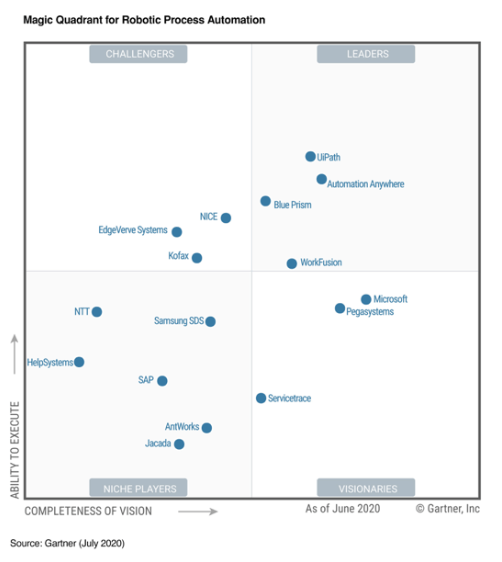
The RPA market is rapidly growing as incumbent vendors jockey for market position and evolve their offerings. In the second year of this Magic Quadrant, the bar has been raised for market viability, relevance, growth, revenue and how vendors set the vision for their RPA offerings in a fluid market.

Choosing the right RPA tool for your business is vital. The 16 vendors that made it into the 2020 Gartner report is marked in the appropriate quadrant below.

The Automation Journey

To stay in the race, you have to start fast. Robotic process automation (RPA) is non-invasive and lightning fast. You see value and make an immediate impact.

Part of the journey is not just making a good start with RPA implementations but to put the needed governance around this technology enabler. Make sure you can maintain the automated processes to quickly adapt to changes, integrate with new applications, align with continuously changing business processes while making sure that you can control the change and clearly communicate it to all needed audiences.

To ensure that you continuously monitor the RPA performance you must be able to measure success. Data gathered throughout the RPA journey and then converted through analytics into meaningful management information (MI). MI that enables quick and effective decisions – that’s how you finish the journey.

Some end-to-end RPA tools cover most of the above change management and business governance aspects – keep that in mind when selecting the right tool for your organisation.

So, do you want to stay ahead of your competition? Start by giving your employees robots that help them throughout the day.

Give your employees a robot

Imagine if, especially in the competitive and demanding times we live today, you could give back a few minutes of time of every employee’s day. You can if you free them from wrangling across systems and process siloes for information. How? Software robots that automate the desktop tasks that frustrate your people and slow them down. These bots collaborate with your employees to bridge systems and process siloes. They do work like tabbing, searching, and copying and pasting – so your people can focus on your customers.

RPA injects instant ROI into your business.

Also read:

Different Software Testing – Explained

Testing of software and application is an integral part of the software development and deployment lifecycle. But with so many different types of tests to choose from when compiling your test approach, which are best suited for your requirements?

In this post 45 different tests are explained.

Software Application Testing are conducted within two domains: Functional and Non-Functional Testing.

Functional testing is a software testing process used within softwaredevelopment in which software is tested to ensure that it conforms with all requirements. Functional testing is a way of checking software to ensure that it has all the required functionality that’s specified within its functional requirements.

Functional testing types include:

  • Unit testing
  • Integration testing
  • System testing
  • Sanity testing
  • Smoke testing
  • Interface testing
  • Regression testing
  • Beta/Acceptance testing

Non-functional testing is defined as a type of Software testing to check non-functional aspects (performance, usability, reliability, etc) of a software application. It is designed to test the readiness of a system as per nonfunctional parameters which are never addressed by functional testing.

Non-functional testing types include:

  • Performance Testing
  • Load testing
  • Stress testing
  • Volume testing
  • Security testing
  • Compatibility testing
  • Install testing
  • Recovery testing
  • Reliability testing
  • Usability testing
  • Compliance testing
  • Localization testing

45 Different types of testing – explained

  1. Alpha Testing

It is the most common type of testing used in the Software industry. The objective of this testing is to identify all possible issues or defects before releasing it into the market or to the user. Alpha testing is carried out at the end of the software development phase but before the Beta Testing. Still, minor design changes may be made as a result of such testing. Alpha testing is conducted at the developer’s site. In-house virtual user environment can be created for this type of testing.

  1. Acceptance Testing

An acceptance test is performed by the client and verifies whether the end to end the flow of the system is as per the business requirements or not and if it is as per the needs of the end user. Client accepts the software only when all the features and functionalities work as expected. It is the last phase of the testing, after which the software goes into production. This is also called as User Acceptance Testing (UAT).

  1. Ad-hoc Testing

The name itself suggests that this testing is performed on an ad-hoc basis i.e. with no reference to test case and also without any plan or documentation in place for such type of testing. The objective of this testing is to find the defects and break the application by executing any flow of the application or any random functionality.

Ad-hoc testing is an informal way of finding defects and can be performed by anyone in the project. It is difficult to identify defects without a test case but sometimes it is possible that defects found during ad-hoc testing might not have been identified using existing test cases.

  1. Accessibility Testing

The aim of accessibility testing is to determine whether the software or application is accessible for disabled people or not. Here disability means deaf, color blind, mentally disabled, blind, old age and other disabled groups. Various checks are performed such as font size for visually disabled, color and contrast for color blindness etc.

  1. Beta Testing

Beta Testing is a formal type of software testing which is carried out by the customer. It is performed in Real Environment before releasing the product to the market for the actual end users. Beta testing is carried out to ensure that there are no major failures in the software or product and it satisfies the business requirements from an end-user perspective. Beta testing is successful when the customer accepts the software.

Usually, this testing is typically done by end-users or others. It is the final testing done before releasing an application for commercial purpose. Usually, the Beta version of the software or product released is limited to a certain number of users in a specific area. So end user actually uses the software and shares the feedback to the company. Company then takes necessary action before releasing the software to the worldwide.

  1. Back-end Testing

Whenever an input or data is entered on front-end application, it stores in the database and the testing of such database is known as Database Testing or Backend testing. There are different databases like SQL Server, MySQL, and Oracle etc. Database testing involves testing of table structure, schema, stored procedure, data structure and so on.

In back-end testing GUI is not involved, testers are directly connected to the database with proper access and testers can easily verify data by running a few queries on the database. There can be issues identified like data loss, deadlock, data corruption etc during this back-end testing and these issues are critical to fixing before the system goes live into the production environment

  1. Browser Compatibility Testing

It is a subtype of Compatibility Testing (which is explained below) and is performed by the testing team.

Browser Compatibility Testing is performed for web applications and it ensures that the software can run with the combination of different browser and operating system. This type of testing also validates whether web application runs on all versions of all browsers or not.

  1. Backward Compatibility Testing

It is a type of testing which validates whether the newly developed software or updated software works well with older version of the environment or not.

Backward Compatibility Testing checks whether the new version of the software works properly with file format created by older version of the software; it also works well with data tables, data files, data structure created by older version of that software. If any of the software is updated then it should work well on top of the previous version of that software.

  1. Black Box Testing

Internal system design is not considered in this type of testing. Tests are based on the requirements and functionality.

Detailed information about the advantages, disadvantages, and types of Black box testing can be seen here.

  1. Boundary Value Testing

This type of testing checks the behavior of the application at the boundary level.

Boundary value Testing is performed for checking if defects exist at boundary values. Boundary value testing is used for testing a different range of numbers. There is an upper and lower boundary for each range and testing is performed on these boundary values.

If testing requires a test range of numbers from 1 to 500 then Boundary Value Testing is performed on values at 0, 1, 2, 499, 500 and 501.

  1. Branch Testing

It is a type of white box testing and is carried out during unit testing. Branch Testing, the name itself suggests that the code is tested thoroughly by traversing at every branch.

  1. Comparison Testing

Comparison of a product’s strength and weaknesses with its previous versions or other similar products is termed as Comparison Testing.

  1. Compatibility Testing

It is a testing type in which it validates how software behaves and runs in a different environment, web servers, hardware, and network environment. Compatibility testing ensures that software can run on a different configuration, different database, different browsers and their versions. Compatibility testing is performed by the testing team.

  1. Component Testing

It is mostly performed by developers after the completion of unit testing. Component Testing involves testing of multiple functionalities as a single code and its objective is to identify if any defect exists after connecting those multiple functionalities with each other.

  1. End-to-End Testing

Similar to system testing, End-to-end testing involves testing of a complete application environment in a situation that mimics real-world use, such as interacting with a database, using network communications, or interacting with other hardware, applications, or systems if appropriate.

  1. Equivalence Partitioning

It is a testing technique and a type of Black Box Testing. During this equivalence partitioning, a set of group is selected and a few values or numbers are picked up for testing. It is understood that all values from that group generate the same output. The aim of this testing is to remove redundant test cases within a specific group which generates the same output but not any defect.

Suppose, application accepts values between -10 to +10 so using equivalence partitioning the values picked up for testing are zero, one positive value, one negative value. So the Equivalence Partitioning for this testing is: -10 to -1, 0, and 1 to 10.

  1. Example Testing

It means real-time testing. Example testing includes the real-time scenario, it also involves the scenarios based on the experience of the testers.

  1. Exploratory Testing

Exploratory Testing is an informal testing performed by the testing team. The objective of this testing is to explore the application and looking for defects that exist in the application. Sometimes it may happen that during this testing major defect discovered can even cause system failure.

During exploratory testing, it is advisable to keep a track of what flow you have tested and what activity you did before the start of the specific flow.

An exploratory testing technique is performed without documentation and test cases.

  1. Functional Testing

This type of testing ignores the internal parts and focuses only on the output to check if it is as per the requirement or not. It is a Black-box type testing geared to the functional requirements of an application. For detailed information about Functional Testing click here.

  1. Graphical User Interface (GUI) Testing

The objective of this GUI testing is to validate the GUI as per the business requirement. The expected GUI of the application is mentioned in the Detailed Design Document and GUI mockup screens.

The GUI testing includes the size of the buttons and input field present on the screen, alignment of all text, tables and content in the tables.

It also validates the menu of the application, after selecting different menu and menu items, it validates that the page does not fluctuate and the alignment remains same after hovering the mouse on the menu or sub-menu.

  1. Gorilla Testing

Gorilla Testing is a testing type performed by a tester and sometimes by developer the as well. In Gorilla Testing, one module or the functionality in the module is tested thoroughly and heavily. The objective of this testing is to check the robustness of the application.

  1. Happy Path Testing

The objective of Happy Path Testing is to test an application successfully on a positive flow. It does not look for negative or error conditions. The focus is only on the valid and positive inputs through which application generates the expected output.

  1. Incremental Integration Testing

Incremental Integration Testing is a Bottom-up approach for testing i.e continuous testing of an application when a new functionality is added. Application functionality and modules should be independent enough to test separately. This is done by programmers or by testers.

  1. Install/Uninstall Testing

Installation and uninstallation testing is done on full, partial, or upgrade install/uninstall processes on different operating systems under different hardware or software environment.

  1. Integration Testing

Testing of all integrated modules to verify the combined functionality after integration is termed as Integration Testing. Modules are typically code modules, individual applications, client and server applications on a network, etc. This type of testing is especially relevant to client/server and distributed systems.

  1. Load Testing

It is a type of non-functional testing and the objective of Load testing is to check how much of load or maximum workload a system can handle without any performance degradation.

Load testing helps to find the maximum capacity of the system under specific load and any issues that cause the software performance degradation. Load testing is performed using tools like JMeter, LoadRunner, WebLoad, Silk performer etc.

  1. Monkey Testing

Monkey testing is carried out by a tester assuming that if the monkey uses the application then how random input, values will be entered by the Monkey without any knowledge or understanding of the application. The objective of Monkey Testing is to check if an application or system gets crashed by providing random input values/data. Monkey Testing is performed randomly and no test cases are scripted and it is not necessary to

Monkey Testing is performed randomly and no test cases are scripted and it is not necessary to be aware of the full functionality of the system.

  1. Mutation Testing

Mutation Testing is a type of white box testing in which the source code of one of the program is changed and verifies whether the existing test cases can identify these defects in the system. The change in the program source code is very minimal so that it does not impact the entire application, only the specific area having the impact and the related test cases should able to identify those errors in the system.

  1. Negative Testing

Testers having the mindset of “attitude to break” and using negative testing they validate that if system or application breaks. A negative testing technique is performed using incorrect data, invalid data or input. It validates that if the system throws an error of invalid input and behaves as expected.

  1. Non-Functional Testing

It is a type of testing for which every organization having a separate team which usually called as Non-Functional Test (NFT) team or Performance team.

Non-functional testing involves testing of non-functional requirements such as Load Testing, Stress Testing, Security, Volume, Recovery Testing etc. The objective of NFT testing is to ensure whether the response time of software or application is quick enough as per the business requirement.

It should not take much time to load any page or system and should sustain during peak load.

  1. Performance Testing

This term is often used interchangeably with ‘stress’ and ‘load’ testing. Performance Testing is done to check whether the system meets the performance requirements. Different performance and load tools are used to do this testing.

  1. Recovery Testing

It is a type of testing which validates that how well the application or system recovers from crashes or disasters.

Recovery testing determines if the system is able to continue the operation after a disaster. Assume that application is receiving data through the network cable and suddenly that network cable has been unplugged. Sometime later, plug the network cable; then the system should start receiving data from where it lost the connection due to network cable unplugged.

  1. Regression Testing

Testing an application as a whole for the modification in any module or functionality is termed as Regression Testing. It is difficult to cover all the system in Regression Testing, so typically automation testing tools are used for these types of testing.

  1. Risk-Based Testing (RBT)

In Risk Based Testing, the functionalities or requirements are tested based on their priority. Risk-based testing includes testing of highly critical functionality, which has the highest impact on business and in which the probability of failure is very high. The priority decision is based on the business need, so once priority is set for all functionalities then high priority functionality or test cases are executed first followed by medium and then low priority functionalities.

The low priority functionality may be tested or not tested based on the available time. The Risk-based testing is carried out if there is insufficient time available to test entire software and software needs to be implemented on time without any delay. This approach is followed only by the discussion and approval of the client and senior management of the organization.

  1. Sanity Testing

Sanity Testing is done to determine if a new software version is performing well enough to accept it for a major testing effort or not. If an application is crashing for the initial use then the system is not stable enough for further testing. Hence a build or an application is assigned to fix it.

  1. Security Testing

It is a type of testing performed by a special team of testers. A system can be penetrated by any hacking way.

Security Testing is done to check how the software or application or website is secure from internal and external threats. This testing includes how much software is secure from the malicious program, viruses and how secure and strong the authorization and authentication processes are.

It also checks how software behaves for any hackers attack and malicious programs and how software is maintained for data security after such a hacker attack.

  1. Smoke Testing

Whenever a new build is provided by the development team then the software testing team validates the build and ensures that no major issue exists. The testing team ensures that build is stable and a detailed level of testing is carried out further. Smoke Testing checks that no show stopper defect exists in the build which will prevent the testing team to test the application in detail.

If testers find that the major critical functionality is broken down at the initial stage itself then testing team can reject the build and inform accordingly to the development team. Smoke Testing is carried out to a detailed level of any functional or regression testing.

  1. Static Testing

Static Testing is a type of testing which is executed without any code. The execution is performed on the documentation during the testing phase. It involves reviews, walkthrough, and inspection of the deliverables of the project. Static testing does not execute the code instead of the code syntax, naming conventions are checked.

The static testing is also applicable for test cases, test plan, design document. It is necessary to perform static testing by the testing team as the defects identified during this type of testing are cost-effective from the project perspective.

  1. Stress Testing

This testing is done when a system is stressed beyond its specifications in order to check how and when it fails. This is performed under heavy load like putting large number beyond storage capacity, complex database queries, continuous input to the system or database load.

  1. System Testing

Under System Testing technique, the entire system is tested as per the requirements. It is a Black-box type testing that is based on overall requirement specifications and covers all the combined parts of a system.

  1. Unit Testing

Testing an individual software component or module is termed as Unit Testing. It is typically done by the programmer and not by testers, as it requires a detailed knowledge of the internal program design and code. It may also require developing test driver modules or test harnesses.

  1. Usability Testing

Under Usability Testing, User-friendliness check is done. Application flow is tested to know if a new user can understand the application easily or not, Proper help documented if a user gets stuck at any point. Basically, system navigation is checked in this testing.

  1. Vulnerability Testing

The testing which involves identifying of weakness in the software, hardware and the network is known as Vulnerability Testing. Malicious programs, the hacker can take control of the system, if it is vulnerable to such kind of attacks, viruses, and worms.

So it is necessary to check if those systems undergo Vulnerability Testing before production. It may identify critical defects, flaws in the security.

  1. Volume Testing

Volume testing is a type of non-functional testing performed by the performance testing team.

The software or application undergoes a huge amount of data and Volume Testing checks the system behavior and response time of the application when the system came across such a high volume of data. This high volume of data may impact the system’s performance and speed of the processing time.

  1. White Box Testing

White Box testing is based on the knowledge about the internal logic of an application’s code.

It is also known as Glass box Testing. Internal software and code working should be known for performing this type of testing. Under this tests are based on the coverage of code statements, branches, paths, conditions etc.

Release Management as a Competitive Advantage

“Delivery focussed”, “Getting the job done”, “Results driven”, “The proof is in the pudding” – we are all familiar with these phrases and in Information Technology it means getting the solutions into operations through effective Release Management, quickly.

In the increasingly competitive market, where digital is enabling rapid change, time to market is king. Translated into IT terms – you must get your solution into production before the competition does, through an effective ability to do frequent releases. Doing frequent releases benefit teams as features can be validated earlier and bugs detected and resolved rapidly. The smaller iteration cycles provide flexibility, making adjustments to unforeseen scope changes easier and reducing the overall risk of change while rapidly enhancing stability and reliability in the production environment.

IT teams with well governed agile and robust release management practices have a significant competitive advantage. This advantage materialises through self-managed teams consisting of highly skilled technologist who collaborative work according to a team defined release management process enabled by continuous integration and continuous delivery (CICD), that continuously improves through constructive feedback loops and corrective actions.

The process of implementing such agile practices, can be challenging as building software becomes increasingly more complex due to factors such as technical debt, increasing legacy code, resource movements, globally distributed development teams, and the increasing number of platforms to be supported.

To realise this advantage, an organisation must first optimise its release management process and identify the most appropriate platform and release management tools.

Here are three well known trends that every technology team can use to optimise delivery:

1. Agile delivery practises – with automation at the core 

So, you have adopted an agile delivery methodology and you’re having daily scrum meetings – but you know that is not enough. Sprint planning as well as review and retrospection are all essential elements for a successful release, but in order to gain substantial and meaningful deliverables within the time constraints of agile iterations, you need to invest in automation.

An automation ability brings measurable benefits to the delivery team as it reduces the pressure on people in minimising human error and increasing overall productivity and delivery quality into your production environment that shows in key metrics like team velocity. Another benefit automation introduces is consistent and repeatable process, enabling easily scalable teams while reducing errors and release times. Agile delivery practices (see “Executive Summary of 4 commonly used Agile Methodologies“) all embrace and promote the use of automation across the delivery lifecycle, especially in build, test and deployment automation. Proper automation support delivery teams in reducing overhead of time-consuming repetitive tasks in configuration and testing so them can focus on the core of customer centric product/service development with quality build in. Also read How to Innovate to stay Relevant“; “Agile Software Development – What Business Executives need to know” for further insight in Agile methodologies…

Example:

Code Repository (version Control) –> Automated Integration –> Automated Deployment of changes to Test Environments –> Platform & Environment Changes automated build into Testbed –> Automated Build Acceptance Tests –> Automated Release

When a software developer commits changes to the version control, these changes automatically get integrated with the rest of the modules. Integrated assembles are then automatically deployed to a test environment – changes to the platform or the environment, gets automatically built and deployed on the test bed. Next, build acceptance tests are automatically kicked off, which would include capacity tests, performance, and reliability tests. Developers and/or leads are notified only when something fails. Therefore, the focus remains on core development and not just on other overhead activities. Of course, there will be some manual check points that the release management team will have to pass in order to trigger next the phase, but each activity within this deployment pipeline can be more or less automated. As your software passes all quality checkpoints, product version releases are automatically pushed to the release repository from which new versions can be pulled automatically by systems or downloaded by customers.

Example Technologies:

  • Build Automation:  Ant, Maven, Make
  • Continuous Integration: Jenkins, Cruise Control, Bamboo
  • Test Automation: Silk Test, EggPlant, Test Complete, Coded UI, Selenium, Postman
  • Continuous Deployment: Jenkins, Bamboo, Prism, Microsoft DevOps

2. Cloud platforms and Virtualisation as development and test environments

Today, most software products are built to support multiple platforms, be it operating systems, application servers, databases, or Internet browsers. Software development teams need to test their products in all of these environments in-house prior to releasing them to the market.

This presents the challenge of creating all of these environments as well as maintaining them. These challenges increase in complexity as development and test teams become more geographically distributed. In these circumstances, the use of cloud platforms and virtualisation helps, especially as these platforms have recently been widely adopted in all industries.

Automation on cloud and virtualised platforms enables delivery teams to rapidly spin up/down environments optimising infrastructure utilisation aligned with demand while, similar to maintaining code and configuration version history for our products, also maintain the version history of all supported platforms. Automated cloud platforms and virtualisation introduces flexibility that optimises infrastructure utilisation and the delivery footprint as demand changes – bringing savings across the overall delivery life-cycle.

Example:

When a build and release engineer changes configurations for the target platform – the operating system, database, or application server settings – the whole platform can be built and a snapshot of it created and deployed to the relevant target platforms.

Virtualisation: The virtual machine (VM) is automatically provisioned from the snapshot of base operating system VM, appropriate configurations are deployed and the rest of the platform and application components are automatically deployed.

Cloud: Using a solution provider like Azure or AWS to deliver Infrastructure-as-a-Service (IaaS) and Platform as a Service (PaaS), new configurations can be introduced in a new environment instance, instantiated, and configured as an environment for development, testing, staging or production hosting. This is crucial for flexibility and productivity, as it takes minutes instead of weeks to adapt to configuration changes. With automation, the process becomes repeatable, quick, and streamlines communication across different teams within the Tech-hub.

3. Distributed version control systems

Distributed version control systems (DVCS), for example GIT, Perforce or Mercurial, introduces flexibility for teams to collaborate at the code level. The fundamental design principle behind DVCS is that each user keeps a self-contained repository with complete version history on one’s local computer. There is no need for a privileged master repository, although most teams designate one as a best practice. DVCS allow developers to work offline and commit changes locally.

As developers complete their changes for an assigned story or feature set, they push their changes to the central repository as a release candidate. DVCS offers a fundamentally new way to collaborate, as  developers can commit their changes frequently without disrupting the main codebase or trunk. This becomes useful when teams are exploring new ideas or experimenting as well as enabling rapid team scalability with reduced disruption.

DVCS is a powerful enabler for the team that utilise an agile-feature-based branching strategy. This encourages development teams to continue to work on their features (branches) as they get ready, having fully tested their changes locally, to load them into next release cycle. In this scenario, developers are able to work on and merge their feature branches to a local copy of the repository.After standard reviews and quality checks will the changes then be merged into the main repository.

To conclude

Adopting these three major trends in the delivery life-cycle enables a organisation to imbed proper release management as a strategic competitive advantage. Implementing these best practices will obviously require strategic planning and an investment of time in the early phases of your project or team maturity journey – this will reduce the organisational and change management efforts to get to market quicker.

The Rise of the Bots

Guest Blog from Robert Bertora @ Kamoha Tech – Original article here

The dawn of the rising bots is upon us. If you do not know what a Bot is, it’s the abbreviated form for the word Robot, and it is a term that is now commonly used to describe automated software programs that are capable of performing tasks on computers that traditionally were reserved for human beings. Bots are software and Robots are Hardware, all Robots need Bots to power their reasoning or “brain” so to speak. Today the Golden Goose is to build Artificial Intelligence (commonly known as AI) directly into the Bots, and the goal is, for these Bots to be able to learn on their own, either from being trained, or from their own experience of making mistakes. There is after all no evidence to suggest that the human mind is anything more than a machine, and therefore no reason for us to believe that we can’t build similar intelligent machines incorporating AI.

These days Bots are everywhere, you may not realise it so here are a few examples that come to mind:

Trading Bots: Trading Bots have existed for many years, at least 20 years if not more and are capable of watching financial markets that trade in anything from currency to company shares. Not only do they watch these markets, but they can perform trades just like any other Human Trader. What is more, is that they can reason out, and execute a trade in milliseconds, leaving a Human Trader in the dust.

Harvesting Bots were originally created by computer gamers who were tired of performing repetitive tasks in the games they played. Instead of sitting at their computer or consoles for hours killing foe for resources such as mana or gold, one could simply load up a Bot to do this tedious part of gameplay for you. While you slept, the Bot was “harvesting” game resources for you, and in the morning your mana and gold reserves would be nicely topped up and ready for you to spend in game on more fun stuff, like buying upgraded weapons or defences!

Without Harvesting Bots and their widespread proliferation in the gaming community we are all very unlikely to have ever heard of Crypto Currencies, you see it can be argued that these would never have been invented in the first place. Crypto Currencies and Block Chain technologies rely in part on the foundations set by the computer gaming Harvesting Bots. The Harvesting Bot concept was needed by the Crypto Currency Pioneers who used it to solve their problem of mimicking the mining of gold in the real world. They evolved the Harvesting Bot into Mining Bots which are capable of mining for crypto coins from the electronic Block Chain(s). You may have heard of people mining for Bitcoins and other Crypto coins, using mining Rigs and the Bots; the Rigs being the powerful computer hardware they need to run the Mining Bots.

What about Chat Bots? have you ever heard of these? These Bots replace the function of humans in customer service chat rooms online. There are two kinds of Chat Bots, the really simple ones, and the NLP (Neuro Linguistic Programming) ones which are capable of processing Natural Language.

Simple Chat Bots follow a question, answer, yes/no kind of flow. These Chatbots offer you a choice of actions or questions that you can click on, in order to give you a preprogramed answer or to take you through a preprogramed flow with preprogramed answers. You may have encountered these online, but if not, you will have certainly encountered this concept in Telephone Automation Systems that large companies use as part of their customer service functions.

NLP Chat Bots are able to take your communication in natural language (English, French etc..), making intelligent reasoning as to what you are saying or asking, and then formulating responses again in natural language that when done well may seem like you are chatting with another human online. This type of Chatbot displays what we call artificial intelligence and should be able to learn new responses or behaviours based on training and or experience of making mistakes and learning from these. At KAMOHA TECH, we develop industry agnostic NLP Bots on our KAMOHA Bot Engine incorporating AI and Neural Network coding techniques. Our industry agnostic Bot engine is used to deploy into almost any sector. Just as one could deploy a human into almost any job sector (with the right training and experience) so too we can do this with our industry agnostic artificially intelligent KAMOHA Bots.

Siri, Cortana and Alexa are all Bots which are integrated to many more systems across the internet, giving them seemingly endless access to resources in order to provide answers to our more trivial human questions, like “what’s the weather like in LA?”. These Bots are capable of responding not only to text NLP but also to voice natural language inputs.

Future Bots are currently being developed, Driverless vehicles: powered by Bots, any Robot (taking human or animal form) that you may see in the media or online in YouTube videos are and will be powered by their “AI brain” or Bot so to speak. Fridges that automatically place your online grocery shopping order – powered by Bots, buildings that maintain themselves: powered by Bots. Bot Doctors that can diagnose patients, Lawyer Bots, Banker Bots, Bots that can-do technical design, image recognition, Bots that can run your company? … Bots Bots Bots!

People have embraced new Technology for the last 100 years, almost without question, just as they did for most of Medical Science. Similar to certain branches of Medical Science, Technology has its bad boys though, that stray deeply into the Theological, Social, Moral and even Legal territories. Where IVF was 40-50 years ago, so too are our Artificially Intelligent Bots: pushing the boundaries, of normalities and our moral beliefs. Will Bots replace our jobs? What will become of humans? Are we making Robots in our own image? Are we the new Gods? Will Robots be our slaves? Will they break free and murder us all? A myriad of open ended questions and like a can of worms or pandora’s box, the lid was lifted decades ago. Just as sure as we developed world economies and currency in a hodgepodge of muddling through the millennia we are set to do the same with Bots; we will get there in the end.

It’s not beyond my imagination to say that if Bots replace human workers in substantial volume, then legislation will be put in place to tax these Bots as part of company corporation tax, and to protect human workers it is likely that these taxes will be higher than that of humans. If a bot does the work of 50 people? How do you tax that? Interesting times, interesting questions. My one recommendation to any one reading this, is do not fear change, do not fear the unknown, and have faith in the Human ability to make things work.

Love them or hate them Bots are on the rise, they will only get smarter and their usages will be as diverse as our own human capabilities. Brave new world.

Click on the image below to see our bots:

6 reasons why learning Rainbird is beneficial for your career

  1. You’ll be a better consultant

Rainbird’s human-centric automation is a unique emerging technology in the industry, and understanding how it works is a huge advantage – both in being able to sell a Rainbird solution to your clients, but also through being the gate-keeper for a desirable commodity.

  1. You’ll improve your analytical skills

The skills needed to break down what we call ‘subject matter expertise’ for Rainbird involve understanding a set of human inferences that are not widely understood in the wider RPA (robotic process automation) landscape or by automation consultancies. The nature of the subject matter itself is also very different: whilst the data on which human judgements are based has long been available as subject matter, human judgements, and how those judgements are reached, has never been subject matter for automation before. We’ve even had clients tell us that the process of mapping out their business logic has forced them into the invaluable exercise of confronting, and re-evaluating, their own thinking.

  1. You’ll look at things differently

Traditionally, RPA technologies require that decisions are broken down into formalised logic, requiring the removal of nuance and complete, unambiguous datasets and processes for successful implementation. Before Rainbird, there was an industry standard possible for if-this-then-that process automation; now, authors in Rainbird learn to structure their reasoning, a skill that is completely unfamiliar to most solution consultants.

  1. You’ll be able to do business with clients that no one else can help

Successfully replicating human reasoning, instead of relying on a decision tree, is industry-changing. Applying a new technology to use cases that we’ve never been able to automate before, due to the multi-faceted nature of human inference, provides an undeniable competitive edge.

  1. You’ll be a sought-after resource.

Maintenance of this emerging strand of unique automated reasoning technology is going to be a sought-after and exceptionally rare skill – you can capitalise on your Rainbird understanding as knowledge maps proliferate in the RPA marketplace.

  1. You’ll be able to maximise other technologies more scalably.

Infrastructure in process flow automation is maturing, with big players like Blue Prism and PEGA expanding in the space. Learning Rainbird – the only technology that can tie together these embedded process flow systems in the same way as human reasoning currently does – is crucial in maximising these flow techs scalably.