
Unleashing the Power of Data Analytics: Integrating Power BI with Azure Data Marts

Leveraging the right tools can make a significant difference in how organisations harness and interpret their data. Two powerful tools that, when combined, offer unparalleled capabilities are Power BI and Azure Data Marts. In this blog post, we compare and will explore how these tools integrate seamlessly to provide robust, scalable, and high-performance data analytics solutions.

What is a Data Mart

A data mart is a subset of a data warehouse that is focused on a specific business line, team, or department. It contains a smaller, more specific set of data that addresses the particular needs and requirements of the users within that group. Here are some key features and purposes of a data mart:

  • Subject-Specific: Data marts are designed to focus on a particular subject or business area, such as sales, finance, or marketing, making the data more relevant and easier to analyse for users within that domain.
  • Simplified Data Access: By containing a smaller, more focused dataset, data marts simplify data access and querying processes, allowing users to retrieve and analyse information more efficiently.
  • Improved Performance: Because data marts deal with smaller datasets, they generally offer better performance in terms of data retrieval and processing speed compared to a full-scale data warehouse.
  • Cost-Effective: Building a data mart can be less costly and quicker than developing an enterprise-wide data warehouse, making it a practical solution for smaller organisations or departments with specific needs.
  • Flexibility: Data marts can be tailored to the specific requirements of different departments or teams, providing customised views and reports that align with their unique business processes.

There are generally two types of data marts:

  • Dependent Data Mart: These are created by drawing data from a central data warehouse. They depend on the data warehouse for their data, which ensures consistency and integration across the organisation.
  • Independent Data Mart: These are standalone systems that are created directly from operational or external data sources without relying on a central data warehouse. They are typically used for departmental or functional reporting.

In summary, data marts provide a streamlined, focused approach to data analysis by offering a subset of data relevant to specific business areas, thereby enhancing accessibility, performance, and cost-efficiency.

Understanding the Tools: Power BI and Azure Data Marts

Power BI Datamarts:
Power BI is a leading business analytics service by Microsoft that enables users to create interactive reports and dashboards. With its user-friendly interface and powerful data transformation capabilities, Power BI allows users to connect to a wide range of data sources, shape the data as needed, and share insights across their organisation. Datamarts in Power BI Premium are self-service analytics solutions that allow users to store and explore data in a fully managed database.

Azure Data Marts:
Azure Data Marts are a component of Azure Synapse Analytics, designed to handle large volumes of structured and semi-structured data. They provide high-performance data storage and processing capabilities, leveraging the power of distributed computing to ensure efficient query performance and scalability.

Microsoft Fabric:

In Sep’23, as a significant step forward for data management and analytics, Microsoft has bundled Power BI and Azure Synapse Analytics (including Azure Data Marts) as part of its Fabric SaaS suite. This comprehensive solution, known as Microsoft Fabric, represents the next evolution in data management. By integrating these powerful tools within a single suite, Microsoft Fabric provides a unified platform that enhances data connectivity, transformation, and visualisation. Users can now leverage the full capabilities of Power BI and Azure Data Marts seamlessly, driving more efficient data workflows, improved performance, and advanced analytics capabilities, all within one cohesive ecosystem. This integration is set to revolutionise how organisations handle their data, enabling deeper insights and more informed decision-making.

The Synergy: How Power BI and Azure Data Marts Work Together

Integration and Compatibility

  1. Data Connectivity:
    Power BI offers robust connectivity options that seamlessly link it with Azure Data Marts. Users can choose between Direct Query and Import modes, ensuring they can access and analyse their data in real-time or work with offline datasets for faster querying.
  2. Data Transformation:
    Using Power Query within Power BI, users can clean, transform, and shape data imported from Azure Data Warehouses or Azure Data Marts into PowerBI Data Marts. This ensures that data is ready for analysis and visualisation, enabling more accurate and meaningful insights.
  3. Visualisation and Reporting:
    With the transformed data, Power BI allows users to create rich, interactive reports and dashboards. These visualisations can then be shared across the organisation, promoting data-driven decision-making.

Workflow Integration

The integration of Power BI with Azure Data Marts follows a streamlined workflow:

  • Data Storage: Store large datasets in Azure Data Marts, leveraging its capacity to handle complex queries and significant data volumes.
  • ETL Processes: Utilise Power Query or Azure Data Factory or other ETL tools to manage data extraction, transformation, and loading into the Data Mart.
  • Connecting to Power BI: Link Power BI to Azure Data Marts using its robust connectivity options.
  • Further Data Transformation: Refine the data within Power BI using Power Query to ensure it meets the analytical needs.
  • Creating Visualisations: Develop interactive and insightful reports and dashboards in Power BI.
  • Sharing Insights: Distribute the reports and dashboards to stakeholders, fostering a culture of data-driven insights.

Benefits of the Integration

  • Scalability: Azure Data Marts provide scalable storage and processing, while Power BI scales visualisation and reporting.
  • Performance: Enhanced performance through optimised queries and real-time data access.
  • Centralised Data Management: Ensures data consistency and governance, leading to accurate and reliable reporting.
  • Advanced Analytics: Combining both tools allows for advanced analytics, including machine learning and AI, through integrated Azure services.

In-Depth Comparison: Power BI Data Mart vs Azure Data Mart

Comparing the features, scalability, and resilience of a PowerBI Data Mart and an Azure Data Mart or Warehouse reveals distinct capabilities suited to different analytical needs and scales. Here’s a detailed comparison:

Features

PowerBI Data Mart:

  • Integration: Seamlessly integrates with Power BI for reporting and visualisation.
  • Ease of Use: User-friendly interface designed for business users with minimal technical expertise.
  • Self-service: Enables self-service analytics, allowing users to create their own data models and reports.
  • Data Connectivity: Supports connections to various data sources, including cloud-based and on-premises systems.
  • Data Transformation: Built-in ETL (Extract, Transform, Load) capabilities for data preparation.
  • Real-time Data: Can handle near-real-time data through direct query mode.
  • Collaboration: Facilitates collaboration with sharing and collaboration features within Power BI.

Azure Data Warehouse (Azure Synapse Analytics / Microsoft Fabric Data Warehouse):

  • Data Integration: Deep integration with other Azure services (Azure Data Factory, Azure Machine Learning, etc.).
  • Data Scale: Capable of handling massive volumes of data with distributed computing architecture.
  • Performance: Optimised for large-scale data processing with high-performance querying.
  • Advanced Analytics: Supports advanced analytics with integration for machine learning and AI.
  • Security: Robust security features including encryption, threat detection, and advanced network security.
  • Scalability: On-demand scalability to handle varying workloads.
  • Cost Management: Pay-as-you-go pricing model, optimising costs based on usage.

Scalability

PowerBI Data Mart:

  • Scale: Generally suitable for small to medium-sized datasets.
  • Performance: Best suited for departmental or team-level reporting and analytics.
  • Limits: Limited scalability for very large datasets or complex analytical queries.

Azure Data Warehouse:

  • Scale: Designed for enterprise-scale data volumes, capable of handling petabytes of data.
  • Performance: High scalability with the ability to scale compute and storage independently.
  • Elasticity: Automatic scaling and workload management for optimised performance.

Resilience

PowerBI Data Mart:

  • Redundancy: Basic redundancy features, reliant on underlying storage and compute infrastructure.
  • Recovery: Limited disaster recovery features compared to enterprise-grade systems.
  • Fault Tolerance: Less fault-tolerant for high-availability requirements.

Azure Data Warehouse:

  • Redundancy: Built-in redundancy across multiple regions and data centres.
  • Recovery: Advanced disaster recovery capabilities, including geo-replication and automated backups.
  • Fault Tolerance: High fault tolerance with automatic failover and high availability.

Support for Schemas

Both PowerBI Data Mart and Azure Data Warehouse support the following schemas:

  • Star Schema:
    • PowerBI Data Mart: Supports star schema for simplified reporting and analysis.
    • Azure Data Warehouse: Optimised for star schema, enabling efficient querying and performance.
  • Snowflake Schema:
    • PowerBI Data Mart: Can handle snowflake schema, though complexity may impact performance.
    • Azure Data Warehouse: Well-suited for snowflake schema, with advanced query optimisation.
  • Galaxy Schema:
    • PowerBI Data Mart: Limited support, better suited for simpler schemas.
    • Azure Data Warehouse: Supports galaxy schema, suitable for complex and large-scale data models.

Summary

  • PowerBI Data Mart: Ideal for small to medium-sized businesses or enterprise departmental analytics with a focus on ease of use, self-service, and integration with Power BI.
  • Azure Data Warehouse: Best suited for large enterprises requiring scalable, resilient, and high-performance data warehousing solutions with advanced analytics capabilities.

This table provides a clear comparison of the features, scalability, resilience, and schema support between PowerBI Data Mart and Azure Data Warehouse.

Feature/AspectPowerBI Data MartAzure Data Warehouse (Azure Synapse Analytics)
IntegrationSeamless with Power BIDeep integration with Azure services
Ease of UseUser-friendly interfaceRequires technical expertise
Self-serviceEnables self-service analyticsSupports advanced analytics
Data ConnectivityVarious data sourcesWide range of data sources
Data TransformationBuilt-in ETL capabilitiesAdvanced ETL with Azure Data Factory
Real-time DataSupports near-real-time dataCapable of real-time analytics
CollaborationSharing and collaboration featuresCollaboration through Azure ecosystem
Data ScaleSmall to medium-sized datasetsEnterprise-scale, petabytes of data
PerformanceSuitable for departmental analyticsHigh-performance querying
Advanced AnalyticsBasic analyticsAdvanced analytics and AI integration
SecurityBasic security featuresRobust security with encryption and threat detection
ScalabilityLimited scalabilityOn-demand scalability
Cost ManagementIncluded in Power BI subscriptionPay-as-you-go pricing model
RedundancyBasic redundancyBuilt-in redundancy across regions
RecoveryLimited disaster recoveryAdvanced disaster recovery capabilities
Fault ToleranceLess fault-tolerantHigh fault tolerance and automatic failover
Star Schema SupportSupportedOptimised support
Snowflake Schema SupportSupportedWell-suited and optimised
Galaxy Schema SupportLimited supportSupported for complex models
Datamart: PowerBI vs Azure

Conclusion

Integrating Power BI with Azure Data Marts is a powerful strategy for any organisation looking to enhance its data analytics capabilities. Both platforms support star, snowflake, and galaxy schemas, but Azure Data Warehouse provides better performance and scalability for complex and large-scale data models. The seamless integration offers a robust, scalable, and high-performance solution, enabling users to gain deeper insights and make informed decisions.

Additionally, with Power BI and Azure Data Marts now bundled as part of Microsoft’s Fabric SaaS suite, users benefit from a unified platform that enhances data connectivity, transformation, visualisation, scalability and resilience, further revolutionising data management and analytics.

By leveraging the strengths of Microsoft’s Fabric, organisations can unlock the full potential of their data, driving innovation and success in today’s data-driven world.
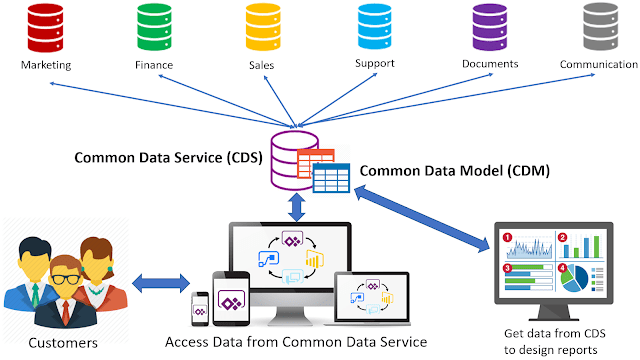
Unlocking the Power of Data: Transforming Business with the Common Data Model

Common Data Model (CDM) at the heart of the Data Lakehouse

Imagine you’re at the helm of a global enterprise, juggling multiple accounting systems, CRMs, and financial consolidation tools like Onestream. The data is flowing in from all directions, but it’s chaotic and inconsistent. Enter the Common Data Model (CDM), a game-changer that brings order to this chaos.

CDM Definition

A Common Data Model (CDM) is like the blueprint for your data architecture. It’s a standardised, modular, and extensible data schema designed to make data interoperability a breeze across different applications and business processes. Think of it as the universal language for your data, defining how data should be structured and understood, making it easier to integrate, share, and analyse.

Key Features of a CDM:
  • Standardisation: Ensures consistent data representation across various systems.
  • Modularity: Allows organisations to use only the relevant parts of the model.
  • Extensibility: Can be tailored to specific business needs or industry requirements.
  • Interoperability: Facilitates data exchange and understanding between different applications and services.
  • Data Integration: Helps merge data from multiple sources for comprehensive analysis.
  • Simplified Analytics: Streamlines data analysis and reporting, generating valuable insights.

The CDM in practise

Let’s delve into how a CDM can revolutionise your business’ data reporting in a global enterprise environment.

Standardised Data Definitions
  • Consistency: A CDM provides a standardised schema for financial data, ensuring uniform definitions and formats across all systems.
  • Uniform Reporting: Standardisation allows for the creation of uniform reports, making data comparison and analysis across different sources straightforward.
Unified Data Architecture
  • Seamless Data Flow: Imagine data flowing effortlessly from your data lake to your data warehouse. A CDM supports this smooth transition, eliminating bottlenecks.
  • Simplified Data Management: Managing data assets becomes simpler across the entire data estate, thanks to the unified framework provided by a CDM.
Data Integration
  • Centralised Data Repository: By mapping data from various systems like Maconomy (accounting), Dynamics (CRM), and Onestream (financial consolidation) into a unified CDM, you establish a centralised data repository.
  • Seamless Data Flow: This integration minimises manual data reconciliation efforts, ensuring smooth data transitions between systems.
Improved Data Quality
  • Data Validation: Enforce data validation rules to reduce errors and inconsistencies.
  • Enhanced Accuracy: Higher data quality leads to more precise financial reports and informed decision-making.
  • Consistency: Standardised data structures maintain consistency across datasets stored in the data lake.
  • Cross-Platform Compatibility: Ensure that data from different systems can be easily combined and used together.
  • Streamlined Processes: Interoperability streamlines processes such as financial consolidation, budgeting, and forecasting.
Extensibility
  • Customisable Models: Extend the CDM to meet specific financial reporting requirements, allowing the finance department to tailor the model to their needs.
  • Scalability: As your enterprise grows, the CDM can scale to include new data sources and systems without significant rework.
Reduced Redundancy
  • MDM eliminates data redundancies, reducing the risk of errors and inconsistencies in financial reporting.
Complements the Enterprise Data Estate
  • A CDM complements a data estate that includes a data lake and a data warehouse, providing a standardised framework for organising and managing data.
Enhanced Analytics
  • Advanced Reporting: Standardised and integrated data allows advanced analytics tools to generate insightful financial reports and dashboards.
  • Predictive Insights: Data analytics can identify trends and provide predictive insights, aiding in strategic financial planning.
Data Cataloguing and Discovery
  • Enhanced Cataloguing: CDM makes it easier to catalogue data within the lake, simplifying data discovery and understanding.
  • Self-Service Access: With a well-defined data model, business users can access and utilise data with minimal technical support.
Enhanced Interoperability
  • CDM facilitates interoperability by providing a common data schema, enabling seamless data exchange and integration across different systems and applications.
Reduced Redundancy and Costs
  • Elimination of Duplicate Efforts: Minimise redundant data processing efforts.
  • Cost Savings: Improved efficiency and data accuracy lead to cost savings in financial reporting and analysis.
Regulatory Compliance
  • Consistency in Reporting: CDM helps maintain consistency in financial reporting, crucial for regulatory compliance.
  • Audit Readiness: Standardised and accurate data simplifies audit preparation and compliance with financial regulations.
Scalability and Flexibility
  • Adaptable Framework: CDM’s extensibility allows it to adapt to new data sources and evolving business requirements without disrupting existing systems.
  • Scalable Solutions: Both the data lake and data warehouse can scale independently while adhering to the CDM, ensuring consistent growth.
Improved Data Utilisation
  • Enhanced Analytics: Apply advanced analytics and machine learning models more effectively with standardised and integrated data.
  • Business Agility: A well-defined CDM enables quick adaptation to changing business needs and faster implementation of new data-driven initiatives.
Improved Decision-Making
  • High-quality, consistent master data enables finance teams to make more informed and accurate decisions.

CDM and the Modern Medallion Architecture Data Lakehouse

In a lakehouse architecture, data is organised into multiple layers or “medals” (bronze, silver, and gold) to enhance data management, processing, and analytics.

  • Bronze Layer (Raw Data): Raw, unprocessed data ingested from various sources.
  • Silver Layer (Cleaned and Refined Data): Data that has been cleaned, transformed, and enriched, suitable for analysis and reporting.
  • Gold Layer (Aggregated and Business-Level Data): Highly refined and aggregated data, designed for specific business use cases and advanced analytics.
CDM in Relation to the Data Lakehouse Silver Layer

A CDM can be likened to the silver layer in a Medallion Architecture. Here’s how they compare:

AspectData Lakehouse – Silver LayerCommon Data Model (CDM)
Purpose and FunctionTransforms, cleans, and enriches data to ensure quality and consistency, preparing it for further analysis and reporting. Removes redundancies and errors found in raw data.Provides standardised schemas, structures, and semantics for data. Ensures data from different sources is represented uniformly for integration and quality.
Data StandardisationImplements transformations and cleaning processes to standardise data formats and values, making data consistent and reliable.Defines standardised data schemas to ensure uniform data structure across the organisation, simplifying data integration and analysis.
Data Quality and ConsistencyFocuses on improving data quality by eliminating errors, duplicates, and inconsistencies through transformation and enrichment processes.Ensures data quality and consistency by enforcing standardised data definitions and validation rules.
InteroperabilityEnhances data interoperability by transforming data into a common format easily consumed by various analytics and reporting tools.Facilitates interoperability with a common data schema for seamless data exchange and integration across different systems and applications.
Role in Data ProcessingActs as an intermediate layer where raw data is processed and refined before moving to the gold layer for final consumption.Serves as a guide during data processing stages to ensure data adheres to predefined standards and structures.

How CDM Complements the Silver Layer

  • Guiding Data Transformation: CDM serves as a blueprint for transformations in the silver layer, ensuring data is cleaned and structured according to standardised schemas.
  • Ensuring Consistency Across Layers: By applying CDM principles, the silver layer maintains consistency in data definitions and formats, making it easier to integrate and utilise data in the gold layer.
  • Facilitating Data Governance: Implementing a CDM alongside the silver layer enhances data governance with clear definitions and standards for data entities, attributes, and relationships.
  • Supporting Interoperability and Integration: With a CDM, the silver layer can integrate data from various sources more effectively, ensuring transformed data is ready for advanced analytics and reporting in the gold layer.

CDM Practical Implementation Steps

By implementing a CDM, a global enterprise can transform its finance department’s data reporting, leading to more efficient operations, better decision-making, and enhanced financial performance.

  1. Data Governance: Establish data governance policies to maintain data quality and integrity. Define roles and responsibilities for managing the CDM and MDM. Implement data stewardship processes to monitor and improve data quality continuously.
  2. Master Data Management (MDM): Implement MDM to maintain a single, consistent, and accurate view of key financial data entities (e.g. customers, products, accounts). Ensure that master data is synchronised across all systems to avoid discrepancies. (Learn more on Master Data Management).
  3. Define the CDM: Develop a comprehensive CDM that includes definitions for all relevant data entities and attributes used across the data estate.
  4. Data Mapping: Map data from various accounting systems, CRMs, and Onestream to the CDM schema. Ensure all relevant financial data points are included and standardised.
  5. Integration with Data Lake Platform & Automated Data Pipelines (Lakehouse): Implement processes to ingest data into the data lake using the CDM, ensuring data is stored in a standardised format. Use an integration platform to automate ETL processes into the CDM, supporting real-time data updates and synchronisation.
  6. Data Consolidation (Data Warehouse): Use ETL processes to transform data from the data lake and consolidate it according to the CDM. Ensure the data consolidation process includes data cleansing and deduplication steps. CDM helps maintain data lineage by clearly defining data transformations and movements from the source to the data warehouse.
  7. Analytics and Reporting Tools: Implement analytics and reporting tools that leverage the standardised data in the CDM. Train finance teams to use these tools effectively to generate insights and reports. Develop dashboards and visualisations to provide real-time financial insights.
  8. Extensibility and Scalability: Extend the CDM to accommodate specific financial reporting requirements and future growth. Ensure that the CDM and MDM frameworks are scalable to integrate new data sources and systems as the enterprise evolves.
  9. Data Security and Compliance: Implement robust data security measures to protect sensitive financial data. Ensure compliance with regulatory requirements by maintaining consistent and accurate financial records.
  10. Continuous Improvement: Regularly review and update the CDM and MDM frameworks to adapt to changing business needs. Solicit feedback from finance teams to identify areas for improvement and implement necessary changes.

By integrating a Common Data Model within the data estate, organisations can achieve a more coherent, efficient, and scalable data architecture, enhancing their ability to derive value from their data assets.

Conclusion

In global enterprise operations, the ability to manage, integrate, and analyse vast amounts of data efficiently is paramount. The Common Data Model (CDM) emerges as a vital tool in achieving this goal, offering a standardised, modular, and extensible framework that enhances data interoperability across various systems and platforms.

By implementing a CDM, organisations can transform their finance departments, ensuring consistent data definitions, seamless data flow, and improved data quality. This transformation leads to more accurate financial reporting, streamlined processes, and better decision-making capabilities. Furthermore, the CDM supports regulatory compliance, reduces redundancy, and fosters advanced analytics, making it an indispensable component of modern data management strategies.

Integrating a CDM within the Medallion Architecture of a data lakehouse further enhances its utility, guiding data transformations, ensuring consistency across layers, and facilitating robust data governance. As organisations continue to grow and adapt to new challenges, the scalability and flexibility of a CDM will allow them to integrate new data sources and systems seamlessly, maintaining a cohesive and efficient data architecture.

Ultimately, the Common Data Model empowers organisations to harness the full potential of their data assets, driving business agility, enhancing operational efficiency, and fostering innovation. By embracing CDM, enterprises can unlock valuable insights, make informed decisions, and stay ahead in an increasingly data-driven world.