Understanding the Difference: Semantic Models vs. Data Marts in Microsoft Fabric

In the ever-evolving landscape of data management and business intelligence, understanding the tools and concepts at your disposal is crucial. Among these tools, the terms “semantic model” and “data mart” often surface, particularly in the context of Microsoft Fabric. While they might seem similar at a glance, they serve distinct purposes and operate at different layers within a data ecosystem. Let’s delve into these concepts to understand their roles, differences, and how they can be leveraged effectively.

What is a Semantic Model in Microsoft Fabric?

A semantic model is designed to provide a user-friendly, abstracted view of complex data, making it easier for users to interpret and analyze information without needing to dive deep into the underlying data structures. In the realm of Microsoft Fabric, semantic models play a critical role within business intelligence (BI) tools like Power BI.

Key Features of Semantic Models:

  • Purpose: Simplifies complex data, offering an understandable and meaningful representation.
  • Usage: Utilized within BI tools for creating reports and dashboards, enabling analysts and business users to work efficiently.
  • Components: Comprises metadata, relationships between tables, measures (calculated fields), and business logic.
  • Examples: Power BI data models, Analysis Services tabular models.

What is a Data Mart?

On the other hand, a data mart is a subset of a data warehouse, focused on a specific business area or department, such as sales, finance, or marketing. It is tailored to meet the particular needs of a specific group of users, providing a performance-optimized environment for querying and reporting.

Key Features of Data Marts:

  • Purpose: Serves as a focused, subject-specific subset of a data warehouse.
  • Usage: Provides a tailored dataset for analysis and reporting in a specific business domain.
  • Components: Includes cleaned, integrated, and structured data relevant to the business area.
  • Examples: Sales data mart, finance data mart, customer data mart.

Semantic Model vs. Data Mart: Key Differences

Here is a table outlining the key differences between a Semantic Model and a Data Mart:

AspectSemantic ModelData Mart
ScopeEncompasses a broader scope within a BI tool, facilitating report and visualization creation across various data sources.Targets a specific subject area, offering a specialized dataset optimized for that domain.
Abstraction vs. StorageActs as an abstraction layer, providing a simplified view of the data.Physically stores data in a structured manner tailored to a particular business function.
UsersPrimarily used by business analysts, data analysts, and report creators within BI tools.Utilized by business users and decision-makers needing specific data for their department.
ImplementationImplemented within BI tools like Power BI, often utilizing DAX (Data Analysis Expressions) to define measures and relationships.Implemented within database systems, using ETL (Extract, Transform, Load) processes to load and structure data.

Semantic Model vs. Data Mart: Key Differences

This table highlights the unique benefits the benefits that a Semantic Models and Data Marts offers, helping organisations choose the right tool for their specific needs.

AspectBenefits of Semantic ModelBenefits of Data Mart
User-FriendlinessProvides a user-friendly view of data, making it easier for non-technical users to create reports and visualizations.Offers a specialized and simplified dataset tailored to the specific needs of a business area.
EfficiencyReduces the complexity of data for report creation and analysis, speeding up the process for end-users.Enhances query performance by providing a focused, optimized dataset for a specific function or department.
ConsistencyEnsures consistency in reporting by centralizing business logic and calculations within the model.Ensures data relevancy and accuracy for a specific business area, reducing data redundancy.
IntegrationAllows integration of data from multiple sources into a unified model, facilitating comprehensive analysis.Can be quickly developed and deployed for specific departmental needs without impacting the entire data warehouse.
FlexibilitySupports dynamic and complex calculations and measures using DAX, adapting to various analytical needs.Provides flexibility in data management for individual departments, allowing them to focus on their specific metrics.
CollaborationEnhances collaboration among users by providing a shared understanding and view of the data.Facilitates departmental decision-making by providing easy access to relevant data.
MaintenanceSimplifies maintenance as updates to business logic are centralized within the semantic model.Reduces the workload on the central data warehouse by offloading specific queries and reporting to data marts.
ScalabilityScales easily within BI tools to accommodate growing data and more complex analytical requirements.Can be scaled horizontally by creating multiple data marts for different business areas as needed.

Conclusion

While semantic models and data marts are both integral to effective data analysis and reporting, they serve distinct purposes within an organization’s data architecture. A semantic model simplifies and abstracts complex data for BI tools, whereas a data mart structures and stores data for specific business needs. Understanding these differences allows businesses to leverage each tool appropriately, enhancing their data management and decision-making processes.

By comprehensively understanding and utilizing semantic models and data marts within Microsoft Fabric, organizations can unlock the full potential of their data, driving insightful decisions and strategic growth.

Unleashing the Power of Data Analytics: Integrating Power BI with Azure Data Marts

Leveraging the right tools can make a significant difference in how organisations harness and interpret their data. Two powerful tools that, when combined, offer unparalleled capabilities are Power BI and Azure Data Marts. In this blog post, we compare and will explore how these tools integrate seamlessly to provide robust, scalable, and high-performance data analytics solutions.

What is a Data Mart

A data mart is a subset of a data warehouse that is focused on a specific business line, team, or department. It contains a smaller, more specific set of data that addresses the particular needs and requirements of the users within that group. Here are some key features and purposes of a data mart:

  • Subject-Specific: Data marts are designed to focus on a particular subject or business area, such as sales, finance, or marketing, making the data more relevant and easier to analyse for users within that domain.
  • Simplified Data Access: By containing a smaller, more focused dataset, data marts simplify data access and querying processes, allowing users to retrieve and analyse information more efficiently.
  • Improved Performance: Because data marts deal with smaller datasets, they generally offer better performance in terms of data retrieval and processing speed compared to a full-scale data warehouse.
  • Cost-Effective: Building a data mart can be less costly and quicker than developing an enterprise-wide data warehouse, making it a practical solution for smaller organisations or departments with specific needs.
  • Flexibility: Data marts can be tailored to the specific requirements of different departments or teams, providing customised views and reports that align with their unique business processes.

There are generally two types of data marts:

  • Dependent Data Mart: These are created by drawing data from a central data warehouse. They depend on the data warehouse for their data, which ensures consistency and integration across the organisation.
  • Independent Data Mart: These are standalone systems that are created directly from operational or external data sources without relying on a central data warehouse. They are typically used for departmental or functional reporting.

In summary, data marts provide a streamlined, focused approach to data analysis by offering a subset of data relevant to specific business areas, thereby enhancing accessibility, performance, and cost-efficiency.

Understanding the Tools: Power BI and Azure Data Marts

Power BI Datamarts:
Power BI is a leading business analytics service by Microsoft that enables users to create interactive reports and dashboards. With its user-friendly interface and powerful data transformation capabilities, Power BI allows users to connect to a wide range of data sources, shape the data as needed, and share insights across their organisation. Datamarts in Power BI Premium are self-service analytics solutions that allow users to store and explore data in a fully managed database.

Azure Data Marts:
Azure Data Marts are a component of Azure Synapse Analytics, designed to handle large volumes of structured and semi-structured data. They provide high-performance data storage and processing capabilities, leveraging the power of distributed computing to ensure efficient query performance and scalability.

Microsoft Fabric:

In Sep’23, as a significant step forward for data management and analytics, Microsoft has bundled Power BI and Azure Synapse Analytics (including Azure Data Marts) as part of its Fabric SaaS suite. This comprehensive solution, known as Microsoft Fabric, represents the next evolution in data management. By integrating these powerful tools within a single suite, Microsoft Fabric provides a unified platform that enhances data connectivity, transformation, and visualisation. Users can now leverage the full capabilities of Power BI and Azure Data Marts seamlessly, driving more efficient data workflows, improved performance, and advanced analytics capabilities, all within one cohesive ecosystem. This integration is set to revolutionise how organisations handle their data, enabling deeper insights and more informed decision-making.

The Synergy: How Power BI and Azure Data Marts Work Together

Integration and Compatibility

  1. Data Connectivity:
    Power BI offers robust connectivity options that seamlessly link it with Azure Data Marts. Users can choose between Direct Query and Import modes, ensuring they can access and analyse their data in real-time or work with offline datasets for faster querying.
  2. Data Transformation:
    Using Power Query within Power BI, users can clean, transform, and shape data imported from Azure Data Warehouses or Azure Data Marts into PowerBI Data Marts. This ensures that data is ready for analysis and visualisation, enabling more accurate and meaningful insights.
  3. Visualisation and Reporting:
    With the transformed data, Power BI allows users to create rich, interactive reports and dashboards. These visualisations can then be shared across the organisation, promoting data-driven decision-making.

Workflow Integration

The integration of Power BI with Azure Data Marts follows a streamlined workflow:

  • Data Storage: Store large datasets in Azure Data Marts, leveraging its capacity to handle complex queries and significant data volumes.
  • ETL Processes: Utilise Power Query or Azure Data Factory or other ETL tools to manage data extraction, transformation, and loading into the Data Mart.
  • Connecting to Power BI: Link Power BI to Azure Data Marts using its robust connectivity options.
  • Further Data Transformation: Refine the data within Power BI using Power Query to ensure it meets the analytical needs.
  • Creating Visualisations: Develop interactive and insightful reports and dashboards in Power BI.
  • Sharing Insights: Distribute the reports and dashboards to stakeholders, fostering a culture of data-driven insights.

Benefits of the Integration

  • Scalability: Azure Data Marts provide scalable storage and processing, while Power BI scales visualisation and reporting.
  • Performance: Enhanced performance through optimised queries and real-time data access.
  • Centralised Data Management: Ensures data consistency and governance, leading to accurate and reliable reporting.
  • Advanced Analytics: Combining both tools allows for advanced analytics, including machine learning and AI, through integrated Azure services.

In-Depth Comparison: Power BI Data Mart vs Azure Data Mart

Comparing the features, scalability, and resilience of a PowerBI Data Mart and an Azure Data Mart or Warehouse reveals distinct capabilities suited to different analytical needs and scales. Here’s a detailed comparison:

Features

PowerBI Data Mart:

  • Integration: Seamlessly integrates with Power BI for reporting and visualisation.
  • Ease of Use: User-friendly interface designed for business users with minimal technical expertise.
  • Self-service: Enables self-service analytics, allowing users to create their own data models and reports.
  • Data Connectivity: Supports connections to various data sources, including cloud-based and on-premises systems.
  • Data Transformation: Built-in ETL (Extract, Transform, Load) capabilities for data preparation.
  • Real-time Data: Can handle near-real-time data through direct query mode.
  • Collaboration: Facilitates collaboration with sharing and collaboration features within Power BI.

Azure Data Warehouse (Azure Synapse Analytics / Microsoft Fabric Data Warehouse):

  • Data Integration: Deep integration with other Azure services (Azure Data Factory, Azure Machine Learning, etc.).
  • Data Scale: Capable of handling massive volumes of data with distributed computing architecture.
  • Performance: Optimised for large-scale data processing with high-performance querying.
  • Advanced Analytics: Supports advanced analytics with integration for machine learning and AI.
  • Security: Robust security features including encryption, threat detection, and advanced network security.
  • Scalability: On-demand scalability to handle varying workloads.
  • Cost Management: Pay-as-you-go pricing model, optimising costs based on usage.

Scalability

PowerBI Data Mart:

  • Scale: Generally suitable for small to medium-sized datasets.
  • Performance: Best suited for departmental or team-level reporting and analytics.
  • Limits: Limited scalability for very large datasets or complex analytical queries.

Azure Data Warehouse:

  • Scale: Designed for enterprise-scale data volumes, capable of handling petabytes of data.
  • Performance: High scalability with the ability to scale compute and storage independently.
  • Elasticity: Automatic scaling and workload management for optimised performance.

Resilience

PowerBI Data Mart:

  • Redundancy: Basic redundancy features, reliant on underlying storage and compute infrastructure.
  • Recovery: Limited disaster recovery features compared to enterprise-grade systems.
  • Fault Tolerance: Less fault-tolerant for high-availability requirements.

Azure Data Warehouse:

  • Redundancy: Built-in redundancy across multiple regions and data centres.
  • Recovery: Advanced disaster recovery capabilities, including geo-replication and automated backups.
  • Fault Tolerance: High fault tolerance with automatic failover and high availability.

Support for Schemas

Both PowerBI Data Mart and Azure Data Warehouse support the following schemas:

  • Star Schema:
    • PowerBI Data Mart: Supports star schema for simplified reporting and analysis.
    • Azure Data Warehouse: Optimised for star schema, enabling efficient querying and performance.
  • Snowflake Schema:
    • PowerBI Data Mart: Can handle snowflake schema, though complexity may impact performance.
    • Azure Data Warehouse: Well-suited for snowflake schema, with advanced query optimisation.
  • Galaxy Schema:
    • PowerBI Data Mart: Limited support, better suited for simpler schemas.
    • Azure Data Warehouse: Supports galaxy schema, suitable for complex and large-scale data models.

Summary

  • PowerBI Data Mart: Ideal for small to medium-sized businesses or enterprise departmental analytics with a focus on ease of use, self-service, and integration with Power BI.
  • Azure Data Warehouse: Best suited for large enterprises requiring scalable, resilient, and high-performance data warehousing solutions with advanced analytics capabilities.

This table provides a clear comparison of the features, scalability, resilience, and schema support between PowerBI Data Mart and Azure Data Warehouse.

Feature/AspectPowerBI Data MartAzure Data Warehouse (Azure Synapse Analytics)
IntegrationSeamless with Power BIDeep integration with Azure services
Ease of UseUser-friendly interfaceRequires technical expertise
Self-serviceEnables self-service analyticsSupports advanced analytics
Data ConnectivityVarious data sourcesWide range of data sources
Data TransformationBuilt-in ETL capabilitiesAdvanced ETL with Azure Data Factory
Real-time DataSupports near-real-time dataCapable of real-time analytics
CollaborationSharing and collaboration featuresCollaboration through Azure ecosystem
Data ScaleSmall to medium-sized datasetsEnterprise-scale, petabytes of data
PerformanceSuitable for departmental analyticsHigh-performance querying
Advanced AnalyticsBasic analyticsAdvanced analytics and AI integration
SecurityBasic security featuresRobust security with encryption and threat detection
ScalabilityLimited scalabilityOn-demand scalability
Cost ManagementIncluded in Power BI subscriptionPay-as-you-go pricing model
RedundancyBasic redundancyBuilt-in redundancy across regions
RecoveryLimited disaster recoveryAdvanced disaster recovery capabilities
Fault ToleranceLess fault-tolerantHigh fault tolerance and automatic failover
Star Schema SupportSupportedOptimised support
Snowflake Schema SupportSupportedWell-suited and optimised
Galaxy Schema SupportLimited supportSupported for complex models
Datamart: PowerBI vs Azure

Conclusion

Integrating Power BI with Azure Data Marts is a powerful strategy for any organisation looking to enhance its data analytics capabilities. Both platforms support star, snowflake, and galaxy schemas, but Azure Data Warehouse provides better performance and scalability for complex and large-scale data models. The seamless integration offers a robust, scalable, and high-performance solution, enabling users to gain deeper insights and make informed decisions.

Additionally, with Power BI and Azure Data Marts now bundled as part of Microsoft’s Fabric SaaS suite, users benefit from a unified platform that enhances data connectivity, transformation, visualisation, scalability and resilience, further revolutionising data management and analytics.

By leveraging the strengths of Microsoft’s Fabric, organisations can unlock the full potential of their data, driving innovation and success in today’s data-driven world.

Microsoft Fabric: Revolutionising Data Management in the Digital Age

In the ever-evolving landscape of data management, Microsoft Fabric emerges as a beacon of innovation, promising to redefine the way we approach data science, data analytics, data engineering, and data reporting. In this blog post, we will delve into the intricacies of Microsoft Fabric, exploring its transformative potential and the impact it is poised to make on the data industry.

Understanding Microsoft Fabric: A Paradigm Shift in Data Management

Seamless Integration of Data Sources
Microsoft Fabric serves as a unified platform that seamlessly integrates diverse data sources, erasing the boundaries between structured and unstructured data. This integration empowers data scientists, analysts, and engineers to access a comprehensive view of data, fostering more informed decision-making processes.

Advanced Data Processing Capabilities
Fabric boasts cutting-edge data processing capabilities, enabling real-time data analysis and complex computations. Its scalable architecture ensures that it can handle vast datasets with ease, paving the way for more sophisticated algorithms and in-depth analyses.

AI-Powered Insights
At the heart of Microsoft Fabric lies the power of artificial intelligence. By harnessing machine learning algorithms, Fabric identifies patterns, predicts trends, and provides actionable insights, allowing businesses to stay ahead of the curve and make data-driven decisions in real time.

Micosoft Fabric Experiences (Workloads) and Components

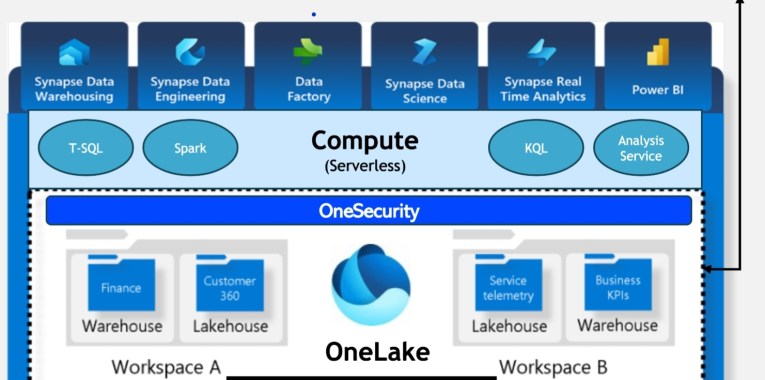
Microsoft Fabric, is the evolutionary next step in cloud data management, providing an all-in-one analytics solution for enterprises that covers everything from data movement to data science, Real-Time Analytics, and business intelligence – all in one place. Microsoft Fabric brings together new and existing components from Azure Power BI, Azure Synapse Analytics, and Azure Data Factory into a single integrated environment. These components are then presented in various customised user experiences or Fabric workloads (the compute layer) including Data Factory, Data Engineering, Data Warehousing, Data Science, Realtime Analytics and Power BI with OneLake as the storage layer.

  1. Data Factory: Combine the simplicity of Power Query with the scalability of Azure Data Factory. Utilize over 200 native connectors to seamlessly connect to on-premises and cloud data sources.
  2. Data Engineering: Experience seamless data transformation and democratization through our world-class Spark platform. Microsoft Fabric Spark integrates with Data Factory, allowing scheduling and orchestration of notebooks and Spark jobs, enabling large-scale data transformation and lakehouse democratization.
  3. Data Warehousing: Experience industry-leading SQL performance and scalability with our Data Warehouse. Separating compute from storage allows independent scaling of components. Data is natively stored in the open Delta Lake format.
  4. Data Science: Build, deploy, and operationalise machine learning models effortlessly within your Fabric experience. Integrated with Azure Machine Learning, it offers experiment tracking and model registry. Empower data scientists to enrich organisational data with predictions, enabling business analysts to integrate these insights into their reports, shifting from descriptive to predictive analytics.
  5. Real-Time Analytics: Handle observational data from diverse sources such as apps and IoT devices with ease. Real-Time Analytics, the ultimate engine for observatio nal data, excels in managing high-volume, semi-structured data like JSON or Text, providing unmatched analytics capabilities.
  6. Power BI: As the world’s leading Business Intelligence platform, Power BI grants intuitive access to all Fabric data. Empowering business owners to make informed decisions swiftly.
  7. OneLake: …the OneDrive for data. OneLake, catering to both professional and citizen developers, offers an open and versatile data storage solution. It supports a wide array of file types, structured or unstructured, storing them in delta parquet format atop Azure Data Lake Storage Gen2 (ADLS). All Fabric data, including data warehouses and lakehouses, automatically store their data in OneLake, simplifying the process for users who need not grapple with infrastructure complexities such as resource groups, RBAC, or Azure regions. Remarkably, it operates without requiring users to 1possess an Azure account. OneLake resolves the issue of scattered data silos by providing a unified storage system, ensuring effortless data discovery, sharing, and compliance with policies and security settings. Each workspace appears as a container within the storage account, and different data items are organized as folders under these containers. Furthermore, OneLake allows data to be accessed as a single ADLS storage account for the entire organization, fostering seamless connectivity across various domains without necessitating data movement. Additionally, users can effortlessly explore OneLake data using the OneLake file explorer for Windows, enabling convenient navigation, uploading, downloading, and modification of files, akin to familiar office tasks.
  8. Unified governance and security within Microsoft Fabric provide a comprehensive framework for managing data, ensuring compliance, and safeguarding sensitive information across the platform. It integrates robust governance policies, access controls, and security measures to create a unified and consistent approach. This unified governance enables seamless collaboration, data sharing, and compliance adherence while maintaining airtight security protocols. Through centralised management and standardised policies, Fabric ensures data integrity, privacy, and regulatory compliance, enhancing overall trust in the system. Users can confidently work with data, knowing that it is protected, compliant, and efficiently governed throughout its lifecycle within the Fabric environment.

Revolutionising Data Science: Unleashing the Power of Predictive Analytics

Microsoft Fabric’s advanced analytics capabilities empower data scientists to delve deeper into data. Its predictive analytics tools enable the creation of robust machine learning models, leading to more accurate forecasts and enhanced risk management strategies. With Fabric, data scientists can focus on refining models and deriving meaningful insights, rather than grappling with data integration challenges.

Transforming Data Analytics: From Descriptive to Prescriptive Analysis

Fabric’s intuitive analytics interface allows data analysts to transition from descriptive analytics to prescriptive analysis effortlessly. By identifying patterns and correlations in real time, analysts can offer actionable recommendations that drive business growth. With Fabric, businesses can optimize their operations, enhance customer experiences, and streamline decision-making processes based on comprehensive, up-to-the-minute data insights.

Empowering Data Engineering: Streamlining Complex Data Pipelines

Data engineers play a pivotal role in any data-driven organization. Microsoft Fabric simplifies their tasks by offering robust tools to streamline complex data pipelines. Its ETL (Extract, Transform, Load) capabilities automate data integration processes, ensuring data accuracy and consistency across the organization. This automation not only saves time but also reduces the risk of errors, making data engineering more efficient and reliable.

Elevating Data Reporting: Dynamic, Interactive, and Insightful Reports

Gone are the days of static, one-dimensional reports. With Microsoft Fabric, data reporting takes a quantum leap forward. Its interactive reporting features allow users to explore data dynamically, drilling down into specific metrics and dimensions. This interactivity enhances collaboration and enables stakeholders to gain a deeper understanding of the underlying data, fostering data-driven decision-making at all levels of the organization.

Conclusion: Embracing the Future of Data Management with Microsoft Fabric

In conclusion, Microsoft Fabric stands as a testament to Microsoft’s commitment to innovation in the realm of data management. By seamlessly integrating data sources, harnessing the power of AI, and providing advanced analytics and reporting capabilities, Fabric is set to revolutionize the way we perceive and utilise data. As businesses and organisations embrace Microsoft Fabric, they will find themselves at the forefront of the data revolution, equipped with the tools and insights needed to thrive in the digital age. The future of data management has arrived, and its name is Microsoft Fabric.