Leveraging Generative AI to Boost Office Productivity

Generative AI tools like ChatGPT and CoPilot are revolutionising the way we approach office productivity. These tools are not only automating routine tasks but are also enhancing complex processes, boosting both efficiency and creativity in the workplace. In the modern fast-paced business environment, maximising productivity is crucial for success. Generative AI tools are at the forefront of this transformation, offering innovative ways to enhance efficiency across various office tasks. Here, we explore how these tools can revolutionise workplace productivity, focusing on email management, consultancy response documentation, data engineering, analytics coding, quality assurance in software development, and other areas.

Here’s how ChatGPT can be utilised in various aspects of office work:

  • Streamlining Email Communication – Email remains a fundamental communication tool in offices, but managing it can be time-consuming. ChatGPT can help streamline this process by generating draft responses, summarising long email threads, and even prioritising emails based on urgency and relevance. By automating routine correspondence, employees can focus more on critical tasks, enhancing overall productivity.
  • Writing Assistance – Whether drafting emails, creating content, or polishing documents, writing can be a significant drain on time. ChatGPT can act as a writing assistant, offering suggestions, correcting mistakes, and improving the overall quality of written communications. This support ensures that communications are not only efficient but also professionally presented.
  • Translating Texts – In a globalised work environment, the ability to communicate across languages is essential. ChatGPT can assist with translating documents and communications, ensuring clear and effective interaction with diverse teams and clients.
  • Enhancing Consultancy Response Documentation – For consultants, timely and accurate documentation is key. Generative AI can assist in drafting documents, proposals, and reports. By inputting the project’s parameters and objectives, tools like ChatGPT can produce comprehensive drafts that consultants can refine and finalise, significantly reducing the time spent on document creation.
  • Enhancing Research – Research can be made more efficient with ChatGPT’s ability to quickly find relevant information, summarise key articles, and provide deep insights. Whether for market research, academic purposes, or competitive analysis, ChatGPT can streamline the information gathering and analysis process.
  • Coding Assistance in Data Engineering and Analytics – For developers, coding can be enhanced with the help of AI tools. By describing a coding problem or requesting specific snippets, ChatGPT can provide relevant and accurate code suggestions. This assistance is invaluable for speeding up development cycles and reducing bugs in the code. CoPilot, powered by AI, transforms how data professionals write code. It suggests code snippets and entire functions based on the comments or the partial code already written. This is especially useful in data engineering and analytics, where writing efficient, error-free code can be complex and time-consuming. CoPilot helps in scripting data pipelines and performing data analysis, thereby reducing errors and improving the speed of development. More on this covered within the Microsoft Fabric and CoPilot section below.
  • Quality Assurance and Test-Driven Development (TDD) – In software development, ensuring quality and adhering to the principles of TDD can be enhanced using generative AI tools. These tools can suggest test cases, help write test scripts, and even provide feedback on the coverage of the tests written. By integrating AI into the development process, developers can ensure that their code not only functions correctly but also meets the required standards before deployment.
  • Automating Routine Office Tasks – Beyond specialised tasks, generative AI can automate various routine activities in the office. From generating financial reports to creating presentations and managing schedules, AI tools can take over repetitive tasks, freeing up employees to focus on more strategic activities. Repetitive tasks like scheduling, data entry, and routine inquiries can be automated with ChatGPT. This delegation of mundane tasks frees up valuable time for employees to engage in more significant, high-value work.
  • Planning Your Day – Effective time management is key to productivity. ChatGPT can help organise your day by taking into account your tasks, deadlines, and priorities, enabling a more structured and productive routine.
  • Summarising Reports and Meeting Notes – One of the most time-consuming tasks in any business setting is going through lengthy documents and meeting notes. ChatGPT can simplify this by quickly analysing large texts and extracting essential information. This capability allows employees to focus on decision-making and strategy rather than getting bogged down by details.
  • Training and Onboarding – Training new employees is another area where generative AI can play a pivotal role. AI-driven programs can provide personalised learning experiences, simulate different scenarios, and give feedback in real-time, making the onboarding process more efficient and effective.
  • Enhancing Creative Processes – Generative AI is not limited to routine or technical tasks. It can also contribute creatively, helping design marketing materials, write creative content, and even generate ideas for innovation within the company.
  • Brainstorming and Inspiration – Creativity is a crucial component of problem-solving and innovation. When you hit a creative block or need a fresh perspective, ChatGPT can serve as a brainstorming partner. By inputting a prompt related to your topic, ChatGPT can generate a range of creative suggestions and insights, sparking new ideas and solutions.
  • Participating in Team Discussions – In collaborative settings like Microsoft Teams, ChatGPT and CoPilot can contribute by providing relevant information during discussions. This capability improves communication and aids in more informed decision-making, making team collaborations more effective.
  • Entertainment – Finally, the workplace isn’t just about productivity, it’s also about culture and morale. ChatGPT can inject light-hearted fun into the day with jokes or fun facts, enhancing the work environment and strengthening team bonds.

Enhancing Productivity with CoPilot in Microsoft’s Fabric Data Platform

The Microsoft’s Fabric Data Platform, a comprehensive ecosystem for managing and analysing data, represents an advanced approach to enterprise data solutions. Integrating AI-driven tools like GitHub’s CoPilot into this environment, significantly enhance the efficiency and effectiveness of data operations. Here’s how CoPilot can be specifically utilised within Microsoft’s Fabric Data Platform to drive innovation and productivity.

  • Streamlined Code Development for Data Solutions – CoPilot, as an AI pair programmer, offers real-time code suggestions and snippets based on the context of the work being done. In the environment of Microsoft’s Fabric Data Platform, which handles large volumes of data and complex data models, CoPilot can assist data engineers and scientists by suggesting optimised data queries, schema designs, and data processing workflows. This reduces the cognitive load on developers and accelerates the development cycle, allowing more time for strategic tasks.
  • Enhanced Error Handling and Debugging – Error handling is critical in data platforms where the integrity of data is paramount. CoPilot can predict common errors in code based on its learning from a vast corpus of codebases and offer preemptive solutions. This capability not only speeds up the debugging process but also helps maintain the robustness of the data platform by reducing downtime and data processing errors.
  • Automated Documentation – Documentation is often a neglected aspect of data platform management due to the ongoing demand for delivering functional code. CoPilot can generate code comments and documentation as the developer writes code. This integration ensures that the Microsoft Fabric Data Platform is well-documented, facilitating easier maintenance and compliance with internal and external audit requirements.
  • Personalised Learning and Development – CoPilot can serve as an educational tool within Microsoft’s Fabric Data Platform by helping new developers understand the intricacies of the platform’s API and existing codebase. By suggesting code examples and guiding through best practices, CoPilot helps in upskilling team members, leading to a more competent and versatile workforce.
  • Proactive Optimisation Suggestions – In data platforms, optimisation is key to handling large datasets efficiently. CoPilot can analyse the patterns in data access and processing within the Fabric Data Platform and suggest optimisations in real-time. These suggestions might include better indexing strategies, more efficient data storage formats, or improved data retrieval methods, which can significantly enhance the performance of the platform.

Conclusion

As we integrate generative AI tools like ChatGPT and CoPilot into our daily workflows, their potential to transform office productivity is immense. By automating mundane tasks, assisting in complex processes, and enhancing creative outputs, these tools not only save time but also improve the quality of work, potentially leading to significant gains in efficiency and innovation. The integration of generative AI tools into office workflows not only automates and speeds up processes but also brings a new level of sophistication to how tasks are approached and executed. From enhancing creative processes to improving how teams function, the role of AI in the office is undeniably transformative, paving the way for a smarter, more efficient workplace.

The integration of GitHub’s CoPilot into Microsoft’s Fabric Data Platform offers a promising enhancement to the productivity and capabilities of data teams. By automating routine coding tasks, aiding in debugging and optimisation, and providing valuable educational support, CoPilot helps build a more efficient, robust, and scalable data management environment. This collaboration not only drives immediate operational efficiencies but also fosters long-term innovation in handling and analysing data at scale.

As businesses continue to adopt these technologies, the future of work looks increasingly promising, driven by intelligent automation and enhanced human-machine collaboration.

“Revolutionising Software Development: The Era of AI Code Assistants have begun”

Reimagining software development with AI augmentation is poised to revolutionise the way we approach programming. Recent insights from Gartner disclose a burgeoning adoption of AI-enhanced coding tools amongst organisations: 18% have already embraced AI code assistants, another 25% are in the midst of doing so, 20% are exploring these tools via pilot programmes, and 14% are at the initial planning stage.

CIOs and tech leaders harbour optimistic views regarding the potential of AI code assistants to boost developer efficiency. Nearly half anticipate substantial productivity gains, whilst over a third regard AI-driven code generation as a transformative innovation.

As the deployment of AI code assistants broadens, it’s paramount for software engineering leaders to assess the return on investment (ROI) and construct a compelling business case. Traditional ROI models, often centred on cost savings, fail to fully recognise the extensive benefits of AI code assistants. Thus, it’s vital to shift the ROI dialogue from cost-cutting to value creation, thereby capturing the complete array of benefits these tools offer.

The conventional outlook on AI code assistants emphasises speedier coding, time efficiency, and reduced expenditures. However, the broader value includes enhancing the developer experience, improving customer satisfaction (CX), and boosting developer retention. This comprehensive view encapsulates the full business value of AI code assistants.

Commencing with time savings achieved through more efficient code production is a wise move. Yet, leaders should ensure these initial time-saving estimates are based on realistic assumptions, wary of overinflated vendor claims and the variable outcomes of small-scale tests.

The utility of AI code assistants relies heavily on how well the use case is represented in the training data of the AI models. Therefore, while time savings is an essential starting point, it’s merely the foundation of a broader value narrative. These tools not only minimise task-switching and help developers stay in the zone but also elevate code quality and maintainability. By aiding in unit test creation, ensuring consistent documentation, and clarifying pull requests, AI code assistants contribute to fewer bugs, reduced technical debt, and a better end-user experience.

In analysing the initial time-saving benefits, it’s essential to temper expectations and sift through the hype surrounding these tools. Despite the enthusiasm, real-world applications often reveal more modest productivity improvements. Starting with conservative estimates helps justify the investment in AI code assistants by showcasing their true potential.

Building a comprehensive value story involves acknowledging the multifaceted benefits of AI code assistants. Beyond coding speed, these tools enhance problem-solving capabilities, support continuous learning, and improve code quality. Connecting these value enablers to tangible impacts on the organisation requires a holistic analysis, including financial and non-financial returns.

In sum, the advent of AI code assistants in software development heralds a new era of efficiency and innovation. By embracing these tools, organisations can unlock a wealth of benefits, extending far beyond traditional metrics of success. The era of the AI code-assistant has begun.

A Guide How to Introduce AI Code Assistants

Integrating AI code assistants into your development teams can mark a transformative step, boosting productivity, enhancing code quality, and fostering innovation. Here’s a guide to seamlessly integrate these tools into your teams:

1. Assess the Needs and Readiness of Your Team

  • Evaluate the current workflow, challenges, and areas where your team could benefit from automation and AI assistance.
  • Determine the skill levels of your team members regarding new technologies and their openness to adopting AI tools.

2. Choose the Right AI Code Assistant

  • Research and compare different AI code assistants based on features, support for programming languages, integration capabilities, and pricing.
  • Consider starting with a pilot programme using a selected AI code assistant to gauge its effectiveness and gather feedback from your team.

3. Provide Training and Resources

  • Organise workshops or training sessions to familiarise your team with the chosen AI code assistant. This should cover basic usage, best practices, and troubleshooting.
  • Offer resources for self-learning, such as tutorials, documentation, and access to online courses.

4. Integrate AI Assistants into the Development Workflow

  • Define clear guidelines on how and when to use AI code assistants within your development process. This might involve integrating them into your IDEs (Integrated Development Environments) or code repositories.
  • Ensure the AI code assistant is accessible to all relevant team members and that it integrates smoothly with your team’s existing tools and workflows.

5. Set Realistic Expectations and Goals

  • Communicate the purpose and potential benefits of AI code assistants to your team, setting realistic expectations about what these tools can and cannot do.
  • Establish measurable goals for the integration of AI code assistants, such as reducing time spent on repetitive coding tasks or improving code quality metrics.

6. Foster a Culture of Continuous Feedback and Improvement

  • Encourage your team to share their experiences and feedback on using AI code assistants. This could be through regular meetings or a dedicated channel for discussion.
  • Use the feedback to refine your approach, address any challenges, and optimise the use of AI code assistants in your development process.

7. Monitor Performance and Adjust as Needed

  • Keep an eye on key performance indicators (KPIs) to evaluate the impact of AI code assistants on your development process, such as coding speed, bug rates, and developer satisfaction.
  • Be prepared to make adjustments based on performance data and feedback, whether that means changing how the tool is used, switching to a different AI code assistant, or updating training materials.

8. Emphasise the Importance of Human Oversight

  • While AI code assistants can significantly enhance productivity and code quality, stress the importance of human review and oversight to ensure the output meets your standards and requirements.

By thoughtfully integrating AI code assistants into your development teams, you can realise the ROI and harness the benefits of AI to streamline workflows, enhance productivity, and drive innovation.

Different Software Testing – Explained

Testing of software and application is an integral part of the software development and deployment lifecycle. But with so many different types of tests to choose from when compiling your test approach, which are best suited for your requirements?

In this post 45 different tests are explained.

Software Application Testing are conducted within two domains: Functional and Non-Functional Testing.

Functional testing is a software testing process used within softwaredevelopment in which software is tested to ensure that it conforms with all requirements. Functional testing is a way of checking software to ensure that it has all the required functionality that’s specified within its functional requirements.

Functional testing types include:

  • Unit testing
  • Integration testing
  • System testing
  • Sanity testing
  • Smoke testing
  • Interface testing
  • Regression testing
  • Beta/Acceptance testing

Non-functional testing is defined as a type of Software testing to check non-functional aspects (performance, usability, reliability, etc) of a software application. It is designed to test the readiness of a system as per nonfunctional parameters which are never addressed by functional testing.

Non-functional testing types include:

  • Performance Testing
  • Load testing
  • Stress testing
  • Volume testing
  • Security testing
  • Compatibility testing
  • Install testing
  • Recovery testing
  • Reliability testing
  • Usability testing
  • Compliance testing
  • Localization testing

45 Different types of testing – explained

  1. Alpha Testing

It is the most common type of testing used in the Software industry. The objective of this testing is to identify all possible issues or defects before releasing it into the market or to the user. Alpha testing is carried out at the end of the software development phase but before the Beta Testing. Still, minor design changes may be made as a result of such testing. Alpha testing is conducted at the developer’s site. In-house virtual user environment can be created for this type of testing.

  1. Acceptance Testing

An acceptance test is performed by the client and verifies whether the end to end the flow of the system is as per the business requirements or not and if it is as per the needs of the end user. Client accepts the software only when all the features and functionalities work as expected. It is the last phase of the testing, after which the software goes into production. This is also called as User Acceptance Testing (UAT).

  1. Ad-hoc Testing

The name itself suggests that this testing is performed on an ad-hoc basis i.e. with no reference to test case and also without any plan or documentation in place for such type of testing. The objective of this testing is to find the defects and break the application by executing any flow of the application or any random functionality.

Ad-hoc testing is an informal way of finding defects and can be performed by anyone in the project. It is difficult to identify defects without a test case but sometimes it is possible that defects found during ad-hoc testing might not have been identified using existing test cases.

  1. Accessibility Testing

The aim of accessibility testing is to determine whether the software or application is accessible for disabled people or not. Here disability means deaf, color blind, mentally disabled, blind, old age and other disabled groups. Various checks are performed such as font size for visually disabled, color and contrast for color blindness etc.

  1. Beta Testing

Beta Testing is a formal type of software testing which is carried out by the customer. It is performed in Real Environment before releasing the product to the market for the actual end users. Beta testing is carried out to ensure that there are no major failures in the software or product and it satisfies the business requirements from an end-user perspective. Beta testing is successful when the customer accepts the software.

Usually, this testing is typically done by end-users or others. It is the final testing done before releasing an application for commercial purpose. Usually, the Beta version of the software or product released is limited to a certain number of users in a specific area. So end user actually uses the software and shares the feedback to the company. Company then takes necessary action before releasing the software to the worldwide.

  1. Back-end Testing

Whenever an input or data is entered on front-end application, it stores in the database and the testing of such database is known as Database Testing or Backend testing. There are different databases like SQL Server, MySQL, and Oracle etc. Database testing involves testing of table structure, schema, stored procedure, data structure and so on.

In back-end testing GUI is not involved, testers are directly connected to the database with proper access and testers can easily verify data by running a few queries on the database. There can be issues identified like data loss, deadlock, data corruption etc during this back-end testing and these issues are critical to fixing before the system goes live into the production environment

  1. Browser Compatibility Testing

It is a subtype of Compatibility Testing (which is explained below) and is performed by the testing team.

Browser Compatibility Testing is performed for web applications and it ensures that the software can run with the combination of different browser and operating system. This type of testing also validates whether web application runs on all versions of all browsers or not.

  1. Backward Compatibility Testing

It is a type of testing which validates whether the newly developed software or updated software works well with older version of the environment or not.

Backward Compatibility Testing checks whether the new version of the software works properly with file format created by older version of the software; it also works well with data tables, data files, data structure created by older version of that software. If any of the software is updated then it should work well on top of the previous version of that software.

  1. Black Box Testing

Internal system design is not considered in this type of testing. Tests are based on the requirements and functionality.

Detailed information about the advantages, disadvantages, and types of Black box testing can be seen here.

  1. Boundary Value Testing

This type of testing checks the behavior of the application at the boundary level.

Boundary value Testing is performed for checking if defects exist at boundary values. Boundary value testing is used for testing a different range of numbers. There is an upper and lower boundary for each range and testing is performed on these boundary values.

If testing requires a test range of numbers from 1 to 500 then Boundary Value Testing is performed on values at 0, 1, 2, 499, 500 and 501.

  1. Branch Testing

It is a type of white box testing and is carried out during unit testing. Branch Testing, the name itself suggests that the code is tested thoroughly by traversing at every branch.

  1. Comparison Testing

Comparison of a product’s strength and weaknesses with its previous versions or other similar products is termed as Comparison Testing.

  1. Compatibility Testing

It is a testing type in which it validates how software behaves and runs in a different environment, web servers, hardware, and network environment. Compatibility testing ensures that software can run on a different configuration, different database, different browsers and their versions. Compatibility testing is performed by the testing team.

  1. Component Testing

It is mostly performed by developers after the completion of unit testing. Component Testing involves testing of multiple functionalities as a single code and its objective is to identify if any defect exists after connecting those multiple functionalities with each other.

  1. End-to-End Testing

Similar to system testing, End-to-end testing involves testing of a complete application environment in a situation that mimics real-world use, such as interacting with a database, using network communications, or interacting with other hardware, applications, or systems if appropriate.

  1. Equivalence Partitioning

It is a testing technique and a type of Black Box Testing. During this equivalence partitioning, a set of group is selected and a few values or numbers are picked up for testing. It is understood that all values from that group generate the same output. The aim of this testing is to remove redundant test cases within a specific group which generates the same output but not any defect.

Suppose, application accepts values between -10 to +10 so using equivalence partitioning the values picked up for testing are zero, one positive value, one negative value. So the Equivalence Partitioning for this testing is: -10 to -1, 0, and 1 to 10.

  1. Example Testing

It means real-time testing. Example testing includes the real-time scenario, it also involves the scenarios based on the experience of the testers.

  1. Exploratory Testing

Exploratory Testing is an informal testing performed by the testing team. The objective of this testing is to explore the application and looking for defects that exist in the application. Sometimes it may happen that during this testing major defect discovered can even cause system failure.

During exploratory testing, it is advisable to keep a track of what flow you have tested and what activity you did before the start of the specific flow.

An exploratory testing technique is performed without documentation and test cases.

  1. Functional Testing

This type of testing ignores the internal parts and focuses only on the output to check if it is as per the requirement or not. It is a Black-box type testing geared to the functional requirements of an application. For detailed information about Functional Testing click here.

  1. Graphical User Interface (GUI) Testing

The objective of this GUI testing is to validate the GUI as per the business requirement. The expected GUI of the application is mentioned in the Detailed Design Document and GUI mockup screens.

The GUI testing includes the size of the buttons and input field present on the screen, alignment of all text, tables and content in the tables.

It also validates the menu of the application, after selecting different menu and menu items, it validates that the page does not fluctuate and the alignment remains same after hovering the mouse on the menu or sub-menu.

  1. Gorilla Testing

Gorilla Testing is a testing type performed by a tester and sometimes by developer the as well. In Gorilla Testing, one module or the functionality in the module is tested thoroughly and heavily. The objective of this testing is to check the robustness of the application.

  1. Happy Path Testing

The objective of Happy Path Testing is to test an application successfully on a positive flow. It does not look for negative or error conditions. The focus is only on the valid and positive inputs through which application generates the expected output.

  1. Incremental Integration Testing

Incremental Integration Testing is a Bottom-up approach for testing i.e continuous testing of an application when a new functionality is added. Application functionality and modules should be independent enough to test separately. This is done by programmers or by testers.

  1. Install/Uninstall Testing

Installation and uninstallation testing is done on full, partial, or upgrade install/uninstall processes on different operating systems under different hardware or software environment.

  1. Integration Testing

Testing of all integrated modules to verify the combined functionality after integration is termed as Integration Testing. Modules are typically code modules, individual applications, client and server applications on a network, etc. This type of testing is especially relevant to client/server and distributed systems.

  1. Load Testing

It is a type of non-functional testing and the objective of Load testing is to check how much of load or maximum workload a system can handle without any performance degradation.

Load testing helps to find the maximum capacity of the system under specific load and any issues that cause the software performance degradation. Load testing is performed using tools like JMeter, LoadRunner, WebLoad, Silk performer etc.

  1. Monkey Testing

Monkey testing is carried out by a tester assuming that if the monkey uses the application then how random input, values will be entered by the Monkey without any knowledge or understanding of the application. The objective of Monkey Testing is to check if an application or system gets crashed by providing random input values/data. Monkey Testing is performed randomly and no test cases are scripted and it is not necessary to

Monkey Testing is performed randomly and no test cases are scripted and it is not necessary to be aware of the full functionality of the system.

  1. Mutation Testing

Mutation Testing is a type of white box testing in which the source code of one of the program is changed and verifies whether the existing test cases can identify these defects in the system. The change in the program source code is very minimal so that it does not impact the entire application, only the specific area having the impact and the related test cases should able to identify those errors in the system.

  1. Negative Testing

Testers having the mindset of “attitude to break” and using negative testing they validate that if system or application breaks. A negative testing technique is performed using incorrect data, invalid data or input. It validates that if the system throws an error of invalid input and behaves as expected.

  1. Non-Functional Testing

It is a type of testing for which every organization having a separate team which usually called as Non-Functional Test (NFT) team or Performance team.

Non-functional testing involves testing of non-functional requirements such as Load Testing, Stress Testing, Security, Volume, Recovery Testing etc. The objective of NFT testing is to ensure whether the response time of software or application is quick enough as per the business requirement.

It should not take much time to load any page or system and should sustain during peak load.

  1. Performance Testing

This term is often used interchangeably with ‘stress’ and ‘load’ testing. Performance Testing is done to check whether the system meets the performance requirements. Different performance and load tools are used to do this testing.

  1. Recovery Testing

It is a type of testing which validates that how well the application or system recovers from crashes or disasters.

Recovery testing determines if the system is able to continue the operation after a disaster. Assume that application is receiving data through the network cable and suddenly that network cable has been unplugged. Sometime later, plug the network cable; then the system should start receiving data from where it lost the connection due to network cable unplugged.

  1. Regression Testing

Testing an application as a whole for the modification in any module or functionality is termed as Regression Testing. It is difficult to cover all the system in Regression Testing, so typically automation testing tools are used for these types of testing.

  1. Risk-Based Testing (RBT)

In Risk Based Testing, the functionalities or requirements are tested based on their priority. Risk-based testing includes testing of highly critical functionality, which has the highest impact on business and in which the probability of failure is very high. The priority decision is based on the business need, so once priority is set for all functionalities then high priority functionality or test cases are executed first followed by medium and then low priority functionalities.

The low priority functionality may be tested or not tested based on the available time. The Risk-based testing is carried out if there is insufficient time available to test entire software and software needs to be implemented on time without any delay. This approach is followed only by the discussion and approval of the client and senior management of the organization.

  1. Sanity Testing

Sanity Testing is done to determine if a new software version is performing well enough to accept it for a major testing effort or not. If an application is crashing for the initial use then the system is not stable enough for further testing. Hence a build or an application is assigned to fix it.

  1. Security Testing

It is a type of testing performed by a special team of testers. A system can be penetrated by any hacking way.

Security Testing is done to check how the software or application or website is secure from internal and external threats. This testing includes how much software is secure from the malicious program, viruses and how secure and strong the authorization and authentication processes are.

It also checks how software behaves for any hackers attack and malicious programs and how software is maintained for data security after such a hacker attack.

  1. Smoke Testing

Whenever a new build is provided by the development team then the software testing team validates the build and ensures that no major issue exists. The testing team ensures that build is stable and a detailed level of testing is carried out further. Smoke Testing checks that no show stopper defect exists in the build which will prevent the testing team to test the application in detail.

If testers find that the major critical functionality is broken down at the initial stage itself then testing team can reject the build and inform accordingly to the development team. Smoke Testing is carried out to a detailed level of any functional or regression testing.

  1. Static Testing

Static Testing is a type of testing which is executed without any code. The execution is performed on the documentation during the testing phase. It involves reviews, walkthrough, and inspection of the deliverables of the project. Static testing does not execute the code instead of the code syntax, naming conventions are checked.

The static testing is also applicable for test cases, test plan, design document. It is necessary to perform static testing by the testing team as the defects identified during this type of testing are cost-effective from the project perspective.

  1. Stress Testing

This testing is done when a system is stressed beyond its specifications in order to check how and when it fails. This is performed under heavy load like putting large number beyond storage capacity, complex database queries, continuous input to the system or database load.

  1. System Testing

Under System Testing technique, the entire system is tested as per the requirements. It is a Black-box type testing that is based on overall requirement specifications and covers all the combined parts of a system.

  1. Unit Testing

Testing an individual software component or module is termed as Unit Testing. It is typically done by the programmer and not by testers, as it requires a detailed knowledge of the internal program design and code. It may also require developing test driver modules or test harnesses.

  1. Usability Testing

Under Usability Testing, User-friendliness check is done. Application flow is tested to know if a new user can understand the application easily or not, Proper help documented if a user gets stuck at any point. Basically, system navigation is checked in this testing.

  1. Vulnerability Testing

The testing which involves identifying of weakness in the software, hardware and the network is known as Vulnerability Testing. Malicious programs, the hacker can take control of the system, if it is vulnerable to such kind of attacks, viruses, and worms.

So it is necessary to check if those systems undergo Vulnerability Testing before production. It may identify critical defects, flaws in the security.

  1. Volume Testing

Volume testing is a type of non-functional testing performed by the performance testing team.

The software or application undergoes a huge amount of data and Volume Testing checks the system behavior and response time of the application when the system came across such a high volume of data. This high volume of data may impact the system’s performance and speed of the processing time.

  1. White Box Testing

White Box testing is based on the knowledge about the internal logic of an application’s code.

It is also known as Glass box Testing. Internal software and code working should be known for performing this type of testing. Under this tests are based on the coverage of code statements, branches, paths, conditions etc.

Lean Six Sigma – Organisational Development and Change

Directly related to business performance is the ability to change the business processes for greater efficiency and productivity while terms like specialisation, standardisation comes to mind followed by measurement, data analysis, statistical analysis, root cause analysis and finally process control and quality control.

Remember the saying by Peter Drucker: “What gets measured, gets improved”…

Improvement initiatives bring change.

A brief history of organisational change

Change management has evolved from Organisational Development OD – focused on helping people to manage change and to stay alive post the world war in the 1940S. That lead to Change Management thinking in the 70s and 80s and in parallel project management as another management process, was developed. These processes saw change as linear and hence can it be managed tightly. It starts with a burning platform and a vision to resolve the problem followed by the change journey of solving problems and overcoming obstacles. In the late 80s Appreciative Inquiry emerged changing the focus of change to “best that can be” and driving “what should be” rather than “what is wrong” and driving the “fix it”. The 1990s and 2000s brought more collaborative models and tools to manage change and solve problems and performance coaching got commonly accepted and used.

The drive to improve business performance gave life to various methodologies and frameworks for example:

  • Toyota Production System (TPS), the origins of Lean Thinking, included the prominent problem solving tools through the “five why’s”, continuous improvement, “Just in Time” production and the elimination of waste.
  • Business Process Re-engineering (BPR) which encouraged the outsourcing and off-shoring of work deemed to be non essential or too costly to perform.
  • Balance Scorecard which aims to provide a well-balanced view of the health of an organization through key performance metrics representing the financial, operational, human and environmental aspects of the business performance.
  • Project Management methodologies and frameworks: PMI, Prince2, Agile SCRUM, LEAN, KANBAN
  • Quality Control frameworks, methodologies and standards: ISO9001, Six Sigma
  • Information Technology Service Management (ITSM) frameworks: ITIL


Six Sigma

Six Sigma is a quality improvement approach that seeks to improve the quality of process outputs by identifying and removing the causes of defects and minimizing variability in the delivery processes. This is done through a set of quality tools management tools and statistics.

Another definition – the ability of processes to deliver a very high percentage of the output within a defined specification derived from customer specifications. A key KPI is the defect % and the process to reduce that to be within specification of tolerance – where a defect is defined as any process output that does deliver to customer requirements.

Running a process at Six Sigma quality is defined as defect levels below 3.4 defects per 1M cycles of the process!

Six Sigma principles:

  • Continuous efforts to achieve stable and predictable process outputs are vital for business success.
  • Operational business processes can be measured, analysed, improved and controlled.
  • Achieving sustained quality improvement requires commitment from the entire organization, particularly from the top management.

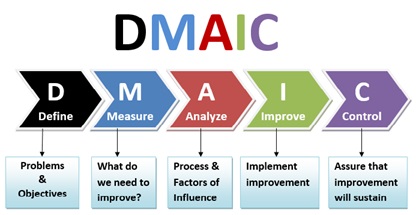
Each Six Sigma project has a five step sequence (DMAIC):

DMAICProblem solving approach:

D – Defining

M – Measuring

A – Analysing

I – Improving

C – Controlling

  1. Defining the problem, and setting a project goal.
  2. Measuring current process performance and collecting relevant data potential root causes.
  3. Analysing the data to investigate and verify cause-and-effect relationships. Determine what the relationships are attempt to ensure that all factors have been considered. The analysis should reveal a root cause of the defect under investigation.
  4. Improving and optimizing the current process by introducing changes that reduce or solve the impact of the identified root cause.
  5. Controlling/Monitoring the newly changed process to ensure no deviation from the expected results occur and that the new process is stable.


LEAN Thinking

You are lean when all you resources are used to deliver value to the end customer – nothing else. This value has to flow through the value chain without any interruptions. All activities not directly supporting in the creation and delivery of this value is considered as waste and therefore reviewed for potential elimination.

Another definition: Lean is focused on getting the rights things to the right place at the right time in the right quantity while achieving a perfect workflow that is dictated by the customers demand to deliver the goods just in time.

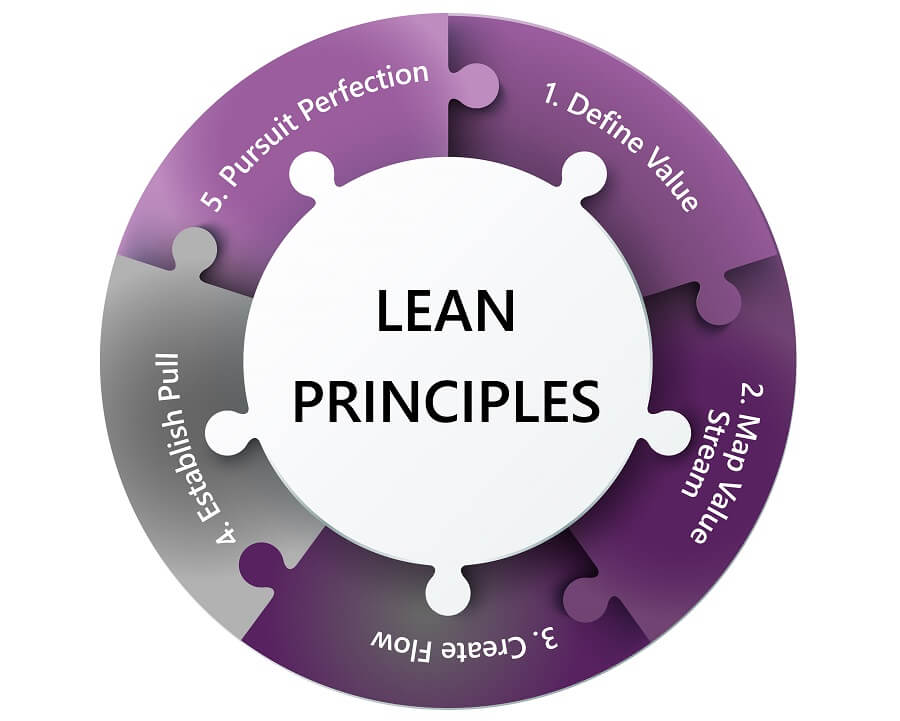
LEAN – Five Principles:

Lean_principles

  1. Specify value from the customer’s point of view. Start by recognizing that only a small percentage of overall time, effort and resources in a organization actually adds value to the customer.
  2. Identify and map the value chain. This is the te entire set of activities across all part of the organization involved in delivering a product or service to the customer. Where possible eliminate the steps that do not create value
  3. Create flow – your product and service should flow to the customer without any interruptions, detours or waiting – delivering customer value.
  4. Respond to customer demand (also referred to as pull). Understand the demand and optimize the process to deliver to this demand – ensuring you deliver only what the customer wants and when they want it – just in time production.
  5. Pursue perfection – all the steps link together as waste is identified – in layers as one waste rectification can expose another – and eliminated by changing / optimizing the process to ensure all assets add value to the customer.

LEAN Tools:

  • Five S (5S): A process of keeping the workplace ready for use exercising a discipline of 5 workplace practices beginning with S.
    • Sort
    • Set in order
    • Shine
    • Standardise
    • Sustain

5S optimally prepare the workplace to perform optimum tasks in the future including the idea of visual management.

  • Seven Wastes: Waste is any activity that consumes resources but do not not creates value for the customer. The purpose of seven wastes is to identify and eliminate waste in processes hence delivery greater customer value.                                              7 Catagories of Waste: Defects, Overproduction, Unnecessary transportation, Waiting, Inventory, Unnecessary Motion, Over-processing
  • Takt Time: The average rate at which a deliverable item is required to meet the customer demand. It is used to create the balance in the process between supply and demand and to help calculate the resources required to efficiently process a process just in time.
  • SMED
  • Kaizen
  • Value-Stream Mapping

Underlining the success of Lean is a culture of respect of people – at all levels. As Lean is a whole-system management methodology that requires a overall culture change to be successful – starting at the top.


Lean Six Sigma

General Electric (GE) adopted Six Sigma in the 1980’s – combining that with the principals adopted by the Toyota Production System (TPS), the origins of Lean Thinking provide the methodology of LEAN SIX SIGMA.

It is a complementary combination between the best of both worlds – Lean Thinking, which is focused on process flow and waste elimination and Six Sigma, which is focused on process variation and defects – driving business operational excellence.


Other relevant posts: Executive Overview of Agile #1 and #2

Let’s Talk – Are you looking to achieve your goals faster? Create better business value? Build strategies to improve growth? We can help – make contact!