

As organisations increasingly adopt data-driven strategies, managing and optimising large-scale data estates becomes a critical challenge. In modern data architectures, Azure’s suite of services offers powerful tools to manage complex data workflows, enabling businesses to unlock the value of their data efficiently and securely. One popular framework for organising and refining data is the Medallion Architecture, which provides a structured approach to managing data layers (bronze, silver, and gold) to ensure quality and accessibility.
When deploying an Azure data estate that utilises services such as Azure Data Lake Storage (ADLS) Gen2, Azure Synapse, Azure Data Factory, and Power BI, non-functional requirements (NFRs) play a vital role in determining the success of the project. While functional requirements describe what the system should do, NFRs focus on how the system should perform and behave under various conditions. They address key aspects such as performance, scalability, security, and availability, ensuring the solution is robust, reliable, and meets both technical and business needs.
In this post, we’ll explore the essential non-functional requirements for a data estate built on Azure, employing a Medallion Architecture. We’ll cover crucial areas such as data processing performance, security, availability, and maintainability—offering comprehensive insights to help you design and manage a scalable, high-performing Azure data estate that meets the needs of your business while keeping costs under control.
Let’s dive into the key non-functional aspects you should consider when planning and deploying your Azure data estate.
1. Performance
- Data Processing Latency:
- Define maximum acceptable latency for data movement through each stage of the Medallion Architecture (Bronze, Silver, Gold). For example, raw data ingested into ADLS-Gen2 (Bronze) should be processed into the Silver layer within 15 minutes and made available in the Gold layer within 30 minutes for analytics consumption.
- Transformation steps in Azure Synapse should be optimised to ensure data is processed promptly for near real-time reporting in Power BI.
- Specific performance KPIs could include batch processing completion times, such as 95% of all transformation jobs completing within the agreed SLA (e.g., 30 minutes).
- Query Performance:
- Define acceptable response times for typical and complex analytical queries executed against Azure Synapse. For instance, simple aggregation queries should return results within 2 seconds, while complex joins or analytical queries should return within 10 seconds.
- Power BI visualisations pulling from Azure Synapse should render within 5 seconds for commonly used reports.
- ETL Job Performance:
- Azure Data Factory pipelines must complete ETL (Extract, Transform, Load) operations within a defined window. For example, daily data refresh pipelines should execute and complete within 2 hours, covering the full process of raw data ingestion, transformation, and loading into the Gold layer.
- Batch processing jobs should run in parallel to enhance throughput without degrading the performance of other ongoing operations.
- Concurrency and Throughput:
- The solution must support a specified number of concurrent users and processes. For example, Azure Synapse should handle 100 concurrent query users without performance degradation.
- Throughput requirements should define how much data can be ingested per unit of time (e.g., supporting the ingestion of 10 GB of data per hour into ADLS-Gen2).
2. Scalability
- Data Volume Handling:
- The system must scale horizontally and vertically to accommodate growing data volumes. For example, ADLS-Gen2 must support scaling from hundreds of gigabytes to petabytes of data as business needs evolve, without requiring significant rearchitecture of the solution.
- Azure Synapse workloads should scale to handle increasing query loads from Power BI as more users access the data warehouse. Autoscaling should be triggered based on thresholds such as CPU usage, memory, and query execution times.
- Compute and Storage Scalability:
- Azure Synapse pools should scale elastically based on workload, with minimum and maximum numbers of Data Warehouse Units (DWUs) or vCores pre-configured for optimal cost and performance.
- ADLS-Gen2 storage should scale to handle both structured and unstructured data with dynamic partitioning to ensure faster access times as data volumes grow.
- ETL Scaling:
- Azure Data Factory pipelines must support scaling by adding additional resources or parallelising processes as data volumes and the number of jobs increase. This ensures that data transformation jobs continue to meet their defined time windows, even as the workload increases.
3. Availability
- Service Uptime:
- A Service Level Agreement (SLA) should be defined for each Azure component, with ADLS-Gen2, Azure Synapse, and Power BI required to provide at least 99.9% uptime. This ensures that critical data services remain accessible to users and systems year-round.
- Azure Data Factory pipelines should be resilient, capable of rerunning in case of transient failures without requiring manual intervention, ensuring data pipelines remain operational at all times.
- Disaster Recovery (DR):
- Define Recovery Time Objectives (RTO) and Recovery Point Objectives (RPO) for critical Azure services. For example, ADLS-Gen2 should have an RPO of 15 minutes (data can be recovered up to the last 15 minutes before an outage), and an RTO of 2 hours (the system should be operational within 2 hours after an outage).
- Azure Synapse and ADLS-Gen2 must replicate data across regions to support geo-redundancy, ensuring data availability in the event of regional outages.
- Data Pipeline Continuity:
- Azure Data Factory must support pipeline reruns, retries, and checkpoints to avoid data loss in the event of failure. Automated alerts should notify the operations team of any pipeline failures requiring human intervention.
4. Security
- Data Encryption:
- All data at rest in ADLS-Gen2, Azure Synapse, and in transit between services must be encrypted using industry standards (e.g., AES-256 for data at rest).
- Transport Layer Security (TLS) should be enforced for data communication between services to ensure data in transit is protected from unauthorised access.
- Role-Based Access Control (RBAC):
- Access to all Azure resources (including ADLS-Gen2, Azure Synapse, and Azure Data Factory) should be restricted using RBAC. Specific roles (e.g., Data Engineers, Data Analysts) should be defined with corresponding permissions, ensuring that only authorised users can access or modify resources.
- Privileged access should be minimised, with multi-factor authentication (MFA) required for high-privilege actions.
- Data Masking:
- Implement dynamic data masking in Azure Synapse or Power BI to ensure sensitive data (e.g., Personally Identifiable Information – PII) is masked or obfuscated for users without appropriate access levels, ensuring compliance with privacy regulations such as GDPR.
- Network Security:
- Ensure that all services are integrated using private endpoints and virtual networks (VNET) to restrict public internet exposure.
- Azure Firewall or Network Security Groups (NSGs) should be used to protect data traffic between components within the architecture.
5. Maintainability
- Modular Pipelines:
- Azure Data Factory pipelines should be built in a modular fashion, allowing individual pipeline components to be reused across different workflows. This reduces maintenance overhead and allows for quick updates.
- Pipelines should be version-controlled using Azure DevOps or Git, with CI/CD pipelines established for deployment automation.
- Documentation and Best Practices:
- All pipelines, datasets, and transformations should be documented to ensure new team members can easily understand and maintain workflows.
- Adherence to best practices, including naming conventions, tagging, and modular design, should be mandatory.
- Monitoring and Logging:
- Azure Monitor and Azure Log Analytics must be used to log and monitor the health of pipelines, resource usage, and performance metrics across the architecture.
- Proactive alerts should be configured to notify of pipeline failures, data ingestion issues, or performance degradation.
6. Compliance
- Data Governance:
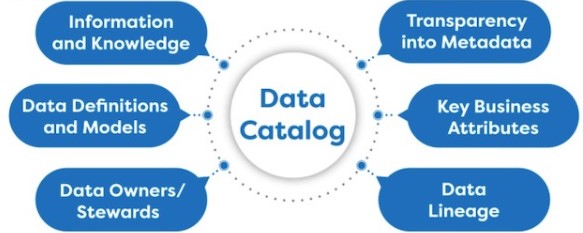
- Azure Purview (or a similar governance tool) should be used to catalogue all datasets in ADLS-Gen2 and Azure Synapse. This ensures that the organisation has visibility into data lineage, ownership, and classification across the data estate.
- Data lifecycle management policies should be established to automatically delete or archive data after a certain period (e.g., archiving data older than 5 years).
- Data Retention and Archiving:
- Define clear data retention policies for data stored in ADLS-Gen2. For example, operational data in the Bronze layer should be archived after 6 months, while Gold data might be retained for longer periods.
- Archiving should comply with regulatory requirements, and archived data must still be recoverable within a specified period (e.g., within 24 hours).
- Auditability:
- All access and actions performed on data in ADLS-Gen2, Azure Synapse, and Azure Data Factory should be logged for audit purposes. Audit logs must be retained for a defined period (e.g., 7 years) and made available for compliance reporting when required.
7. Reliability
- Data Integrity:
- Data validation and reconciliation processes should be implemented at each stage (Bronze, Silver, Gold) to ensure that data integrity is maintained throughout the pipeline. Any inconsistencies should trigger alerts and automated corrective actions.
- Schema validation must be enforced to ensure that changes in source systems do not corrupt data as it flows through the layers.
- Backup and Restore:
- Periodic backups of critical data in ADLS-Gen2 and Azure Synapse should be scheduled to ensure data recoverability in case of corruption or accidental deletion.
- Test restore operations should be performed quarterly to ensure backups are valid and can be restored within the RTO.
8. Cost Optimisation
- Resource Usage Efficiency:
- Azure services must be configured to use cost-effective resources, with cost management policies in place to avoid unnecessary expenses. For example, Azure Synapse compute resources should be paused during off-peak hours to minimise costs.
- Data lifecycle policies in ADLS-Gen2 should archive older, infrequently accessed data to lower-cost storage tiers (e.g., cool or archive).
- Cost Monitoring:
- Set up cost alerts using Azure Cost Management to monitor usage and avoid unexpected overspends. Regular cost reviews should be conducted to identify areas of potential savings.
9. Interoperability
- External System Integration:
- The system must support integration with external systems such as third-party APIs or on-premise databases, with Azure Data Factory handling connectivity and orchestration.
- Data exchange formats such as JSON, Parquet, or CSV should be supported to ensure compatibility across various platforms and services.
10. Licensing
When building a data estate on Azure using services such as Azure Data Lake Storage (ADLS) Gen2, Azure Synapse, Azure Data Factory, and Power BI, it’s essential to understand the licensing models and associated costs for each service. Azure’s licensing follows a pay-as-you-go model, offering flexibility, but it requires careful management to avoid unexpected costs. Below are some key licensing considerations for each component:
- Azure Data Lake Storage (ADLS) Gen2:
- Storage Costs: ADLS Gen2 charges are based on the volume of data stored and the access tier selected (hot, cool, or archive). The hot tier, offering low-latency access, is more expensive, while the cool and archive tiers are more cost-effective but designed for infrequently accessed data.
- Data Transactions: Additional charges apply for data read and write transactions, particularly if the data is accessed frequently.
- Azure Synapse:
- Provisioned vs On-Demand Pricing: Azure Synapse offers two pricing models. The provisioned model charges based on the compute resources allocated (Data Warehouse Units or DWUs), which are billed regardless of actual usage. The on-demand model charges per query, offering flexibility for ad-hoc analytics workloads.
- Storage Costs: Data stored in Azure Synapse also incurs storage costs, based on the size of the datasets within the service.
- Azure Data Factory (ADF):
- Pipeline Runs: Azure Data Factory charges are based on the number of pipeline activities executed. Each data movement or transformation activity incurs costs based on the volume of data processed and the frequency of pipeline executions.
- Integration Runtime: Depending on the region or if on-premises data is involved, using the integration runtime can incur additional costs, particularly for large data transfers across regions or in hybrid environments.
- Power BI:
- Power BI Licensing: Power BI offers Free, Pro, and Premium licensing tiers. The Free tier is suitable for individual users with limited sharing capabilities, while Power BI Pro offers collaboration features at a per-user cost. Power BI Premium provides enhanced performance, dedicated compute resources, and additional enterprise-grade features, which are priced based on capacity rather than per user.
- Data Refreshes: The number of dataset refreshes per day is limited in the Power BI Pro tier, while the Premium tier allows for more frequent and larger dataset refreshes.
Licensing plays a crucial role in the cost and compliance management of a Dev, Test, and Production environment involving services like Azure Data Lake Storage Gen2 (ADLS Gen2), Azure Data Factory (ADF), Synapse Analytics, and Power BI. Each of these services has specific licensing considerations, especially as usage scales across environments.
10.1 Development Environment
- Azure Data Lake Storage Gen2 (ADLS Gen2): The development environment typically incurs minimal licensing costs as storage is charged based on the amount of data stored, operations performed, and redundancy settings. Usage should be low, and developers can manage costs by limiting data ingestion and using lower redundancy options.
- Azure Data Factory (ADF): ADF operates on a consumption-based model where costs are based on the number of pipeline runs and data movement activities. For development, licensing costs are minimal, but care should be taken to avoid unnecessary pipeline executions and data transfers.
- Synapse Analytics: For development, developers may opt for the pay-as-you-go pricing model with minimal resources. Synapse offers a “Development” SKU for non-production environments, which can reduce costs. Dedicated SQL pools should be minimized in Dev to reduce licensing costs, and serverless options should be considered.
- Power BI: Power BI Pro licenses are usually required for developers to create and share reports. A lower number of licenses can be allocated for development purposes, but if collaboration and sharing are involved, a Pro license will be necessary. If embedding Power BI reports, Power BI Embedded SKU licensing should also be considered.
10.2 Test Environment
- Azure Data Lake Storage Gen2 (ADLS Gen2): Licensing in the test environment should mirror production but at a smaller scale. Costs will be related to storage and I/O operations, similar to the production environment, but with the potential for cost savings through lower data volumes or reduced redundancy settings.
- Azure Data Factory (ADF): Testing activities typically generate higher consumption than development due to load testing, integration testing, and data movement simulations. Usage-based licensing for data pipelines and data flows will apply. It is important to monitor the cost of ADF runs and ensure testing does not consume excessive resources unnecessarily.
- Synapse Analytics: For the test environment, the pricing model should mirror production usage with the possibility of scaling down in terms of computing power. Testing should focus on Synapse’s workload management to ensure performance in production while minimizing licensing costs. Synapse’s “Development” or lower-tier options could still be leveraged to reduce costs during non-critical testing periods.
- Power BI: Power BI Pro licenses are typically required for testing reports and dashboards. Depending on the scope of testing, you may need a few additional licenses, but overall testing should not significantly increase licensing costs. If Power BI Premium or Embedded is being used in production, it may be necessary to have similar licensing in the test environment for accurate performance and load testing.
10.3 Production Environment
- Azure Data Lake Storage Gen2 (ADLS Gen2): Licensing is based on the volume of data stored, redundancy options (e.g., LRS, GRS), and operations performed (e.g., read/write transactions). In production, it is critical to consider data lifecycle management policies, such as archiving and deletion, to optimize costs while staying within licensing agreements.
- Azure Data Factory (ADF): Production workloads in ADF are licensed based on consumption, specifically pipeline activities, data integration operations, and Data Flow execution. It’s important to optimize pipeline design to reduce unnecessary executions or long-running activities. ADF also offers Managed VNET pricing for enhanced security, which might affect licensing costs.
- Synapse Analytics: For Synapse Analytics, production environments can leverage either the pay-as-you-go pricing model for serverless SQL pools or reserved capacity (for dedicated SQL pools) to lock in lower pricing over time. The licensing cost in production can be significant if heavy data analytics workloads are running, so careful monitoring and workload optimization are necessary.
- Power BI: For production reporting, Power BI offers two main licensing options:
- Power BI Pro: This license is typically used for individual users, and each user who shares or collaborates on reports will need a Pro license.
- Power BI Premium: Premium provides dedicated cloud compute and storage for larger enterprise users, offering scalability and performance enhancements. Licensing is either capacity-based (Premium Per Capacity) or user-based (Premium Per User). Power BI Premium is especially useful for large-scale, enterprise-wide reporting solutions.
- Depending on the nature of production use (whether reports are shared publicly or embedded), Power BI Embedded licenses may also be required for embedded analytics in custom applications. This is typically licensed based on compute capacity (e.g., A1-A6 SKUs).
License Optimization Across Environments
- Cost Control with Reserved Instances: For production, consider reserved capacity for Synapse Analytics and other Azure services to lock in lower pricing over 1- or 3-year periods. This is particularly beneficial when workloads are predictable.
- Developer and Test Licensing Discounts: Azure often offers discounted pricing for Dev/Test environments. Azure Dev/Test pricing is available for active Visual Studio subscribers, providing significant savings for development and testing workloads. This can reduce the cost of running services like ADF, Synapse, and ADLS Gen2 in non-production environments.
- Power BI Embedded vs Premium: If Power BI is being embedded in a web or mobile application, you can choose between Power BI Embedded (compute-based pricing) or Power BI Premium (user-based pricing) depending on whether you need to share reports externally or internally. Evaluate which model works best for cost optimization based on your report sharing patterns.
11. User Experience (Power BI)
- Dashboard Responsiveness:
- Power BI dashboards querying data from Azure Synapse should render visualisations within a specified time (e.g., less than 5 seconds for standard reports) to ensure a seamless user experience.
- Power BI reports should be optimised to ensure quick refreshes and minimise unnecessary queries to the underlying data warehouse.
- Data Refresh Frequenc
- Define how frequently Power BI reports must refresh based on the needs of the business. For example, data should be updated every 15 minutes for dashboards that track near real-time performance metrics.
12. Environment Management: Development, Testing (UAT), and Production
Managing different environments is crucial to ensure that changes to your Azure data estate are deployed systematically, reducing risks, ensuring quality, and maintaining operational continuity. It is essential to have distinct environments for Development, Testing/User Acceptance Testing (UAT), and Production. Each environment serves a specific purpose and helps ensure the overall success of the solution. Here’s how you should structure and manage these environments:
12.1 Development Environment
- Purpose:
The Development environment is where new features, enhancements, and fixes are first developed. This environment allows developers and data engineers to build and test individual components such as data pipelines, models, and transformations without impacting live data or users. - Characteristics:
- Resources should be provisioned based on the specific requirements of the development team, but they can be scaled down to reduce costs.
- Data used in development should be synthetic or anonymised to prevent any exposure of sensitive information.
- CI/CD Pipelines: Set up Continuous Integration (CI) pipelines to automate the testing and validation of new code before it is promoted to the next environment.
- Security and Access:
- Developers should have the necessary permissions to modify resources, but strong access controls should still be enforced to avoid accidental changes or misuse.
- Multi-factor authentication (MFA) should be enabled for access.
12.2 Testing and User Acceptance Testing (UAT) Environment
- Purpose:
The Testing/UAT environment is used to validate new features and bug fixes in a production-like setting. This environment mimics the Production environment to catch any issues before deployment to live users. Testing here ensures that the solution meets business and technical requirements. - Characteristics:
- Data: The data in this environment should closely resemble the production data, but should ideally be anonymised or masked to protect sensitive information.
- Performance Testing: Conduct performance testing in this environment to ensure that the system can handle the expected load in production, including data ingestion rates, query performance, and concurrency.
- Functional Testing: Test new ETL jobs, data transformations, and Power BI reports to ensure they behave as expected.
- UAT: Business users should be involved in testing to ensure that new features meet their requirements and that the system behaves as expected from an end-user perspective.
- Security and Access:
- Developers, testers, and business users involved in UAT should have appropriate levels of access, but sensitive data should still be protected through masking or anonymisation techniques.
- User roles in UAT should mirror production roles to ensure testing reflects real-world access patterns.
- Automated Testing:
- Automate tests for pipelines and queries where possible to validate data quality, performance, and system stability before moving changes to Production.
12.3 Production Environment
- Purpose:
The Production environment is the live environment that handles real data and user interactions. It is mission-critical, and ensuring high availability, security, and performance in this environment is paramount. - Characteristics:
- Service Uptime: The production environment must meet strict availability SLAs, typically 99.9% uptime for core services such as ADLS-Gen2, Azure Synapse, Azure Data Factory, and Power BI.
- High Availability and Disaster Recovery: Production environments must have disaster recovery mechanisms, including data replication across regions and failover capabilities, to ensure business continuity in the event of an outage.
- Monitoring and Alerts: Set up comprehensive monitoring using Azure Monitor and other tools to track performance metrics, system health, and pipeline executions. Alerts should be configured for failures, performance degradation, and cost anomalies.
- Change Control:
- Any changes to the production environment must go through formal Change Management processes. This includes code reviews, approvals, and staged deployments (from Development > Testing > Production) to minimise risk.
- Use Azure DevOps or another CI/CD tool to automate deployments to production. Rollbacks should be available to revert to a previous stable state if issues arise.
- Security and Access:
- Strict access controls are essential in production. Only authorised personnel should have access to the environment, and all changes should be tracked and logged.
- Data Encryption: Ensure that data in production is encrypted at rest and in transit using industry-standard encryption protocols.
12.4 Data Promotion Across Environments
- Data Movement:
- When promoting data pipelines, models, or new code across environments, automated testing and validation must ensure that all changes function correctly in each environment before reaching Production.
- Data should only be moved from Development to UAT and then to Production through secure pipelines. Use Azure Data Factory or Azure DevOps for data promotion and automation.
- Versioning:
- Maintain version control across all environments. Any changes to pipelines, models, and queries should be tracked and revertible, ensuring stability and security as new features are tested and deployed.
13. Workspaces and Sandboxes in the Development Environment
In addition to the non-functional requirements, effective workspaces and sandboxes are essential for development in Azure-based environments. These structures provide isolated and flexible environments where developers can build, test, and experiment without impacting production workloads.
Workspaces and Sandboxes Overview
- Workspaces: A workspace is a logical container where developers can collaborate and organise their resources, such as data, pipelines, and code. Azure Synapse Analytics, Power BI, and Azure Machine Learning use workspaces to manage resources and workflows efficiently.
- Sandboxes: Sandboxes are isolated environments that allow developers to experiment and test their configurations, code, or infrastructure without interfering with other developers or production environments. Sandboxes are typically temporary and can be spun up or destroyed as needed, often implemented using infrastructure-as-code (IaC) tools.
Non-Functional Requirements for Workspaces and Sandboxes in the Dev Environment
13.1 Isolation and Security
- Workspace Isolation: Developers should be able to create independent workspaces in Synapse Analytics and Power BI to develop pipelines, datasets, and reports without impacting production data or resources. Each workspace should have its own permissions and access controls.
- Sandbox Isolation: Each developer or development team should have access to isolated sandboxes within the Dev environment. This prevents interference from others working on different projects and ensures that errors or experimental changes do not affect shared resources.
- Role-Based Access Control (RBAC): Enforce RBAC in both workspaces and sandboxes. Developers should have sufficient privileges to build and test solutions but should not have access to sensitive production data or environments.
13.2 Scalability and Flexibility
- Elastic Sandboxes: Sandboxes should allow developers to scale compute resources up or down based on the workload (e.g., Synapse SQL pools, ADF compute clusters). This allows efficient testing of both lightweight and complex data scenarios.
- Customisable Workspaces: Developers should be able to customise workspace settings, such as data connections and compute options. In Power BI, this means configuring datasets, models, and reports, while in Synapse, it involves managing linked services, pipelines, and other resources.
13.3 Version Control and Collaboration
- Source Control Integration: Workspaces and sandboxes should integrate with source control systems like GitHub or Azure Repos, enabling developers to collaborate on code and ensure versioning and tracking of all changes (e.g., Synapse SQL scripts, ADF pipelines).
- Collaboration Features: Power BI workspaces, for example, should allow teams to collaborate on reports and dashboards. Shared development workspaces should enable team members to co-develop, review, and test Power BI reports while maintaining control over shared resources.
13.4 Automation and Infrastructure-as-Code (IaC)
- Automated Provisioning: Sandboxes and workspaces should be provisioned using IaC tools like Azure Resource Manager (ARM) templates, Terraform, or Bicep. This allows for quick setup, teardown, and replication of environments as needed.
- Automated Testing in Sandboxes: Implement automated testing within sandboxes to validate changes in data pipelines, transformations, and reporting logic before promoting to the Test or Production environments. This ensures data integrity and performance without manual intervention.
13.5 Cost Efficiency
- Ephemeral Sandboxes: Design sandboxes as ephemeral environments that can be created and destroyed as needed, helping control costs by preventing resources from running when not in use.
- Workspace Optimisation: Developers should use lower-cost options in workspaces (e.g., smaller compute nodes in Synapse, reduced-scale datasets in Power BI) to limit resource consumption. Implement cost-tracking tools to monitor and optimise resource usage.
13.6 Data Masking and Sample Data
- Data Masking: Real production data should not be used in the Dev environment unless necessary. Data masking or anonymisation should be implemented within workspaces and sandboxes to ensure compliance with data protection policies.
- Sample Data: Developers should work with synthetic or representative sample data in sandboxes to simulate real-world scenarios. This minimises the risk of exposing sensitive production data while enabling meaningful testing.
13.7 Cross-Service Integration
- Synapse Workspaces: Developers in Synapse Analytics should easily integrate resources like Azure Data Factory pipelines, ADLS Gen2 storage accounts, and Synapse SQL pools within their workspaces, allowing development and testing of end-to-end data pipelines.
- Power BI Workspaces: Power BI workspaces should be used for developing and sharing reports and dashboards during development. These workspaces should be isolated from production and tied to Dev datasets.
- Sandbox Connectivity: Sandboxes in Azure should be able to access shared development resources (e.g., ADLS Gen2) to test integration flows (e.g., ADF data pipelines and Synapse integration) without impacting other projects.
13.8 Lifecycle Management
- Resource Lifecycle: Sandbox environments should have predefined expiration times or automated cleanup policies to ensure resources are not left running indefinitely, helping manage cloud sprawl and control costs.
- Promotion to Test/Production: Workspaces and sandboxes should support workflows where development work can be moved seamlessly to the Test environment (via CI/CD pipelines) and then to Production, maintaining a consistent process for code and data pipeline promotion.
Key Considerations for Workspaces and Sandboxes in the Dev Environment
- Workspaces in Synapse Analytics and Power BI are critical for organising resources like pipelines, datasets, models, and reports.
- Sandboxes provide safe, isolated environments where developers can experiment and test changes without impacting shared resources or production systems.
- Automation and Cost Efficiency are essential. Ephemeral sandboxes, Infrastructure-as-Code (IaC), and automated testing help reduce costs and ensure agility in development.
- Data Security and Governance must be maintained even in the development stage, with data masking, access controls, and audit logging applied to sandboxes and workspaces.
By incorporating these additional structures and processes for workspaces and sandboxes, organisations can ensure their development environments are flexible, secure, and cost-effective. This not only accelerates development cycles but also ensures quality and compliance across all phases of development.
These detailed non-functional requirements provide a clear framework to ensure that the data estate is performant, secure, scalable, and cost-effective, while also addressing compliance and user experience concerns.
Conclusion
Designing and managing a data estate on Azure, particularly using a Medallion Architecture, involves much more than simply setting up data pipelines and services. The success of such a solution depends on ensuring that non-functional requirements (NFRs), such as performance, scalability, security, availability, and maintainability, are carefully considered and rigorously implemented. By focusing on these critical aspects, organisations can build a data architecture that is not only efficient and reliable but also capable of scaling with the growing demands of the business.
Azure’s robust services, such as ADLS Gen2, Azure Synapse, Azure Data Factory, and Power BI, provide a powerful foundation, but without the right NFRs in place, even the most advanced systems can fail to meet business expectations. Ensuring that data flows seamlessly through the bronze, silver, and gold layers, while maintaining high performance, security, and cost efficiency, will enable organisations to extract maximum value from their data.
Incorporating a clear strategy for each non-functional requirement will help you future-proof your data estate, providing a solid platform for innovation, improved decision-making, and business growth. By prioritising NFRs, you can ensure that your Azure data estate is more than just operational—it becomes a competitive asset for your organisation.







 renierbotha ltd