Mastering Client and Stakeholder Management in Software Development Projects

Best Practices in Managing Your Client/Stakeholder During a Software Development Project

Managing clients and stakeholders effectively can be the linchpin of a successful software development project. Clear communication and effective management techniques can transform what could be a chaotic project into a well-oiled machine. Here are some best practices to ensure you and your clients or stakeholders are always on the same page:

1. Establish Clear Communication Channels

  • Kickoff Meetings: Start with a comprehensive kickoff meeting to align expectations. Discuss the scope, goals, timelines, and deliverables.
  • Regular Updates: Schedule regular update meetings to discuss progress, challenges, and next steps. Use video calls, emails, or project management tools to keep everyone informed.

2. Define Roles and Responsibilities

  • RACI Matrix: Create a RACI (Responsible, Accountable, Consulted, Informed) matrix to clearly outline who is responsible for what. This reduces confusion and ensures accountability.
  • Documentation: Keep detailed documentation of roles, responsibilities, and project milestones. This acts as a reference point throughout the project lifecycle.

3. Set Realistic Expectations

  • Scope Management: Clearly define the project scope and make sure all parties agree to it. Avoid scope creep by having a change management process in place.
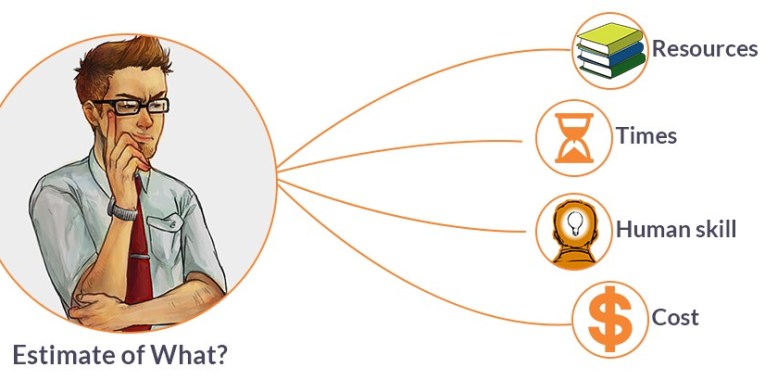
  • Timeline and Budget: Be transparent about timelines and budgets. Provide realistic estimates and highlight potential risks that could affect them.

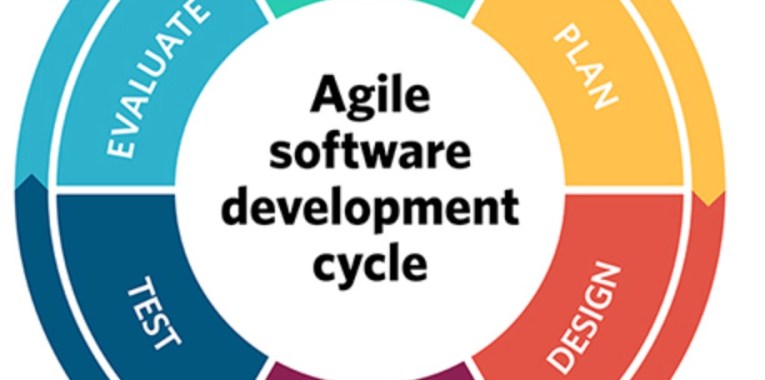
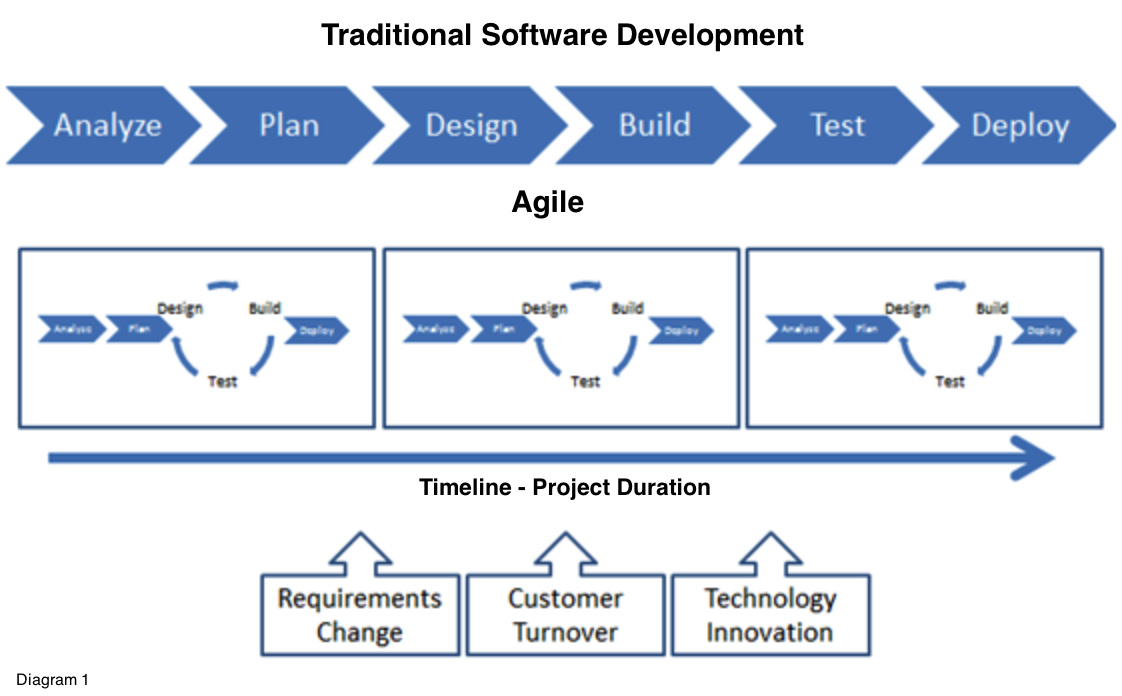
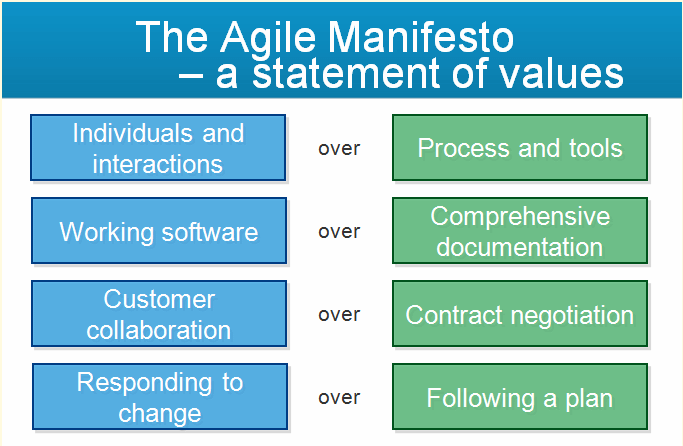
4. Use Agile Methodologies

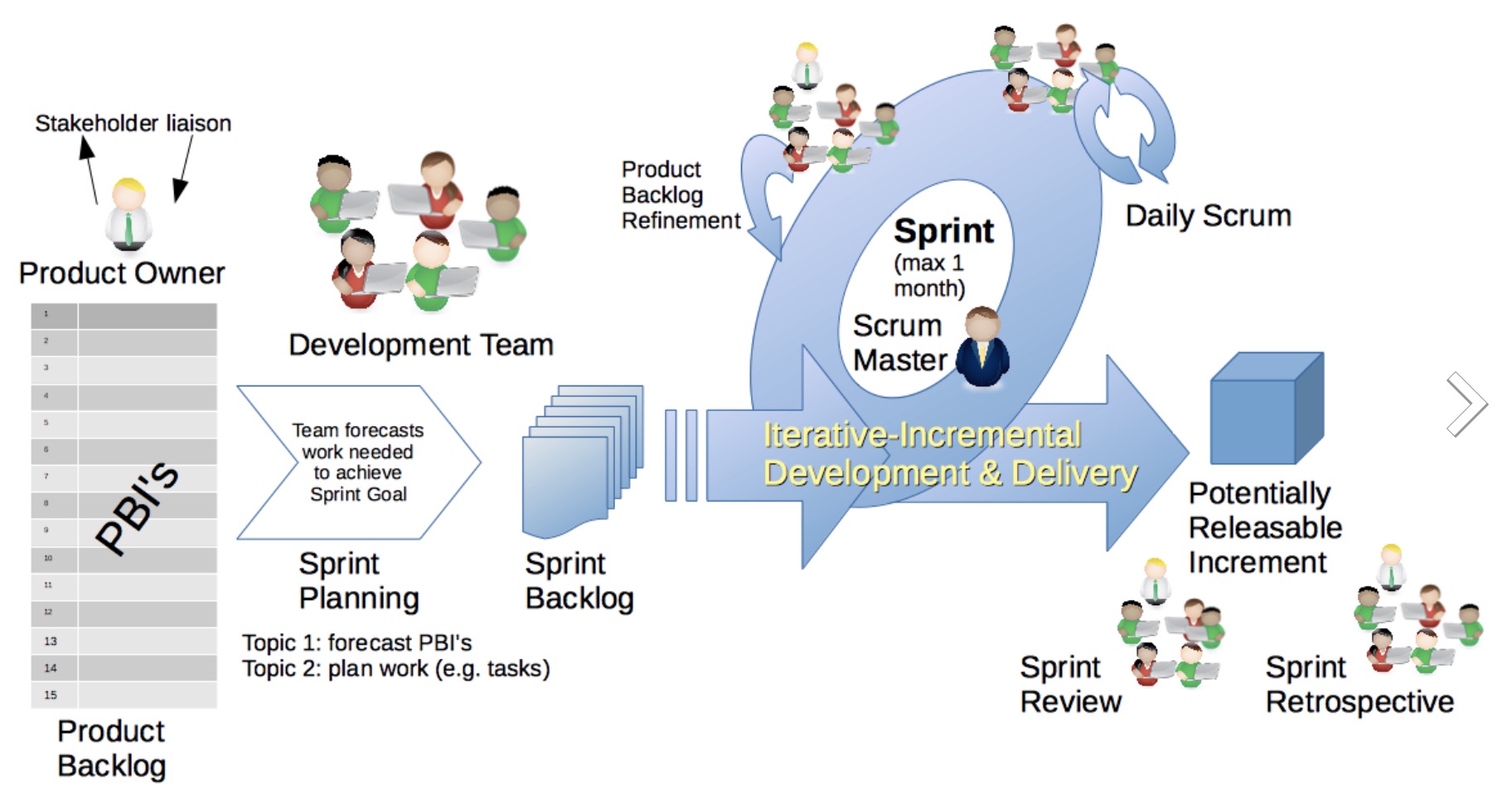
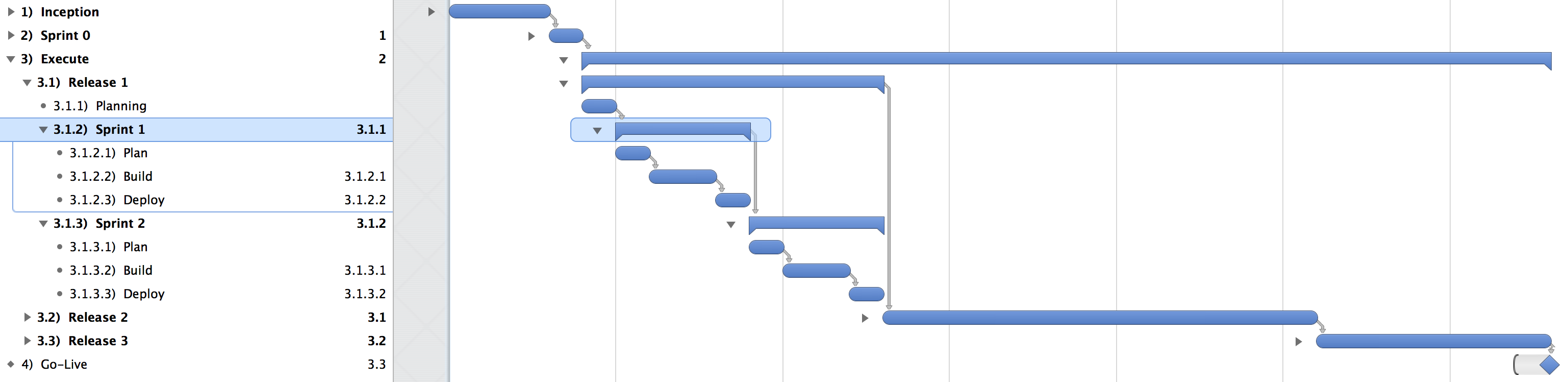
  • Sprint Planning: Break down the project into manageable sprints. Use sprint planning meetings to set objectives and ensure that everyone is aligned.
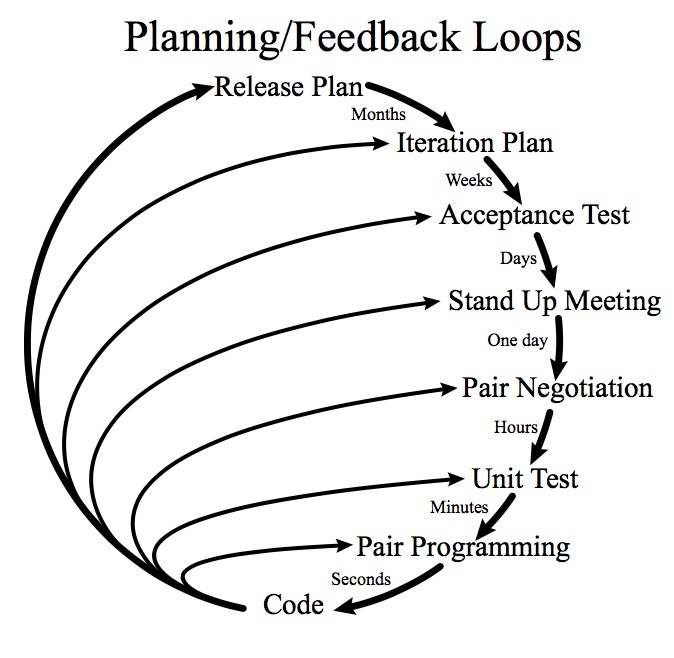
  • Feedback Loops: Implement regular feedback loops to incorporate client or stakeholder feedback early and often. This helps in making necessary adjustments before it’s too late.

5. Prioritise Transparency and Honesty

  • Progress Reports: Share regular progress reports that include both successes and challenges. Honesty about setbacks can build trust and facilitate quicker problem-solving.
  • Open Dialogue: Encourage an open dialogue where clients and stakeholders feel comfortable sharing their concerns and suggestions.

6. Employ Robust Project Management Tools

  • Software Tools: Utilise project management tools like Jira, Trello, or Asana for tracking progress, assigning tasks, and managing deadlines. These tools can improve collaboration and transparency.
  • Dashboards: Create dashboards to visualise project metrics and KPIs. This provides a real-time snapshot of the project’s health.

7. Build Strong Relationships

  • Regular Check-Ins: Beyond formal meetings, have regular check-ins to understand client or stakeholder sentiments. Personal interactions can go a long way in building trust.
  • Empathy and Understanding: Show empathy and understanding towards your clients’ and stakeholders’ needs and constraints. A good relationship fosters better collaboration.

8. Resolve Conflicts Promptly

  • Conflict Resolution Plan: Have a plan in place for resolving conflicts swiftly. This includes identifying the issue, discussing it openly, and finding a mutually agreeable solution.
  • Mediation: If conflicts escalate, consider involving a neutral third party for mediation.

9. Celebrate Milestones and Achievements

  • Acknowledgement: Recognise and celebrate project milestones and individual achievements. This boosts morale and keeps everyone motivated.
  • Client Involvement: Involve clients and stakeholders in these celebrations to show appreciation for their contributions and support.

Conclusion

Effectively managing clients and stakeholders is not just about keeping them happy; it’s about building a partnership that drives the project towards success. By establishing clear communication, setting realistic expectations, employing agile methodologies, and fostering strong relationships, you can ensure that your software development project is a triumph for everyone involved.

Feel free to tweak these practices based on your unique project needs and client dynamics. Happy managing!

Comprehensive Guide: From Monolithic Architectures to Modern Microservices Architecture utilising Kubernetes and Container Orchestration

As businesses scale and evolve in today’s fast-paced digital landscape, the software architectures that support them must be adaptable, scalable, and resilient. Many organizations start with monolithic architectures due to their simplicity and ease of development, but as the business grows, these architectures can become a significant risk, hindering agility, performance, and scalability. This guide will explore the nature of monolithic architectures, the business risks they entail, strategies for mitigating these risks without re-architecting, and the transition to microservices architecture, complemented by Kubernetes, containers, and modern cloud services as a strategic solution.

Introduction

An ongoing challenge I’ve found is that most software development companies are either grappling with or have already confronted the complex challenge of transitioning from a monolithic architecture to a modern microservices architecture. This shift is driven by the need to scale applications more effectively, enhance agility, and respond faster to market demands. As applications grow and customer expectations rise, the limitations of monolithic systems—such as difficulty in scaling, slow development cycles, and cumbersome deployment processes—become increasingly apparent. To overcome these challenges, many organizations are turning to a modular service oriented architecture (SOA) i.e. microservices architecture, leveraging modern cloud technologies like Kubernetes, containers, and other cloud-native tools to build more resilient, flexible, and scalable systems. This transition, however, is not without its difficulties. It requires investment, careful planning, a strategic approach, and a deep understanding of both the existing monolithic system and the new architecture’s potential benefits and challenges.


Part 1: Understanding Monolithic Architecture

What is a Monolithic Architecture?

Monolithic architecture is a traditional software design model where all components of an application are integrated into a single, unified codebase. This includes all three application tiers, the user interface, business logic, and data access layers, which are tightly coupled and interdependent.

Key Characteristics:
  1. Single Codebase: All components reside in a single codebase, simplifying development but leading to potential complexities as the application grows.
  2. Tight Coupling: Components are tightly integrated, meaning changes in one part of the system can affect others, making maintenance and updates challenging.
  3. Single Deployment: The entire application must be redeployed, even for minor updates, leading to deployment inefficiencies.
  4. Shared Memory: Components share the same memory space, allowing fast communication but increasing the risk of systemic failures.
  5. Single Technology Stack: The entire application is typically built on a single technology stack, limiting flexibility.
Advantages of Monolithic Architecture:
  • Simplicity: Easier to develop, deploy, and test, particularly for smaller applications.
  • Performance: Direct communication between components can lead to better performance in simple use cases.
  • Easier Testing: With everything in one place, end-to-end testing is straightforward.
Disadvantages of Monolithic Architecture:
  • Scalability Issues: Difficult to scale individual components independently, leading to inefficiencies.
  • Maintenance Challenges: As the codebase grows, it becomes complex and harder to maintain.
  • Deployment Overhead: Any change requires redeploying the entire application, increasing the risk of downtime.
  • Limited Flexibility: Difficult to adopt new technologies or frameworks.

Part 2: The Business Risks of Monolithic Architecture

As businesses grow, the limitations of monolithic architectures can translate into significant risks, including:

1. Scalability Issues:
  • Risk: Monolithic applications struggle to scale effectively to meet growing demands. Scaling typically involves duplicating/replicating the entire application, which is resource-intensive and costly, leading to performance bottlenecks and poor user experiences.
2. Slow Development Cycles:
  • Risk: The tightly coupled nature of a monolithic codebase makes development slow and cumbersome. Any change, however minor, can have widespread implications, slowing down the release of new features and bug fixes.
3. High Complexity and Maintenance Costs:
  • Risk: As the application grows, so does its complexity, making it harder to maintain and evolve. This increases the risk of introducing errors during updates, leading to higher operational costs and potential downtime.
4. Deployment Challenges:
  • Risk: The need to redeploy the entire application for even small changes increases the risk of deployment failures and extended downtime, which can erode customer trust and affect revenue.
5. Lack of Flexibility:
  • Risk: The single technology stack of a monolithic application limits the ability to adopt new technologies, making it difficult to innovate and stay competitive.
6. Security Vulnerabilities:
  • Risk: A security flaw in one part of a monolithic application can potentially compromise the entire system due to its broad attack surface.
7. Organizational Scaling and Team Independence:
  • Risk: As development teams grow, the monolithic architecture creates dependencies between teams, leading to bottlenecks and slowdowns, reducing overall agility.

Part 3: Risk Mitigation Strategies Without Re-Architecting

Before considering a complete architectural overhaul, there are several strategies to mitigate the risks of a monolithic architecture while retaining the current codebase:

1. Modularization Within the Monolith:
  • Approach: Break down the monolithic codebase into well-defined modules or components with clear boundaries. This reduces complexity and makes the system easier to maintain.
  • Benefit: Facilitates independent updates and reduces the impact of changes.
2. Continuous Integration/Continuous Deployment (CI/CD):
  • Approach: Establish a robust CI/CD pipeline to automate testing and deployment processes.
  • Benefit: Reduces deployment risks and minimizes downtime by catching issues early in the development process.
3. Feature Toggles:
  • Approach: Use feature toggles to control the release of new features, allowing them to be deployed without immediately being exposed to all users.
  • Benefit: Enables safe experimentation and gradual rollout of features.
4. Vertical Scaling and Load Balancing:
  • Approach: Enhance performance by using more powerful hardware and implementing load balancing to distribute traffic across multiple instances.
  • Benefit: Addresses immediate performance bottlenecks and improves the application’s ability to handle increased traffic.
5. Database Optimization and Partitioning:
  • Approach: Optimize the database by indexing, archiving old data, and partitioning large tables.
  • Benefit: Improves application performance and reduces the risk of slow response times.
6. Caching Layer Implementation:
  • Approach: Implement a caching mechanism to store frequently accessed data, reducing database load.
  • Benefit: Drastically improves response times and enhances overall application performance.
7. Horizontal Module Separation (Hybrid Approach):
  • Approach: Identify critical or resource-intensive components and separate them into loosely-coupled services while retaining the monolith.
  • Benefit: Improves scalability and fault tolerance without a full architectural shift.
8. Strengthening Security Practices:
  • Approach: Implement security best practices, including regular audits, automated testing, and encryption of sensitive data.
  • Benefit: Reduces the risk of security breaches.
9. Regular Code Refactoring:
  • Approach: Continuously refactor the codebase to remove technical debt and improve code quality.
  • Benefit: Keeps the codebase healthy and reduces maintenance risks.
10. Logging and Monitoring Enhancements:
  • Approach: Implement comprehensive logging and monitoring tools to gain real-time insights into the application’s performance.
  • Benefit: Allows for quicker identification and resolution of issues, reducing downtime.

Part 4: Recognizing When Mitigation Strategies Run Out of Runway

While the above strategies can extend the lifespan of a monolithic architecture, there comes a point when these options are no longer sufficient. The key indicators that it’s time to consider a new architecture include:

1. Scaling Limits and Performance Bottlenecks:
  • Indicator: Despite optimizations, the application cannot handle increased traffic or data volumes effectively, leading to persistent performance issues.
  • Necessity for Change: Microservices allow specific components to scale independently, improving resource efficiency.
2. Increased Complexity and Maintenance Overhead:
  • Indicator: The monolithic codebase has become too complex, making development slow, error-prone, and expensive.
  • Necessity for Change: Microservices reduce complexity by breaking down the application into smaller, manageable services.
3. Deployment Challenges and Downtime:
  • Indicator: Frequent deployments are risky and often result in downtime, which disrupts business operations.
  • Necessity for Change: Microservices enable independent deployment of components, reducing downtime and deployment risks.
4. Inability to Adopt New Technologies:
  • Indicator: The monolithic architecture’s single technology stack limits innovation and the adoption of new tools.
  • Necessity for Change: Microservices architecture allows for the use of diverse technologies best suited to each service’s needs.
5. Organizational Scaling and Team Independence:
  • Indicator: The growing organization struggles with team dependencies and slow development cycles.
  • Necessity for Change: Microservices enable teams to work independently on different services, increasing agility.

Part 5: Strategic Transition to Microservices Architecture

When the risks and limitations of a monolithic architecture can no longer be mitigated effectively, transitioning to a microservices architecture becomes the strategic solution. This transition is enhanced by leveraging Kubernetes, containers, and modern cloud services.

1. What is Microservices Architecture?

Microservices architecture is a design approach where an application is composed of small, independent services that communicate over a network. Each service is focused on a specific business function, allowing for independent development, deployment, and scaling.

2. How Containers Complement Microservices:
  • Containers are lightweight, portable units that package a microservice along with its dependencies, ensuring consistent operation across environments.
  • Benefits: Containers provide isolation, resource efficiency, and portability, essential for managing multiple microservices effectively.
3. The Role of Kubernetes in Microservices:
  • Kubernetes is an open-source platform that automates the deployment, scaling, and management of containerized applications.
  • How Kubernetes Enhances Microservices:
    • Orchestration: Manages complex deployments, scaling, and operations across clusters of containers.
    • Service Discovery and Load Balancing: Ensures that microservices can find each other and distribute traffic efficiently.
    • Automated Scaling: Kubernetes can automatically scale microservices up or down based on demand, optimizing resource use and ensuring the application remains responsive under varying loads.
    • Self-Healing: Kubernetes continuously monitors the health of microservices and can automatically restart or replace containers that fail or behave unexpectedly, ensuring high availability and resilience.
    • Rolling Updates and Rollbacks: Kubernetes supports seamless updates to microservices, allowing for rolling updates with no downtime. If an update introduces issues, Kubernetes can quickly roll back to a previous stable version.
4. Leveraging Modern Cloud Services:

Modern cloud services, when combined with microservices, containers, and Kubernetes, offer powerful tools to further enhance your architecture:

  • Elasticity and Scalability: Cloud platforms like AWS, Google Cloud, and Microsoft Azure provide the elasticity needed to scale microservices on demand. They offer auto-scaling, serverless computing, and managed container services (e.g., Amazon EKS, Google Kubernetes Engine Ans, Microsoft AKS).
  • Managed Services: These platforms also offer managed services for databases, messaging, and monitoring, which can integrate seamlessly with microservices architectures, reducing operational overhead.
  • Global Distribution: Cloud services enable global distribution of microservices, allowing applications to serve users from multiple geographic locations with minimal latency.
5. Strategic Roadmap for Transitioning to Microservices:

A structured and phased approach to transitioning from a monolithic architecture to a microservices-based architecture, enhanced by containers, Kubernetes and cloud services, can mitigate risks and maximize benefits:

  • Assessment and Planning:
    • Comprehensive Assessment: Start by evaluating the current state of your monolithic application, identifying the most critical pain points and areas that will benefit the most from microservices.
    • Set Clear Objectives: Define the goals for the transition, such as improving scalability, reducing time-to-market, or enhancing resilience, and align these goals with your broader business strategy.
  • Adopt a Strangler Fig Pattern:
    • Gradual Decomposition: Use the Strangler Fig pattern to replace parts of the monolithic application with microservices gradually. New features and updates are built as microservices, slowly “strangling” the monolith over time.
    • API Gateway: Implement an API gateway to manage communication between the monolith and the emerging microservices, ensuring smooth integration and minimal disruption.
  • Containerization:
    • Deploy Microservices in Containers: Begin by containerizing the microservices, ensuring that they are portable, consistent, and easy to manage across different environments.
    • Use Kubernetes for Orchestration: Deploy containers using Kubernetes to manage scaling, networking, and failover, which simplifies operations and enhances the reliability of your microservices.
  • CI/CD Pipeline Implementation:
    • Build a Robust CI/CD Pipeline: Automate the build, testing, and deployment processes to streamline the development cycle. This pipeline ensures that microservices can be independently developed and deployed, reducing integration challenges.
    • Automated Testing: Incorporate automated testing at every stage to maintain high code quality and minimize the risk of regressions.
  • Data Management Strategy:
    • Decentralize Data Storage: Gradually decouple the monolithic database and transition to a model where each microservice manages its own data storage, tailored to its specific needs.
    • Data Synchronization: Implement strategies such as event-driven architectures or eventual consistency to synchronize data between microservices.
  • Monitoring and Logging:
    • Enhanced Monitoring: Deploy comprehensive monitoring tools (like Prometheus and Grafana) to track the health and performance of microservices.
    • Distributed Tracing: Use distributed tracing solutions (e.g., Jaeger, Zipkin) to monitor requests across services, identifying bottlenecks and improving performance.
  • Security Best Practices:
    • Zero Trust Security: Implement a zero-trust model where each microservice is secured independently, with robust authentication, encryption, and authorization measures.
    • Regular Audits and Scanning: Continuously perform security audits and vulnerability scans to maintain the integrity of your microservices architecture.
  • Team Training and Organizational Changes:
    • Empower Teams: Train development and operations teams on microservices, containers, Kubernetes, and DevOps practices to ensure they have the skills to manage the new architecture.
    • Adopt Agile Practices: Consider re-organizing teams around microservices, with each team owning specific services, fostering a sense of ownership and improving development agility.
  • Incremental Migration:
    • Avoid Big Bang Migration: Migrate components of the monolith to microservices incrementally, reducing risk and allowing for continuous learning and adaptation.
    • Maintain Monolith Stability: Ensure that the monolithic application remains functional throughout the migration process, with ongoing maintenance and updates as needed.
  • Continuous Feedback and Improvement:
    • Collect Feedback: Regularly gather feedback from developers, operations teams, and users to assess the impact of the migration and identify areas for improvement.
    • Refine Strategy: Be flexible and ready to adapt your strategy based on the challenges and successes encountered during the transition.
6. Best Practices for Transitioning to Microservices and Kubernetes:
  1. Start Small and Incremental: Begin with a pilot project by identifying a small, non-critical component of your application to transition into a microservice. This approach allows your teams to gain experience and refine the process before scaling up.
  2. Focus on Business Capabilities: Organize microservices around business capabilities rather than technical functions. This alignment ensures that each microservice delivers clear business value and can evolve independently.
  3. Embrace DevOps Culture: Foster a DevOps culture within your organization where development and operations teams work closely together. This collaboration is crucial for managing the complexity of microservices and ensuring smooth deployments.
  4. Invest in Automation: Automation is key to managing a microservices architecture. Invest in CI/CD pipelines, automated testing, and infrastructure as code (IaC) to streamline development and deployment processes.
  5. Implement Observability: Ensure that you have comprehensive monitoring, logging, and tracing in place to maintain visibility across your microservices. This observability is critical for diagnosing issues and ensuring the reliability of your services.
  6. Prioritize Security from the Start: Security should be integrated into every stage of your microservices architecture. Use practices such as zero-trust security, encryption, and regular vulnerability scanning to protect your services.
  7. Prepare for Organizational Change: Transitioning to microservices often requires changes in how teams are structured and how they work. Prepare your organization for these changes by investing in training and fostering a culture of continuous learning and improvement.
  8. Leverage Managed Services: Take advantage of managed services provided by cloud providers for databases, messaging, and orchestration. This approach reduces operational overhead and allows your teams to focus on delivering business value.
  9. Plan for Data Consistency: Data management is one of the most challenging aspects of a microservices architecture. Plan for eventual consistency, and use event-driven architecture or CQRS (Command Query Responsibility Segregation) patterns where appropriate.
  10. Regularly Review and Refine Your Architecture: The transition to microservices is an ongoing process. Regularly review your architecture to identify areas for improvement, and be prepared to refactor or re-architect services as your business needs evolve.

Part 6: Real-World Examples and Best PracticesConclusion

To further illustrate the effectiveness of transitioning from monolithic architectures to microservices, containers, and Kubernetes, it’s helpful to look at real-world examples and best practices that have been proven in various industries.

Real-World Examples:
  1. Netflix:
    • Challenge: Originally built as a monolithic application, Netflix encountered significant challenges as they scaled globally. The monolithic architecture led to slow deployment cycles, limited scalability, and a high risk of downtime.
    • Solution: Netflix transitioned to a microservices architecture, leveraging containers and orchestration tools. Each service, such as user recommendations or streaming, was broken down into independent microservices. Netflix also developed its own orchestration tools, similar to Kubernetes, to manage and scale these services globally.
    • Outcome: This transition allowed Netflix to deploy new features thousands of times a day, scale services based on demand, and maintain high availability even during peak times.
  2. Amazon:
    • Challenge: Amazon’s e-commerce platform started as a monolithic application, which became increasingly difficult to manage as the company grew. The monolithic architecture led to slow development cycles and challenges with scaling to meet the demands of a growing global customer base.
    • Solution: Amazon gradually transitioned to a microservices architecture, where each team owned a specific service (e.g., payment processing, inventory management). This shift was supported by containers and later by Kubernetes for orchestration, allowing teams to deploy, scale, and innovate independently.
    • Outcome: The move to microservices enabled Amazon to achieve faster deployment times, improved scalability, and enhanced resilience, contributing significantly to its ability to dominate the global e-commerce market.
  3. Spotify:
    • Challenge: Spotify’s original architecture couldn’t keep up with the company’s rapid growth and the need for continuous innovation. Their monolithic architecture made it difficult to deploy updates quickly and independently, leading to slower time-to-market for new features.
    • Solution: Spotify adopted a microservices architecture, where each service, such as playlist management or user authentication, was managed independently. They utilized containers for portability and consistency across environments, and Kubernetes for managing their growing number of services.
    • Outcome: This architecture enabled Spotify to scale efficiently, innovate rapidly, and deploy updates with minimal risk, maintaining their competitive edge in the music streaming industry.

Part 7: The Future of Microservices and Kubernetes

As technology continues to evolve, microservices and Kubernetes are expected to remain at the forefront of modern application architecture. However, new trends and innovations are emerging that could further enhance or complement these approaches:

  1. Service Meshes: Service meshes like Istio or Linkerd provide advanced features for managing microservices, including traffic management, security, and observability. They simplify the complexities of service-to-service communication and can be integrated with Kubernetes.
  2. Serverless Architectures: Serverless computing, where cloud providers dynamically manage the allocation of machine resources, is gaining traction. Serverless can complement microservices by allowing for event-driven, highly scalable functions that run independently without the need for server management.
  3. Edge Computing: With the rise of IoT and the need for low-latency processing, edge computing is becoming more important. Kubernetes is being extended to support edge deployments, enabling microservices to run closer to the data source or end-users.
  4. AI and Machine Learning Integration: AI and machine learning are increasingly being integrated into microservices architectures, providing intelligent automation, predictive analytics, and enhanced decision-making capabilities. Kubernetes can help manage the deployment and scaling of these AI/ML models.
  5. Multi-Cloud and Hybrid Cloud Strategies: Many organizations are adopting multi-cloud or hybrid cloud strategies to avoid vendor lock-in and increase resilience. Kubernetes is well-suited to manage microservices across multiple cloud environments, providing a consistent operational model.
  6. DevSecOps and Shift-Left Security: Security is becoming more integrated into the development process, with a shift-left approach where security is considered from the start. This trend will continue to grow, with more tools and practices emerging to secure microservices and containerized environments.

Part 8: Practical Steps for Transitioning from Monolithic to Microservices Architecture

For organizations considering or already embarking on the transition from a monolithic architecture to microservices, it’s crucial to have a clear, practical roadmap to guide the process. This section outlines the essential steps to ensure a successful migration.

Step 1: Build the Foundation
  • Establish Leadership Support: Secure buy-in from leadership by clearly articulating the business benefits of transitioning to microservices. This includes improved scalability, faster time-to-market, and enhanced resilience.
  • Assemble a Cross-Functional Team: Create a team that includes developers, operations, security experts, and business stakeholders. This team will be responsible for planning and executing the transition.
  • Define Success Metrics: Identify key performance indicators (KPIs) to measure the success of the transition, such as deployment frequency, system uptime, scalability improvements, and customer satisfaction.
Step 2: Start with a Pilot Project
  • Select a Non-Critical Component: Choose a small, non-critical component of your monolithic application to refactor into a microservice. This allows your team to gain experience without risking core business functions.
  • Develop and Deploy the Microservice: Use containers and deploy the microservice using Kubernetes. Ensure that the service is well-documented and includes comprehensive automated testing.
  • Monitor and Learn: Deploy the microservice in a production-like environment and closely monitor its performance. Gather feedback from the team and users to refine your approach.
Step 3: Gradual Decomposition Using the Strangler Fig Pattern
  • Identify Additional Candidates for Microservices: Based on the success of the pilot project, identify other components of the monolith that can be decoupled into microservices. Focus on areas with the highest impact on business agility or scalability.
  • Implement API Gateways: As you decompose the monolith, use an API gateway to manage traffic between the monolith and the new microservices. This ensures that the system remains cohesive and that services can be accessed consistently.
  • Integrate and Iterate: Continuously integrate the new microservices into the broader application. Ensure that each service is independently deployable and can scale according to demand.
Step 4: Enhance Operational Capabilities
  • Automate with CI/CD Pipelines: Develop robust CI/CD pipelines to automate the build, test, and deployment processes. This minimizes the risk of errors and accelerates the release of new features.
  • Implement Comprehensive Monitoring and Logging: Deploy monitoring tools like Prometheus, Grafana, and ELK stack (Elasticsearch, Logstash, Kibana) to gain visibility into the health and performance of your microservices. Use distributed tracing to diagnose and resolve issues efficiently.
  • Adopt Infrastructure as Code (IaC): Use IaC tools like Terraform or Kubernetes manifests to manage infrastructure in a consistent, repeatable manner. This reduces configuration drift and simplifies the management of complex environments.
Step 5: Optimize for Scalability and Resilience
  • Leverage Kubernetes for Orchestration: Use Kubernetes to manage the scaling, networking, and failover of your microservices. Take advantage of Kubernetes’ auto-scaling and self-healing capabilities to optimize resource usage and ensure high availability.
  • Implement Service Meshes: Consider deploying a service mesh like Istio to manage the communication between microservices. A service mesh provides advanced traffic management, security, and observability features, making it easier to manage large-scale microservices deployments.
  • Plan for Disaster Recovery: Develop and test disaster recovery plans to ensure that your microservices can recover quickly from failures or outages. This may involve replicating data across multiple regions and using Kubernetes for cross-cluster failover.
Step 6: Focus on Data Management and Security
  • Decentralize Data Storage: As you transition more components to microservices, decentralize your data storage by giving each service its own database or data storage solution. This reduces the risk of a single point of failure and allows each service to choose the best data solution for its needs.
  • Ensure Data Consistency: Implement strategies for maintaining data consistency across services, such as eventual consistency, event sourcing, or the Command Query Responsibility Segregation (CQRS) pattern.
  • Strengthen Security: Apply a zero-trust security model where each microservice is independently secured. Use encryption, secure communication channels, and robust authentication and authorization mechanisms to protect your services.
Step 7: Foster a Culture of Continuous Improvement
  • Encourage Collaboration: Promote collaboration between development, operations, and security teams (DevSecOps). This fosters a culture of shared responsibility and continuous improvement.
  • Regularly Review and Refactor: Periodically review your microservices architecture to identify areas for improvement. Be prepared to refactor services as needed to maintain performance, scalability, and security.
  • Invest in Training: Ensure that your teams stay current with the latest tools, technologies, and best practices related to microservices, Kubernetes, and cloud computing. Continuous training and education are critical to the long-term success of your architecture.

Part 9: Overcoming Common Challenges

While transitioning from a monolithic architecture to microservices, organizations may face several challenges. Understanding these challenges and how to overcome them is crucial to a successful migration.

Challenge 1: Managing Complexity
  • Solution: Break down the complexity by focusing on one service at a time. Use tools like Kubernetes to automate management tasks and employ a service mesh to simplify service-to-service communication.
Challenge 2: Ensuring Data Consistency
  • Solution: Embrace eventual consistency where possible, and use event-driven architecture to keep data synchronized across services. For critical operations, implement robust transactional patterns, such as the Saga pattern, to manage distributed transactions.
Challenge 3: Balancing Decentralization and Governance
  • Solution: While microservices promote decentralization, it’s essential to maintain governance over how services are developed and deployed. Establish guidelines and standards for API design, service ownership, and security practices to maintain consistency across the architecture.
Challenge 4: Cultural Resistance
  • Solution: Engage with teams early in the process and clearly communicate the benefits of the transition. Provide training and support to help teams adapt to the new architecture and processes. Encourage a culture of experimentation and learning to reduce resistance.
Challenge 5: Managing Legacy Systems
  • Solution: Integrate legacy systems with your new microservices architecture using APIs and middleware. Consider gradually refactoring or replacing legacy systems as part of your long-term strategy to fully embrace microservices.

Part 10: Tools and Technologies Supporting the Transition

To successfully transition from a monolithic architecture to a microservices-based architecture supported by containers and Kubernetes, it’s essential to leverage the right tools and technologies. This section outlines the key tools and technologies that can facilitate the transition, covering everything from development and deployment to monitoring and security.

1. Containerization:
  • Docker: Docker is the industry-standard tool for containerization. It allows you to package your microservices along with all dependencies into lightweight, portable containers. Docker simplifies the deployment process by ensuring consistency across different environments.
  • Podman: An alternative to Docker, Podman offers similar containerization capabilities but without requiring a running daemon. It’s compatible with Docker’s CLI and images, making it an attractive option for those looking to reduce the overhead associated with Docker.
2. Kubernetes for Orchestration:
  • Kubernetes: Kubernetes is the leading container orchestration platform. It automates the deployment, scaling, and management of containerized applications, making it easier to manage large-scale microservices architectures. Kubernetes handles service discovery, load balancing, automated rollouts, and self-healing.
  • Helm: Helm is a package manager for Kubernetes, helping you manage Kubernetes applications through “charts.” Helm simplifies the deployment of complex applications by managing their dependencies and configuration in a consistent and repeatable manner.
3. CI/CD and Automation:
  • Jenkins: Jenkins is a widely used open-source automation server that facilitates CI/CD processes. It can automate the building, testing, and deployment of microservices, integrating seamlessly with Docker and Kubernetes.
  • GitLab CI/CD: GitLab offers built-in CI/CD capabilities, allowing you to manage your code repositories, CI/CD pipelines, and deployment processes from a single platform. It integrates well with Kubernetes for automated deployments.
  • Tekton: An open-source CI/CD system for Kubernetes, Tekton enables you to create, run, and manage CI/CD pipelines natively in Kubernetes, providing greater flexibility and scalability for microservices deployment.
4. Monitoring, Logging, and Tracing:
  • Prometheus: Prometheus is an open-source monitoring and alerting toolkit designed specifically for cloud-native applications. It collects metrics from your services, providing powerful querying capabilities and integration with Grafana for visualization.
  • Grafana: Grafana is an open-source platform for monitoring and observability, allowing you to create dashboards and visualize metrics collected by Prometheus or other data sources.
  • ELK Stack (Elasticsearch, Logstash, Kibana): The ELK Stack is a popular suite for logging and analytics. Elasticsearch stores and indexes logs, Logstash processes and transforms log data, and Kibana provides a user-friendly interface for visualizing and analyzing logs.
  • Jaeger: Jaeger is an open-source distributed tracing tool that helps you monitor and troubleshoot transactions in complex microservices environments. It integrates with Kubernetes to provide end-to-end visibility into service interactions.
5. Service Mesh:
  • Istio: Istio is a powerful service mesh that provides advanced networking, security, and observability features for microservices running on Kubernetes. Istio simplifies traffic management, enforces policies, and offers deep insights into service behavior without requiring changes to application code.
  • Linkerd: Linkerd is a lightweight service mesh designed for Kubernetes. It offers features like automatic load balancing, failure handling, and observability with minimal configuration, making it a good choice for smaller or less complex environments.
6. Security:
  • Vault (by HashiCorp): Vault is a tool for securely managing secrets and protecting sensitive data. It integrates with Kubernetes to manage access to secrets, such as API keys, passwords, and certificates, ensuring that they are securely stored and accessed.
  • Calico: Calico is a networking and network security solution for containers. It provides fine-grained control over network traffic between microservices, implementing network policies to restrict communication and reduce the attack surface.
  • Kubernetes Network Policies: Kubernetes network policies define how pods in a Kubernetes cluster are allowed to communicate with each other and with external endpoints. Implementing network policies is crucial for securing communications between microservices.
7. Data Management:
  • Kafka (Apache Kafka): Apache Kafka is a distributed streaming platform often used in microservices architectures for building real-time data pipelines and streaming applications. Kafka helps in decoupling services by allowing them to publish and subscribe to data streams.
  • CockroachDB: CockroachDB is a cloud-native, distributed SQL database designed for building resilient, globally scalable applications. It is highly compatible with microservices architectures that require high availability and strong consistency.
  • Event Sourcing with Axon: Axon is a framework that supports event-driven architectures, often used in conjunction with microservices. It provides tools for implementing event sourcing and CQRS patterns, enabling better data consistency and scalability.

Part 11: Organizational and Cultural Shifts

Transitioning to microservices and leveraging Kubernetes and containers isn’t just a technological shift, it’s also a significant organizational and cultural change. To maximize the benefits of this new architecture, organizations need to adapt their processes, team structures, and culture.

1. Adopting DevOps Practices:
  • Collaborative Culture: Encourage collaboration between development, operations, and security teams (DevSecOps). Break down silos by creating cross-functional teams that work together throughout the software lifecycle.
  • Continuous Learning: Promote a culture of continuous learning and experimentation. Provide training, workshops, and access to resources that help teams stay updated on the latest tools, technologies, and best practices.
  • Automation Mindset: Emphasize the importance of automation in all processes, from testing and deployment to infrastructure management. Automation reduces human error, increases efficiency, and accelerates delivery cycles.
2. Organizational Structure:
  • Small, Autonomous Teams: Reorganize teams around microservices, with each team owning and managing specific services end-to-end. This “two-pizza team” model, popularized by Amazon, fosters ownership and accountability, leading to faster development cycles and more resilient services.
  • Empowered Teams: Give teams the autonomy to make decisions about the technologies and tools they use, within the guidelines set by the organization. Empowerment leads to innovation and faster problem-solving.
3. Agile Methodologies:
  • Adopt Agile Practices: Implement agile methodologies such as Scrum or Kanban to manage the development and deployment of microservices. Agile practices help teams respond quickly to changes and deliver value incrementally.
  • Regular Retrospectives: Conduct regular retrospectives to review what’s working well and where improvements can be made. Use these insights to continuously refine processes and practices.
4. Change Management:
  • Communicate the Vision: Clearly communicate the reasons for the transition to microservices, the expected benefits, and the roadmap. Ensure that all stakeholders understand the vision and how their roles will evolve.
  • Support During Transition: Provide support during the transition by offering training, resources, and mentoring. Address concerns and resistance proactively, and celebrate early wins to build momentum.

Part 12: Measuring Success and Continuous Improvement

To ensure that the transition to microservices and Kubernetes is delivering the desired outcomes, it’s essential to measure success using well-defined metrics and to commit to continuous improvement.

1. Key Metrics to Track:
  • Deployment Frequency: Measure how often you’re able to deploy updates to production. Higher deployment frequency indicates improved agility and faster time-to-market.
  • Lead Time for Changes: Track the time it takes from code commit to deployment. Shorter lead times suggest more efficient processes and quicker response to market needs.
  • Change Failure Rate: Monitor the percentage of deployments that result in a failure requiring a rollback or a fix. A lower change failure rate reflects better code quality and more reliable deployments.
  • Mean Time to Recovery (MTTR): Measure the average time it takes to recover from a failure. A lower MTTR indicates more robust systems and effective incident response.
  • Customer Satisfaction: Gather feedback from users to assess the impact of the transition on their experience. Improved performance, reliability, and feature availability should translate into higher customer satisfaction.
2. Continuous Feedback Loop:
  • Regularly Review Metrics: Establish a regular cadence for reviewing the key metrics with your teams. Use these reviews to identify areas for improvement and to celebrate successes.
  • Iterate on Processes: Based on the insights gained from metrics and feedback, iterate on your development and operational processes. Make incremental improvements to refine your approach continuously.
  • Stay Agile: Maintain agility by being open to change. As new challenges arise or as your business needs evolve, be ready to adapt your architecture, tools, and practices to stay ahead.
3. Long-Term Sustainability:
  • Avoid Technical Debt: As you transition to microservices, be mindful of accumulating technical debt. Regularly refactor services to keep the architecture clean and maintainable.
  • Plan for Scalability: Ensure that your architecture can scale as your business grows. This involves not only scaling the number of services but also the underlying infrastructure and team processes.
  • Invest in Talent: Continuously invest in your teams by providing training and opportunities for professional development. Skilled and motivated teams are crucial to maintaining the long-term success of your microservices architecture.

Part 13: Case Studies and Lessons Learned

Looking at case studies from companies that have successfully transitioned from monolithic to microservices architectures can provide valuable insights and lessons.

Case Study 1: Netflix

  • Initial Challenges: Netflix’s monolithic architecture led to frequent outages and slow deployment cycles as it struggled to scale to meet the demands of a rapidly growing global audience.
  • Transition Strategy: Netflix transitioned to a microservices architecture where each service was designed to handle a specific business function, such as user recommendations or video streaming. This architecture allowed for independent scaling and development.
  • Key Technologies: Netflix developed its own tools, like Hystrix for fault tolerance, and used containerization and orchestration principles similar to what Kubernetes offers today.
  • Outcomes and Lessons Learned:
    • Resilience: Netflix achieved significant improvements in resilience. The failure of a single service no longer impacted the entire platform, leading to reduced downtime.
    • Agility: With microservices, Netflix was able to deploy thousands of changes every day, allowing for rapid innovation and continuous delivery.
    • Scalability: The microservices architecture allowed Netflix to scale its platform globally, ensuring smooth service delivery across diverse geographic locations.
    • Lesson Learned: A gradual, service-by-service approach to transitioning from monolithic to microservices, supported by a robust infrastructure, is key to managing complexity and minimizing risk.
Case Study 2: Amazon
  • Initial Challenges: Amazon’s e-commerce platform began as a monolithic application, which became increasingly difficult to scale and maintain as the company expanded its offerings and customer base.
  • Transition Strategy: Amazon decomposed its monolithic application into hundreds of microservices, each owned by a “two-pizza” team responsible for that service’s development, deployment, and maintenance.
  • Key Technologies: Amazon initially developed its own tools and later adopted containerization technologies. Today, Amazon Web Services (AWS) provides a comprehensive suite of tools and services to support microservices architectures.
  • Outcomes and Lessons Learned:
    • Ownership and Responsibility: The “two-pizza” team model fostered a culture of ownership, with each team responsible for a specific service. This led to faster innovation and higher service quality.
    • Scalability and Performance: Amazon’s microservices architecture allowed the company to scale its platform dynamically, handling peak traffic during events like Black Friday with ease.
    • Lesson Learned: Organizing teams around microservices not only enhances scalability but also accelerates development cycles by reducing dependencies and fostering autonomy.
Case Study 3: Spotify
  • Initial Challenges: Spotify’s monolithic architecture hindered its ability to innovate rapidly and deploy updates efficiently, critical in the competitive music streaming market.
  • Transition Strategy: Spotify adopted a microservices architecture and introduced the concept of “Squads,” autonomous teams that managed specific services, such as playlist management or user authentication.
  • Key Technologies: Spotify used Docker for containerization and Kubernetes for orchestration, enabling consistent deployments across different environments.
  • Outcomes and Lessons Learned:
    • Autonomy and Speed: The introduction of Squads allowed Spotify to deploy new features quickly and independently, significantly reducing time-to-market.
    • User Experience: Spotify’s microservices architecture contributed to a seamless user experience, with high availability and minimal downtime.
    • Lesson Learned: Autonomy in both teams and services is critical to achieving agility in a rapidly changing industry. Decentralizing both decision-making and technology can lead to faster innovation and better customer experiences.
Case Study 4: Airbnb
  • Initial Challenges: Airbnb’s original Ruby on Rails monolith was becoming increasingly difficult to manage as the platform grew, leading to slower deployment times and performance issues.
  • Transition Strategy: Airbnb gradually refactored its monolithic application into microservices, focusing first on critical areas such as user profiles and search functionalities. They used containerization to manage these services effectively.
  • Key Technologies: Airbnb utilized Docker for containerization and a combination of open-source tools for service discovery, monitoring, and orchestration before moving to Kubernetes.
  • Outcomes and Lessons Learned:
    • Flexibility: The shift to microservices allowed Airbnb to adopt new technologies for specific services without affecting the entire platform, leading to faster innovation cycles.
    • Improved Deployment: Deployment times decreased significantly, and the platform became more resilient to failures, enhancing the overall user experience.
    • Lesson Learned: A focus on critical areas during the transition can yield immediate benefits, and leveraging containerization tools like Docker ensures consistency across environments, easing the migration process.

Part 14: The Evolution Beyond Microservices

As technology continues to evolve, so too does the landscape of software architecture. While microservices represent a significant advancement from monolithic architectures, the industry is already seeing new trends and paradigms that build upon the microservices foundation.

1. Serverless Architectures
  • What is Serverless? Serverless architecture is a cloud-computing execution model where the cloud provider dynamically manages the allocation of machine resources. Developers write functions, which are executed in response to events, without managing the underlying infrastructure.
  • Complementing Microservices: Serverless can be used alongside microservices to handle specific, event-driven tasks, reducing operational overhead and enabling fine-grained scaling.
  • Example Use Cases: Serverless functions are ideal for tasks such as processing image uploads, handling webhooks, or running periodic tasks, allowing microservices to focus on core business logic.
2. Service Mesh and Observability
  • Service Mesh Integration: As microservices architectures grow in complexity, service meshes like Istio and Linkerd provide critical functionality, including advanced traffic management, security, and observability.
  • Enhanced Observability: Service meshes integrate with monitoring and tracing tools to provide deep visibility into the interactions between microservices, making it easier to diagnose issues and optimize performance.
3. Multi-Cloud and Hybrid Cloud Strategies
  • What is Multi-Cloud? A multi-cloud strategy involves using services from multiple cloud providers, allowing organizations to avoid vendor lock-in and increase resilience.
  • Kubernetes as an Enabler: Kubernetes abstracts the underlying infrastructure, making it easier to deploy and manage microservices across multiple cloud environments.
  • Hybrid Cloud: In a hybrid cloud setup, organizations combine on-premises infrastructure with cloud services, using Kubernetes to orchestrate deployments across both environments.
4. Edge Computing
  • What is Edge Computing? Edge computing involves processing data closer to the source (e.g., IoT devices) rather than relying on a central cloud. This reduces latency and bandwidth use, making it ideal for real-time applications.
  • Kubernetes and the Edge: Kubernetes is being extended to support edge computing scenarios, allowing microservices to be deployed and managed across distributed edge locations.
5. AI and Machine Learning in Microservices
  • Integration with AI/ML: As AI and machine learning become integral to business processes, microservices architectures are evolving to incorporate AI/ML models as part of the service ecosystem.
  • Operationalizing AI: Kubernetes and microservices can be used to deploy, scale, and manage AI/ML models in production, integrating them seamlessly with other services.

Part 15: Final Thoughts and Future Readiness

Transitioning from a monolithic architecture to a microservices-based approach, supported by Kubernetes, containers, and cloud services, is more than just a technological upgrade – it’s a strategic move that positions your organization for future growth and innovation. By embracing this transition, organizations can achieve greater agility, scalability, and resilience, which are critical for thriving in today’s competitive landscape.

As you embark on this journey, it’s essential to:

  • Plan Thoughtfully: Begin with a clear roadmap that addresses both technical and organizational challenges. Start small, learn from early successes, and scale incrementally.
  • Empower Teams: Foster a culture of autonomy, collaboration, and continuous improvement. Empower teams to take ownership of services and encourage innovation at every level.
  • Invest in Tools and Training: Equip your teams with the best tools and training available. Staying current with the latest technologies and best practices is crucial for maintaining a competitive edge.
  • Adapt and Evolve: Stay flexible and be prepared to adapt as new challenges and opportunities arise. The technology landscape is constantly evolving, and organizations that can pivot quickly will be best positioned to capitalize on new trends.

By following these principles and leveraging the comprehensive strategies outlined in this guide, your organization will be well-prepared to navigate the complexities of modern software development and build a robust foundation for long-term success.


Part 16: Future Outlook and Conclusion

The transition from a monolithic architecture to microservices, enhanced by containers, Kubernetes, and cloud services, represents a significant step forward in building scalable, resilient, and agile software systems. While the process can be challenging, the benefits of increased flexibility, faster time-to-market, and improved operational efficiency make it a critical evolution for modern businesses.

Future Outlook

As technology continues to evolve, the trends driving the adoption of microservices, containers, and Kubernetes are likely to accelerate. Innovations such as service meshes, serverless computing, and edge computing will further enhance the capabilities of microservices architectures, making them even more powerful and versatile.

Organizations that successfully transition to microservices will be better positioned to capitalize on these emerging trends, maintain a competitive edge, and meet the ever-growing demands of their customers and markets. The key to success lies in starting the transition timeously, careful planning, continuous learning, and the ability to adapt to new challenges and opportunities as they arise.

In embracing this architecture, you are not just adopting a new technology stack, you are fundamentally transforming how your organization builds, deploys, and scales software, setting the stage for sustained innovation and growth in the digital age.

Conslusion

As businesses grow, the limitations of monolithic architectures become more pronounced, posing risks that can hinder scalability, agility, and innovation. While there are mitigation strategies to extend the lifespan of a monolithic system, these options have their limits. When those limits are reached, transitioning to a microservices architecture, supported by containers, Kubernetes, and modern cloud services, offers a robust solution.

The strategic approach, outlines the bed in thus guide, allows organizations to manage the risks of monolithic architectures effectively while positioning themselves for future growth. By adopting microservices, leveraging the power of Kubernetes for orchestration, and utilizing modern cloud services for scalability and global reach, businesses can achieve greater flexibility, resilience, and operational efficiency, ensuring they remain competitive in an increasingly complex and dynamic marketplace.

The journey from a monolithic architecture to a microservices-based approach, enhanced by Kubernetes, containers, and modern cloud services, is a strategic evolution that can significantly improve an organization’s ability to scale, innovate, and respond to market demands. While the transition may be challenging, the benefits of increased agility, resilience, and operational efficiency make it a worthwhile investment.

By carefully planning the transition, leveraging best practices, and staying informed about emerging trends, businesses can successfully navigate the complexities of modern application architectures. The future of software development is increasingly modular, scalable, and cloud-native, and embracing these changes is key to maintaining a competitive edge in the digital era.

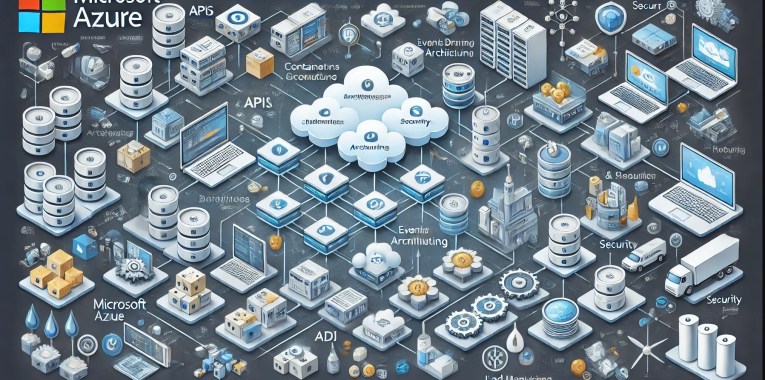
Embracing Modern Cloud-Based Application Architecture with Microsoft Azure

In cloud computing, Microsoft Azure offers a robust framework for building modern cloud-based applications. Designed to enhance scalability, flexibility, and resilience, Azure’s comprehensive suite of services empowers developers to create efficient and robust solutions. Let’s dive into the core components of this architecture in detail.

1. Microservices Architecture

Overview:
Microservices architecture breaks down applications into small, independent services, each performing a specific function. These services communicate over well-defined APIs, enabling a modular approach to development.

Advantages:

  • Modularity: Easier to develop, test, and deploy individual components.
  • Scalability: Services can be scaled independently based on demand.
  • Deployability: Faster deployment cycles since services can be updated independently without affecting the whole system.
  • Fault Isolation: Failures in one service do not impact the entire system.

Key Azure Services:

  • Azure Kubernetes Service (AKS): Provides a managed Kubernetes environment for deploying, scaling, and managing containerised applications.
  • Azure Service Fabric: A distributed systems platform for packaging, deploying, and managing scalable and reliable microservices.

2. Containers and Orchestration

Containers:
Containers encapsulate an application and its dependencies, ensuring consistency across multiple environments. They provide a lightweight, portable, and efficient alternative to virtual machines.

Orchestration:
Orchestration tools manage the deployment, scaling, and operation of containers, ensuring that containerised applications run smoothly across different environments.

Advantages:

  • Consistency: Ensures that applications run the same way in development, testing, and production.
  • Efficiency: Containers use fewer resources compared to virtual machines.
  • Portability: Easily move applications between different environments or cloud providers.

Key Azure Services:

  • Azure Kubernetes Service (AKS): Manages Kubernetes clusters, automating tasks such as scaling, updates, and provisioning.
  • Azure Container Instances: Provides a quick and easy way to run containers without managing the underlying infrastructure.

3. Serverless Computing

Overview:
Serverless computing allows developers to run code in response to events without managing servers. The cloud provider automatically provisions, scales, and manages the infrastructure required to run the code.

Advantages:

  • Simplified Deployment: Focus on code rather than infrastructure management.
  • Cost Efficiency: Pay only for the compute time used when the code is running.
  • Automatic Scaling: Automatically scales based on the load and usage patterns.

Key Azure Services:

  • Azure Functions: Enables you to run small pieces of code (functions) without provisioning or managing servers.
  • Azure Logic Apps: Facilitates the automation of workflows and integration with various services and applications.

4. APIs and API Management

APIs:
APIs (Application Programming Interfaces) enable communication between different services and components, acting as a bridge that allows them to interact.

API Management:
API Management involves securing, monitoring, and managing API traffic. It provides features like rate limiting, analytics, and a single entry point for accessing APIs.

Advantages:

  • Security: Protects APIs from misuse and abuse.
  • Management: Simplifies the management and monitoring of API usage.
  • Scalability: Supports scaling by managing API traffic effectively.

Key Azure Services:

  • Azure API Management: A comprehensive solution for managing APIs, providing security, analytics, and monitoring capabilities.

5. Event-Driven Architecture

Overview:
Event-driven architecture uses events to trigger actions and facilitate communication between services. This approach decouples services, allowing them to operate independently and respond to real-time changes.

Advantages:

  • Decoupling: Services can operate independently, reducing dependencies.
  • Responsiveness: Real-time processing of events improves the responsiveness of applications.
  • Scalability: Easily scale services based on event load.

Key Azure Services:

  • Azure Event Grid: Simplifies the creation and management of event-based architectures by routing events from various sources to event handlers.
  • Azure Service Bus: A reliable message broker that enables asynchronous communication between services.
  • Azure Event Hubs: A big data streaming platform for processing and analysing large volumes of events.

6. Databases and Storage

Relational Databases:
Relational databases, like Azure SQL Database, are ideal for structured data and support ACID (Atomicity, Consistency, Isolation, Durability) properties.

NoSQL Databases:
NoSQL databases, such as Azure Cosmos DB, handle unstructured or semi-structured data, offering flexibility, scalability, and performance.

Object Storage:
Object storage solutions like Azure Blob Storage are used for storing large amounts of unstructured data, such as media files and backups.

Advantages:

  • Flexibility: Choose the right database based on the data type and application requirements.
  • Scalability: Scale databases and storage solutions to handle varying loads.
  • Performance: Optimise performance based on the workload characteristics.

Key Azure Services:

  • Azure SQL Database: A fully managed relational database service with built-in intelligence.
  • Azure Cosmos DB: A globally distributed, multi-model database service for any scale.
  • Azure Blob Storage: A scalable object storage service for unstructured data.

7. Load Balancing and Traffic Management

Overview:
Load balancing distributes incoming traffic across multiple servers or services to ensure reliability and performance. Traffic management involves routing traffic based on various factors like geographic location or server health.

Advantages:

  • Availability: Ensures that services remain available even if some instances fail.
  • Performance: Distributes load evenly to prevent any single server from becoming a bottleneck.
  • Scalability: Easily add or remove instances based on traffic demands.

Key Azure Services:

  • Azure Load Balancer: Distributes network traffic across multiple servers to ensure high availability and reliability.
  • Azure Application Gateway: A web traffic load balancer that provides advanced routing capabilities, including SSL termination and session affinity.

8. Monitoring and Logging

Monitoring:
Monitoring tracks the performance and health of applications and infrastructure, providing insights into their operational state.

Logging:
Logging involves collecting and analysing log data for troubleshooting, performance optimisation, and security auditing.

Advantages:

  • Visibility: Gain insights into application performance and infrastructure health.
  • Troubleshooting: Quickly identify and resolve issues based on log data.
  • Optimisation: Use monitoring data to optimise performance and resource usage.

Key Azure Services:

  • Azure Monitor: Provides comprehensive monitoring of applications and infrastructure, including metrics, logs, and alerts.
  • Azure Log Analytics: Collects and analyses log data from various sources, enabling advanced queries and insights.

9. Security

IAM (Identity and Access Management):
IAM manages user identities and access permissions to resources, ensuring that only authorised users can access sensitive data and applications.

Encryption:
Encryption protects data in transit and at rest, ensuring that it cannot be accessed or tampered with by unauthorised parties.

WAF (Web Application Firewall):
A WAF protects web applications from common threats and vulnerabilities, such as SQL injection and cross-site scripting (XSS).

Advantages:

  • Access Control: Manage user permissions and access to resources effectively.
  • Data Protection: Secure sensitive data with encryption and other security measures.
  • Threat Mitigation: Protect applications from common web exploits.

Key Azure Services:

  • Azure Active Directory: A comprehensive identity and access management service.
  • Azure Key Vault: Securely stores and manages sensitive information, such as encryption keys and secrets.
  • Azure Security Centre: Provides unified security management and advanced threat protection.
  • Azure Web Application Firewall: Protects web applications from common threats and vulnerabilities.

10. CI/CD Pipelines

Overview:
CI/CD (Continuous Integration/Continuous Deployment) pipelines automate the processes of building, testing, and deploying applications, ensuring that new features and updates are delivered quickly and reliably.

Advantages:

  • Efficiency: Automate repetitive tasks, reducing manual effort and errors.
  • Speed: Accelerate the deployment of new features and updates.
  • Reliability: Ensure that code changes are thoroughly tested before deployment.

Key Azure Services:

  • Azure DevOps: Provides a suite of tools for managing the entire application lifecycle, including CI/CD pipelines.
  • GitHub Actions: Automates workflows directly within GitHub, including CI/CD pipelines.

11. Configuration Management

Overview:
Configuration management involves managing the configuration and state of applications across different environments, ensuring consistency and automating infrastructure management tasks.

Advantages:

  • Consistency: Ensure that applications and infrastructure are configured consistently across environments.
  • Automation: Automate the deployment and management of infrastructure.
  • Version Control: Track and manage changes to configurations over time.

Key Azure Services:

  • Azure Resource Manager: Provides a consistent management layer for deploying and managing Azure resources.
  • Azure Automation: Automates repetitive tasks and orchestrates complex workflows.
  • Terraform on Azure: An open-source tool for building, changing, and versioning infrastructure safely and efficiently.

12. Edge Computing and CDN

Edge Computing:
Edge computing processes data closer to the source (e.g., IoT devices) to reduce latency and improve responsiveness.

CDN (Content Delivery Network):
A CDN distributes content globally, reducing latency and improving load times for users by caching content at strategically located edge nodes.

Advantages:

  • Latency Reduction: Process data closer to the source to minimise delays.
  • Performance Improvement: Deliver content faster by caching it closer to users.
  • Scalability: Handle large volumes of traffic efficiently.

Key Azure Services:

  • Azure IoT Edge: Extends cloud intelligence to edge devices, enabling data processing and analysis closer to the data source.
  • Azure Content Delivery Network (CDN): Delivers high-bandwidth content to users globally by caching content at edge locations.

Example Architecture on Azure

Frontend:

  • Hosting: Deploy the frontend on Azure CDN for fast, global delivery (e.g., React app).
  • API Communication: Communicate with backend services via APIs.

Backend:

  • Microservices: Deploy microservices in containers managed by Azure Kubernetes Service (AKS).
  • Serverless Functions: Use Azure Functions for specific tasks that require quick execution.

Data Layer:

  • Databases: Combine relational databases (e.g., Azure SQL Database) and NoSQL databases (e.g., Azure Cosmos DB) for different data needs.
  • Storage: Use Azure Blob Storage for storing media files and large datasets.

Communication:

  • Event-Driven: Implement event-driven architecture with Azure Event Grid for inter-service communication.
  • API Management: Manage and secure API requests using Azure API Management.

Security:

  • Access Control: Use Azure Active Directory for managing user identities and access permissions.
  • Threat Protection: Protect applications with Azure Web Application Firewall.

DevOps:

  • CI/CD: Set up CI/CD pipelines with Azure DevOps for automated testing and deployment.
  • Monitoring and Logging: Monitor applications with Azure Monitor and analyse logs with Azure Log Analytics.

Conclusion

Leveraging Microsoft Azure for modern cloud-based application architecture provides a robust and scalable foundation for today’s dynamic business environments. By integrating these key components, businesses can achieve high availability, resilience, and the flexibility to adapt rapidly to changing demands while maintaining robust security and operational efficiency.

DevOps – The Methodology

Understanding DevOps: Bridging the Gap Between Development and Operations

In the past 15 years, driven by demand on the effective development, depoloyment and support of software solutions, the DevOps methodology has emerged as a transformative approach seemlessly melting together software development and IT operations. It aims to enhance collaboration, streamline processes, and accelerate the delivery of high-quality software products. This blog post will delve into the core principles, benefits, and key practices of DevOps, providing a comprehensive overview of why this methodology has become indispensable for modern organisations.

What is DevOps?

DevOps is a cultural and technical movement that combines software development (Dev) and IT operations (Ops) with the goal of shortening the system development lifecycle and delivering high-quality software continuously. It emphasises collaboration, communication, and integration between developers and IT operations teams, fostering a unified approach to problem-solving and productivity.

Core Principles of DevOps

  • Collaboration and Communication:
    DevOps breaks down silos between development and operations teams, encouraging continuous collaboration and open communication. This alignment helps in understanding each other’s challenges and working towards common goals.
  • Continuous Integration and Continuous Delivery (CI/CD):
    CI/CD practices automate the integration and deployment process, ensuring that code changes are automatically tested and deployed to production. This reduces manual intervention, minimises errors, and speeds up the release cycle.
  • Infrastructure as Code (IaC):
    IaC involves managing and provisioning computing infrastructure through machine-readable scripts, rather than physical hardware configuration or interactive configuration tools. This practice promotes consistency, repeatability, and scalability.
  • Automation:
    Automation is a cornerstone of DevOps, encompassing everything from code testing to infrastructure provisioning. Automated processes reduce human error, increase efficiency, and free up time for more strategic tasks.
  • Monitoring and Logging:
    Continuous monitoring and logging of applications and infrastructure help in early detection of issues, performance optimisation, and informed decision-making. It ensures that systems are running smoothly and any anomalies are quickly addressed.
  • Security:
    DevSecOps integrates security practices into the DevOps pipeline, ensuring that security is an integral part of the development process rather than an afterthought. This proactive approach to security helps in identifying vulnerabilities early and mitigating risks effectively.

Benefits of DevOps

  • Faster Time-to-Market:
    By automating processes and fostering collaboration, DevOps significantly reduces the time taken to develop, test, and deploy software. This agility allows organisations to respond quickly to market changes and customer demands.
  • Improved Quality:
    Continuous testing and integration ensure that code is frequently checked for errors, leading to higher-quality software releases. Automated testing helps in identifying and fixing issues early in the development cycle.
  • Enhanced Collaboration:
    DevOps promotes a culture of shared responsibility and transparency, enhancing teamwork and communication between development, operations, and other stakeholders. This collective approach leads to better problem-solving and innovation.
  • Scalability and Flexibility:
    With practices like IaC and automated provisioning, scaling infrastructure becomes more efficient and flexible. Organisations can quickly adapt to changing requirements and scale their operations seamlessly.
  • Increased Efficiency:
    Automation of repetitive tasks reduces manual effort and allows teams to focus on more strategic initiatives. This efficiency leads to cost savings and better resource utilisation.
  • Greater Reliability:
    Continuous monitoring and proactive issue resolution ensure higher system reliability and uptime. DevOps practices help in maintaining stable and resilient production environments.

Key DevOps Practices

  1. Version Control:
    Using version control systems like Git to manage code changes ensures that all changes are tracked, reversible, and collaborative.
  2. Automated Testing:
    Implementing automated testing frameworks to continuously test code changes helps in identifying and addressing issues early.
  3. Configuration Management:
    Tools like Ansible, Puppet, and Chef automate the configuration of servers and environments, ensuring consistency across development, testing, and production environments.
  4. Continuous Deployment:
    Deploying code changes automatically to production environments after passing automated tests ensures that new features and fixes are delivered rapidly and reliably.
  5. Containerisation:
    Using containers (e.g., Docker) to package applications and their dependencies ensures consistency across different environments and simplifies deployment.
  6. Monitoring and Alerting:
    Implementing comprehensive monitoring solutions (e.g., Prometheus, Grafana) to track system performance and set up alerts for potential issues helps in maintaining system health.

Recommended Reading

For those looking to dive deeper into the principles and real-world applications of DevOps, several books offer valuable insights:

  • “The DevOps Handbook” by Gene Kim, Jez Humble, Patrick Debois, and John Willis:
    This book is a comprehensive guide to the DevOps methodology, offering practical advice and real-world case studies on how to implement DevOps practices effectively. It covers everything from continuous integration to monitoring and security, making it an essential resource for anyone interested in DevOps.
  • “The Phoenix Project” by Gene Kim, Kevin Behr, and George Spafford:
    Presented as a novel, this book tells the story of an IT manager tasked with saving a failing project. Through its engaging narrative, “The Phoenix Project” illustrates the challenges and benefits of adopting DevOps principles. It provides a compelling look at how organisations can transform their IT operations to achieve better business outcomes.
  • “The Unicorn Project” by Gene Kim:
    A follow-up to “The Phoenix Project,” this novel focuses on the perspective of a software engineer within the same organisation. It delves deeper into the technical and cultural aspects of DevOps, exploring themes of autonomy, mastery, and purpose. “The Unicorn Project” offers a detailed look at the developer’s role in driving DevOps transformation.

Conclusion

DevOps is more than just a set of practices, it’s a cultural shift that transforms how organisations develop, deploy, and manage software. By fostering collaboration, automation, and continuous improvement, DevOps helps organisations deliver high-quality software faster and more reliably. Embracing DevOps can lead to significant improvements in efficiency, productivity, and customer satisfaction, making it an essential methodology for any modern IT organisation.

By understanding and implementing the core principles and practices of DevOps, organisations can navigate the complexities of today’s technological landscape and achieve sustained success in their software development endeavours. Reading foundational books like “The DevOps Handbook,” “The Phoenix Project,” and “The Unicorn Project” can provide valuable insights and practical guidance on this transformative journey.

C4 Architecture Model – Detailed Explanation

The C4 model, developed by Simon Brown, is a framework for visualizing software architecture at various levels of detail. It emphasizes the use of hierarchical diagrams to represent different aspects and views of a system, providing a comprehensive understanding for various stakeholders. The model’s name, C4, stands for Context, Containers, Components, and Code, each representing a different level of architectural abstraction.

Levels of the C4 Model

1. Context (Level 1)

Purpose: To provide a high-level overview of the system and its environment.

  • The System Context diagram is a high-level view of your software system.
  • It shows your software system as the central part, and any external systems and users that your system interacts with.
  • It should be technology agnostic, and the focus on the people and software systems instead of low-level details.
  • The intended audience for the System Context Diagram is everybody. If you can show it to non-technical people and they are able to understand it, then you know you’re on the right track.

Key Elements:

  • System: The primary system under consideration.
  • External Systems: Other systems that the primary system interacts with.
  • Users: Human actors or roles that interact with the system.

Diagram Features:

  • Scope: Shows the scope and boundaries of the system within its environment.
  • Relationships: Illustrates relationships between the system, external systems, and users.
  • Simplification: Focuses on high-level interactions, ignoring internal details.

Example: An online banking system context diagram might show:

  • The banking system itself.
  • External systems like payment gateways, credit scoring agencies, and notification services.
  • Users such as customers, bank employees, and administrators.

More Extensive Detail:

  • Primary System: Represents the main application or service being documented.
  • Boundaries: Defines the limits of what the system covers.
  • Purpose: Describes the main functionality and goals of the system.
  • External Systems: Systems outside the primary system that interact with it.
  • Dependencies: Systems that the primary system relies on for specific functionalities (e.g., third-party APIs, external databases).
  • Interdependencies: Systems that rely on the primary system (e.g., partner applications).
  • Users: Different types of users who interact with the system.
  • Roles: Specific roles that users may have, such as Admin, Customer, Support Agent.
  • Interactions: The nature of interactions users have with the system (e.g., login, data entry, report generation).

2. Containers (Level 2)

When you zoom into one software system, you get to the Container diagram.

Purpose: To break down the system into its major containers, showing their interactions.

  • Your software system is comprised of multiple running parts – containers.
  • A container can be a:
    • Web application
    • Single-page application
    • Database
    • File system
    • Object store
    • Message broker
  • You can look at a container as a deployment unit that executes code or stores data.
  • The Container diagram shows the high-level view of the software architecture and the major technology choices.
  • The Container diagram is intended for technical people inside and outside of the software development team:
    • Operations/support staff
    • Software architects
    • Developers

Key Elements:

  • Containers: Executable units or deployable artifacts (e.g., web applications, databases, microservices).
  • Interactions: Communication and data flow between containers and external systems.

Diagram Features:

  • Runtime Environment: Depicts the containers and their runtime environments.
  • Technology Choices: Shows the technology stacks and platforms used by each container.
  • Responsibilities: Describes the responsibilities of each container within the system.

Example: For the online banking system:

  • Containers could include a web application, a mobile application, a backend API, and a database.
  • The web application might interact with the backend API for business logic and the database for data storage.
  • The mobile application might use a different API optimized for mobile clients.

More Extensive Detail:

  • Web Application:
    • Technology Stack: Frontend framework (e.g., Angular, React), backend language (e.g., Node.js, Java).
    • Responsibilities: User interface, handling user requests, client-side validation.
  • Mobile Application:
    • Technology Stack: Native (e.g., Swift for iOS, Kotlin for Android) or cross-platform (e.g., React Native, Flutter).
    • Responsibilities: User interface, handling user interactions, offline capabilities.
  • Backend API:
    • Technology Stack: Server-side framework (e.g., Spring Boot, Express.js), programming language (e.g., Java, Node.js).
    • Responsibilities: Business logic, data processing, integrating with external services.
  • Database:
    • Technology Stack: Type of database (e.g., SQL, NoSQL), specific technology (e.g., PostgreSQL, MongoDB).
    • Responsibilities: Data storage, data retrieval, ensuring data consistency and integrity.

3. Components (Level 3)

Next you can zoom into an individual container to decompose it into its building blocks.

Purpose: To further decompose each container into its key components and their interactions.

  • The Component diagram show the individual components that make up a container:
    • What each of the components are
    • The technology and implementation details
  • The Component diagram is intended for software architects and developers.

Key Elements:

  • Components: Logical units within a container, such as services, modules, libraries, or APIs.
  • Interactions: How these components interact within the container.

Diagram Features:

  • Internal Structure: Shows the internal structure and organization of each container.
  • Detailed Responsibilities: Describes the roles and responsibilities of each component.
  • Interaction Details: Illustrates the detailed interaction between components.

Example: For the backend API container of the online banking system:

  • Components might include an authentication service, an account management module, a transaction processing service, and a notification handler.
  • The authentication service handles user login and security.
  • The account management module deals with account-related operations.
  • The transaction processing service manages financial transactions.
  • The notification handler sends alerts and notifications to users.

More Extensive Detail:

  • Authentication Service:
    • Responsibilities: User authentication, token generation, session management.
    • Interactions: Interfaces with the user interface components, interacts with the database for user data.
  • Account Management Module:
    • Responsibilities: Managing user accounts, updating account information, retrieving account details.
    • Interactions: Interfaces with the authentication service for user validation, interacts with the transaction processing service.
  • Transaction Processing Service:
    • Responsibilities: Handling financial transactions, validating transactions, updating account balances.
    • Interactions: Interfaces with the account management module, interacts with external payment gateways.
  • Notification Handler:
    • Responsibilities: Sending notifications (e.g., emails, SMS) to users, managing notification templates.
    • Interactions: Interfaces with the transaction processing service to send transaction alerts, interacts with external notification services.

4. Code (Level 4)

Finally, you can zoom into each component to show how it is implemented with code, typically using a UML class diagram or an ER diagram.

Purpose: To provide detailed views of the codebase, focusing on specific components or classes.

  • This level is rarely used as it goes into too much technical detail for most use cases. However, there are supplementary diagrams that can be useful to fill in missing information by showcasing:
    • Sequence of events
    • Deployment information
    • How systems interact at a higher level
  • It’s only recommended for the most important or complex components.
  • Of course, the target audience are software architects and developers.

Key Elements:

  • Classes: Individual classes, methods, or functions within a component.
  • Relationships: Detailed relationships like inheritance, composition, method calls, or data flows.

Diagram Features:

  • Detailed Code Analysis: Offers a deep dive into the code structure and logic.
  • Code-Level Relationships: Illustrates how classes and methods interact at a code level.
  • Implementation Details: Shows specific implementation details and design patterns used.

Example: For the transaction processing service in the backend API container:

  • Classes might include Transaction, TransactionProcessor, Account, and NotificationService.
  • The TransactionProcessor class might have methods for initiating, validating, and completing transactions.
  • Relationships such as TransactionProcessor calling methods on the Account class to debit or credit funds.

More Extensive Detail:

  • Transaction Class:
    • Attributes: transactionId, amount, timestamp, status.
    • Methods: validate(), execute(), rollback().
    • Responsibilities: Representing a financial transaction, ensuring data integrity.
  • TransactionProcessor Class:
    • Attributes: transactionQueue, auditLog.
    • Methods: processTransaction(transaction), validateTransaction(transaction), completeTransaction(transaction).
    • Responsibilities: Processing transactions, managing transaction flow, logging transactions.
  • Account Class:
    • Attributes: accountId, balance, accountHolder.
    • Methods: debit(amount), credit(amount), getBalance().
    • Responsibilities: Managing account data, updating balances, providing account information.
  • NotificationService Class:
    • Attributes: notificationQueue, emailTemplate, smsTemplate.
    • Methods: sendEmailNotification(recipient, message), sendSMSNotification(recipient, message).
    • Responsibilities: Sending notifications to users, managing notification templates, handling notification queues.

Benefits of the C4 Model

  • Clarity and Focus:
    • Provides a clear separation of concerns by breaking down the system into different levels of abstraction.
    • Each diagram focuses on a specific aspect, avoiding information overload.
  • Consistency and Standardization:
    • Offers a standardized approach to documenting architecture, making it easier to maintain consistency across diagrams.
    • Facilitates comparison and review of different systems using the same visual language.
  • Enhanced Communication:
    • Improves communication within development teams and with external stakeholders by providing clear, concise, and visually appealing diagrams.
    • Helps in onboarding new team members by offering an easy-to-understand representation of the system.
  • Comprehensive Documentation:
    • Ensures comprehensive documentation of the system architecture, covering different levels of detail.
    • Supports various documentation needs, from high-level overviews to detailed technical specifications.

Practical Usage of the C4 Model

  • Starting with Context:
    • Begin with a high-level context diagram to understand the system’s scope, external interactions, and primary users.
    • Use this diagram to set the stage for more detailed diagrams.
  • Defining Containers:
    • Break down the system into its major containers, showing how they interact and are deployed.
    • Highlight the technology choices and responsibilities of each container.
  • Detailing Components:
    • For each container, create a component diagram to illustrate the internal structure and interactions.
    • Focus on how functionality is divided among components and how they collaborate.
  • Exploring Code:
    • If needed, delve into the code level for specific components to provide detailed documentation and analysis.
    • Use class or sequence diagrams to show detailed code-level relationships and logic.

Example Scenario: Online Banking System

Context Diagram:

  • System: Online Banking System
  • External Systems: Payment Gateway, Credit Scoring Agency, Notification Service
  • Users: Customers, Bank Employees, Administrators
  • Description: Shows how customers interact with the banking system, which in turn interacts with external systems for payment processing, credit scoring, and notifications.

Containers Diagram:

  • Containers: Web Application, Mobile Application, Backend API, Database
  • Interactions: The web application and mobile application interact with the backend API. The backend API communicates with the database and external systems.
  • Technology Stack: The web application might be built with Angular, the mobile application with React Native, the backend API with Spring Boot, and the database with PostgreSQL.

Components Diagram:

  • Web Application Components: Authentication Service, User Dashboard, Transaction Module
  • Backend API Components: Authentication Service, Account Management Module, Transaction Processing Service, Notification Handler
  • Interactions: The Authentication Service in both the web application and backend API handles user authentication and security. The Transaction Module in the web application interacts with the Transaction Processing Service in the backend API.

Code Diagram:

  • Classes: Transaction, TransactionProcessor, Account, NotificationService
  • Methods: The TransactionProcessor class has methods for initiating, validating, and completing transactions. The NotificationService class has methods for sending notifications.
  • Relationships: The TransactionProcessor calls methods on the Account class to debit or credit funds. It also calls the NotificationService to send transaction alerts.

Conclusion

The C4 model is a powerful tool for visualising and documenting software architecture. By providing multiple levels of abstraction, it ensures that stakeholders at different levels of the organisation can understand the system. From high-level overviews to detailed code analysis, the C4 model facilitates clear communication, consistent documentation, and comprehensive understanding of complex software systems.

Leveraging Generative AI to Boost Office Productivity

Generative AI tools like ChatGPT and CoPilot are revolutionising the way we approach office productivity. These tools are not only automating routine tasks but are also enhancing complex processes, boosting both efficiency and creativity in the workplace. In the modern fast-paced business environment, maximising productivity is crucial for success. Generative AI tools are at the forefront of this transformation, offering innovative ways to enhance efficiency across various office tasks. Here, we explore how these tools can revolutionise workplace productivity, focusing on email management, consultancy response documentation, data engineering, analytics coding, quality assurance in software development, and other areas.

Here’s how ChatGPT can be utilised in various aspects of office work:

  • Streamlining Email Communication – Email remains a fundamental communication tool in offices, but managing it can be time-consuming. ChatGPT can help streamline this process by generating draft responses, summarising long email threads, and even prioritising emails based on urgency and relevance. By automating routine correspondence, employees can focus more on critical tasks, enhancing overall productivity.
  • Writing Assistance – Whether drafting emails, creating content, or polishing documents, writing can be a significant drain on time. ChatGPT can act as a writing assistant, offering suggestions, correcting mistakes, and improving the overall quality of written communications. This support ensures that communications are not only efficient but also professionally presented.
  • Translating Texts – In a globalised work environment, the ability to communicate across languages is essential. ChatGPT can assist with translating documents and communications, ensuring clear and effective interaction with diverse teams and clients.
  • Enhancing Consultancy Response Documentation – For consultants, timely and accurate documentation is key. Generative AI can assist in drafting documents, proposals, and reports. By inputting the project’s parameters and objectives, tools like ChatGPT can produce comprehensive drafts that consultants can refine and finalise, significantly reducing the time spent on document creation.
  • Enhancing Research – Research can be made more efficient with ChatGPT’s ability to quickly find relevant information, summarise key articles, and provide deep insights. Whether for market research, academic purposes, or competitive analysis, ChatGPT can streamline the information gathering and analysis process.
  • Coding Assistance in Data Engineering and Analytics – For developers, coding can be enhanced with the help of AI tools. By describing a coding problem or requesting specific snippets, ChatGPT can provide relevant and accurate code suggestions. This assistance is invaluable for speeding up development cycles and reducing bugs in the code. CoPilot, powered by AI, transforms how data professionals write code. It suggests code snippets and entire functions based on the comments or the partial code already written. This is especially useful in data engineering and analytics, where writing efficient, error-free code can be complex and time-consuming. CoPilot helps in scripting data pipelines and performing data analysis, thereby reducing errors and improving the speed of development. More on this covered within the Microsoft Fabric and CoPilot section below.
  • Quality Assurance and Test-Driven Development (TDD) – In software development, ensuring quality and adhering to the principles of TDD can be enhanced using generative AI tools. These tools can suggest test cases, help write test scripts, and even provide feedback on the coverage of the tests written. By integrating AI into the development process, developers can ensure that their code not only functions correctly but also meets the required standards before deployment.
  • Automating Routine Office Tasks – Beyond specialised tasks, generative AI can automate various routine activities in the office. From generating financial reports to creating presentations and managing schedules, AI tools can take over repetitive tasks, freeing up employees to focus on more strategic activities. Repetitive tasks like scheduling, data entry, and routine inquiries can be automated with ChatGPT. This delegation of mundane tasks frees up valuable time for employees to engage in more significant, high-value work.
  • Planning Your Day – Effective time management is key to productivity. ChatGPT can help organise your day by taking into account your tasks, deadlines, and priorities, enabling a more structured and productive routine.
  • Summarising Reports and Meeting Notes – One of the most time-consuming tasks in any business setting is going through lengthy documents and meeting notes. ChatGPT can simplify this by quickly analysing large texts and extracting essential information. This capability allows employees to focus on decision-making and strategy rather than getting bogged down by details.
  • Training and Onboarding – Training new employees is another area where generative AI can play a pivotal role. AI-driven programs can provide personalised learning experiences, simulate different scenarios, and give feedback in real-time, making the onboarding process more efficient and effective.
  • Enhancing Creative Processes – Generative AI is not limited to routine or technical tasks. It can also contribute creatively, helping design marketing materials, write creative content, and even generate ideas for innovation within the company.
  • Brainstorming and Inspiration – Creativity is a crucial component of problem-solving and innovation. When you hit a creative block or need a fresh perspective, ChatGPT can serve as a brainstorming partner. By inputting a prompt related to your topic, ChatGPT can generate a range of creative suggestions and insights, sparking new ideas and solutions.
  • Participating in Team Discussions – In collaborative settings like Microsoft Teams, ChatGPT and CoPilot can contribute by providing relevant information during discussions. This capability improves communication and aids in more informed decision-making, making team collaborations more effective.
  • Entertainment – Finally, the workplace isn’t just about productivity, it’s also about culture and morale. ChatGPT can inject light-hearted fun into the day with jokes or fun facts, enhancing the work environment and strengthening team bonds.

Enhancing Productivity with CoPilot in Microsoft’s Fabric Data Platform

The Microsoft’s Fabric Data Platform, a comprehensive ecosystem for managing and analysing data, represents an advanced approach to enterprise data solutions. Integrating AI-driven tools like GitHub’s CoPilot into this environment, significantly enhance the efficiency and effectiveness of data operations. Here’s how CoPilot can be specifically utilised within Microsoft’s Fabric Data Platform to drive innovation and productivity.

  • Streamlined Code Development for Data Solutions – CoPilot, as an AI pair programmer, offers real-time code suggestions and snippets based on the context of the work being done. In the environment of Microsoft’s Fabric Data Platform, which handles large volumes of data and complex data models, CoPilot can assist data engineers and scientists by suggesting optimised data queries, schema designs, and data processing workflows. This reduces the cognitive load on developers and accelerates the development cycle, allowing more time for strategic tasks.
  • Enhanced Error Handling and Debugging – Error handling is critical in data platforms where the integrity of data is paramount. CoPilot can predict common errors in code based on its learning from a vast corpus of codebases and offer preemptive solutions. This capability not only speeds up the debugging process but also helps maintain the robustness of the data platform by reducing downtime and data processing errors.
  • Automated Documentation – Documentation is often a neglected aspect of data platform management due to the ongoing demand for delivering functional code. CoPilot can generate code comments and documentation as the developer writes code. This integration ensures that the Microsoft Fabric Data Platform is well-documented, facilitating easier maintenance and compliance with internal and external audit requirements.
  • Personalised Learning and Development – CoPilot can serve as an educational tool within Microsoft’s Fabric Data Platform by helping new developers understand the intricacies of the platform’s API and existing codebase. By suggesting code examples and guiding through best practices, CoPilot helps in upskilling team members, leading to a more competent and versatile workforce.
  • Proactive Optimisation Suggestions – In data platforms, optimisation is key to handling large datasets efficiently. CoPilot can analyse the patterns in data access and processing within the Fabric Data Platform and suggest optimisations in real-time. These suggestions might include better indexing strategies, more efficient data storage formats, or improved data retrieval methods, which can significantly enhance the performance of the platform.

Conclusion

As we integrate generative AI tools like ChatGPT and CoPilot into our daily workflows, their potential to transform office productivity is immense. By automating mundane tasks, assisting in complex processes, and enhancing creative outputs, these tools not only save time but also improve the quality of work, potentially leading to significant gains in efficiency and innovation. The integration of generative AI tools into office workflows not only automates and speeds up processes but also brings a new level of sophistication to how tasks are approached and executed. From enhancing creative processes to improving how teams function, the role of AI in the office is undeniably transformative, paving the way for a smarter, more efficient workplace.

The integration of GitHub’s CoPilot into Microsoft’s Fabric Data Platform offers a promising enhancement to the productivity and capabilities of data teams. By automating routine coding tasks, aiding in debugging and optimisation, and providing valuable educational support, CoPilot helps build a more efficient, robust, and scalable data management environment. This collaboration not only drives immediate operational efficiencies but also fosters long-term innovation in handling and analysing data at scale.

As businesses continue to adopt these technologies, the future of work looks increasingly promising, driven by intelligent automation and enhanced human-machine collaboration.

“Revolutionising Software Development: The Era of AI Code Assistants have begun”

Reimagining software development with AI augmentation is poised to revolutionise the way we approach programming. Recent insights from Gartner disclose a burgeoning adoption of AI-enhanced coding tools amongst organisations: 18% have already embraced AI code assistants, another 25% are in the midst of doing so, 20% are exploring these tools via pilot programmes, and 14% are at the initial planning stage.

CIOs and tech leaders harbour optimistic views regarding the potential of AI code assistants to boost developer efficiency. Nearly half anticipate substantial productivity gains, whilst over a third regard AI-driven code generation as a transformative innovation.

As the deployment of AI code assistants broadens, it’s paramount for software engineering leaders to assess the return on investment (ROI) and construct a compelling business case. Traditional ROI models, often centred on cost savings, fail to fully recognise the extensive benefits of AI code assistants. Thus, it’s vital to shift the ROI dialogue from cost-cutting to value creation, thereby capturing the complete array of benefits these tools offer.

The conventional outlook on AI code assistants emphasises speedier coding, time efficiency, and reduced expenditures. However, the broader value includes enhancing the developer experience, improving customer satisfaction (CX), and boosting developer retention. This comprehensive view encapsulates the full business value of AI code assistants.

Commencing with time savings achieved through more efficient code production is a wise move. Yet, leaders should ensure these initial time-saving estimates are based on realistic assumptions, wary of overinflated vendor claims and the variable outcomes of small-scale tests.

The utility of AI code assistants relies heavily on how well the use case is represented in the training data of the AI models. Therefore, while time savings is an essential starting point, it’s merely the foundation of a broader value narrative. These tools not only minimise task-switching and help developers stay in the zone but also elevate code quality and maintainability. By aiding in unit test creation, ensuring consistent documentation, and clarifying pull requests, AI code assistants contribute to fewer bugs, reduced technical debt, and a better end-user experience.

In analysing the initial time-saving benefits, it’s essential to temper expectations and sift through the hype surrounding these tools. Despite the enthusiasm, real-world applications often reveal more modest productivity improvements. Starting with conservative estimates helps justify the investment in AI code assistants by showcasing their true potential.

Building a comprehensive value story involves acknowledging the multifaceted benefits of AI code assistants. Beyond coding speed, these tools enhance problem-solving capabilities, support continuous learning, and improve code quality. Connecting these value enablers to tangible impacts on the organisation requires a holistic analysis, including financial and non-financial returns.

In sum, the advent of AI code assistants in software development heralds a new era of efficiency and innovation. By embracing these tools, organisations can unlock a wealth of benefits, extending far beyond traditional metrics of success. The era of the AI code-assistant has begun.

A Guide How to Introduce AI Code Assistants

Integrating AI code assistants into your development teams can mark a transformative step, boosting productivity, enhancing code quality, and fostering innovation. Here’s a guide to seamlessly integrate these tools into your teams:

1. Assess the Needs and Readiness of Your Team

  • Evaluate the current workflow, challenges, and areas where your team could benefit from automation and AI assistance.
  • Determine the skill levels of your team members regarding new technologies and their openness to adopting AI tools.

2. Choose the Right AI Code Assistant

  • Research and compare different AI code assistants based on features, support for programming languages, integration capabilities, and pricing.
  • Consider starting with a pilot programme using a selected AI code assistant to gauge its effectiveness and gather feedback from your team.

3. Provide Training and Resources

  • Organise workshops or training sessions to familiarise your team with the chosen AI code assistant. This should cover basic usage, best practices, and troubleshooting.
  • Offer resources for self-learning, such as tutorials, documentation, and access to online courses.

4. Integrate AI Assistants into the Development Workflow

  • Define clear guidelines on how and when to use AI code assistants within your development process. This might involve integrating them into your IDEs (Integrated Development Environments) or code repositories.
  • Ensure the AI code assistant is accessible to all relevant team members and that it integrates smoothly with your team’s existing tools and workflows.

5. Set Realistic Expectations and Goals

  • Communicate the purpose and potential benefits of AI code assistants to your team, setting realistic expectations about what these tools can and cannot do.
  • Establish measurable goals for the integration of AI code assistants, such as reducing time spent on repetitive coding tasks or improving code quality metrics.

6. Foster a Culture of Continuous Feedback and Improvement

  • Encourage your team to share their experiences and feedback on using AI code assistants. This could be through regular meetings or a dedicated channel for discussion.
  • Use the feedback to refine your approach, address any challenges, and optimise the use of AI code assistants in your development process.

7. Monitor Performance and Adjust as Needed

  • Keep an eye on key performance indicators (KPIs) to evaluate the impact of AI code assistants on your development process, such as coding speed, bug rates, and developer satisfaction.
  • Be prepared to make adjustments based on performance data and feedback, whether that means changing how the tool is used, switching to a different AI code assistant, or updating training materials.

8. Emphasise the Importance of Human Oversight

  • While AI code assistants can significantly enhance productivity and code quality, stress the importance of human review and oversight to ensure the output meets your standards and requirements.

By thoughtfully integrating AI code assistants into your development teams, you can realise the ROI and harness the benefits of AI to streamline workflows, enhance productivity, and drive innovation.

Embracing the “Think Product” Mindset in Software Development

In the realm of software development, shifting from a project-centric to a product-oriented mindset can be a game-changer for both developers and businesses alike. This paradigm, often encapsulated in the phrase “think product,” urges teams to design and build software solutions with the flexibility, scalability, and vision of a product intended for a broad audience. This approach not only enhances the software’s utility and longevity but also maximises the economies of scale, making the development process more efficient and cost-effective in the long run.

The Core of “Think Product”

The essence of “think product” lies in the anticipation of future needs and the creation of solutions that are not just tailored to immediate requirements but are adaptable, scalable, and capable of evolving over time. This involves embracing best practices such as reusability, modularity, service orientation, generality, client-agnosticism, and parameter-driven design.

Reusability: The Building Blocks of Efficiency

Reusability is about creating software components that can be easily repurposed across different projects or parts of the same project. This approach minimises duplication of effort, fosters consistency, and speeds up the development process. By focusing on reusability, developers can construct a library of components, functions, and services that serve as a versatile toolkit for building new solutions more swiftly and efficiently.

Modularity: Independence and Integration

Modularity involves designing software in self-contained units or modules that can operate independently but can be integrated seamlessly to form a larger system. This facilitates easier maintenance, upgrades, and scalability, as changes can be made to individual modules without impacting the entire system. Modularity also enables parallel development, where different teams work on separate modules simultaneously, thus accelerating the development cycle.

Service Orientation: Flexibility and Scalability

Service-oriented architecture (SOA) emphasises creating software solutions as a collection of services that communicate and operate together. This approach enhances flexibility, as services can be reused, replaced, or scaled independently of each other. It also promotes interoperability, making it easier to integrate with external systems and services.

Generality: Beyond Specific Use Cases

Designing software with generality in mind means creating solutions that are not overly specialised to a specific task or client. Instead, they are versatile enough to accommodate a range of requirements. This broader applicability maximises the potential user base and market relevance of the software, contributing to its longevity and success.

Client Agnosticism: Serving a Diverse Audience

A client-agnostic approach ensures that software solutions are compatible across various platforms, devices, and user environments. This universality makes the product accessible to a wider audience, enhancing its marketability and usability across different contexts.

Parameter-Driven Design: Flexibility at Its Core

Parameter-driven design allows software behaviour and features to be customised through external parameters or configuration files, rather than hardcoded values. This adaptability enables the software to cater to diverse user needs and scenarios without requiring significant code changes, making it more versatile and responsive to market demands.

Cultivating the “Think Product” Mindset

Adopting a “think product” mindset necessitates a cultural shift within the development team and the broader organisation. It involves embracing long-term thinking, prioritising quality and scalability, and being open to feedback and adaptation. This mindset encourages continuous improvement, innovation, and a focus on delivering value to a wide range of users.

By integrating best practices like reusability, modularity, service orientation, generality, client agnosticism, and parameter-driven design, developers can create software solutions that stand the test of time. These practices not only contribute to the creation of superior products but also foster a development ecosystem that is more sustainable, efficient, and prepared to meet the challenges of an ever-evolving technological landscape.

The Importance of Standardisation and Consistency in Software Development Environments

Ensuring that software development teams have appropriate hardware and software specifications as part of their tooling is crucial for businesses for several reasons:

  1. Standardisation and Consistency: Beyond individual productivity and innovation, establishing standardised hardware, software and work practice specifications across the development team is pivotal for ensuring consistency, interoperability, and efficient collaboration. Standardisation can help in creating a unified development environment where team members can seamlessly work together, share resources, and maintain a consistent workflow. This is particularly important in large or distributed teams, where differences in tooling can lead to compatibility issues, hinder communication, and slow down the development process. Moreover, standardising tools and platforms simplifies training and onboarding for new team members, allowing them to quickly become productive. It also eases the management of licences, updates, and security patches, ensuring that the entire team is working with the most up-to-date and secure software versions. By fostering a standardised development environment, businesses can minimise technical discrepancies that often lead to inefficiencies, reduce the overhead associated with managing diverse systems, and ensure that their development practices are aligned with industry standards and best practices. This strategic approach not only enhances operational efficiency but also contributes to the overall quality and security of the software products developed.
  2. Efficiency and Productivity: Proper tools tailored to the project’s needs can significantly boost the productivity of a development team. Faster and more powerful hardware can reduce compile times, speed up test runs, and facilitate the use of complex development environments or virtualisation technologies, directly impacting the speed at which new features or products can be developed and released.
  3. Quality and Reliability: The right software tools and hardware can enhance the quality and reliability of the software being developed. This includes tools for version control, continuous integration/continuous deployment (CI/CD), automated testing, and code quality analysis. Such tools help in identifying and fixing bugs early, ensuring code quality, and facilitating smoother deployment processes, leading to more reliable and stable products.
  4. Innovation and Competitive Edge: Access to the latest technology and cutting-edge tools can empower developers to explore innovative solutions and stay ahead of the competition. This could be particularly important in fields that are rapidly evolving, such as artificial intelligence (AI), where the latest hardware accelerations (e.g., GPUs for machine learning tasks) can make a significant difference in the feasibility and speed of developing new algorithms or services.
  5. Scalability and Flexibility: As businesses grow, their software needs evolve. Having scalable and flexible tooling can make it easier to adapt to changing requirements without significant disruptions. This could involve cloud-based development environments that can be easily scaled up or down, or software that supports modular and service-oriented architectures.
  6. Talent Attraction and Retention: Developers often prefer to work with modern, efficient tools and technologies. Providing your team with such resources can be a significant factor in attracting and retaining top talent. Skilled developers are more likely to join and stay with a company that invests in its technology stack and cares about the productivity and satisfaction of its employees.
  7. Cost Efficiency: While investing in high-quality hardware and software might seem costly upfront, it can lead to significant cost savings in the long run. Improved efficiency and productivity mean faster time-to-market, which can lead to higher revenues. Additionally, reducing the incidence of bugs and downtime can decrease the cost associated with fixing issues post-release. Also, utilising cloud services and virtualisation can optimise resource usage and reduce the need for physical hardware upgrades.
  8. Security: Appropriate tooling includes software that helps ensure the security of the development process and the final product. This includes tools for secure coding practices, vulnerability scanning, and secure access to development environments. Investing in such tools can help prevent security breaches, which can be incredibly costly in terms of both finances and reputation.

In conclusion, the appropriate hardware and software specifications are not just a matter of having the right tools for the job; they’re about creating an environment that fosters productivity, innovation, and quality, all of which are key to maintaining a competitive edge and ensuring long-term business success.

Embracing Bimodal Model: A Data-Driven Journey for Modern Organisations

With data being the live blood of organisations the emphasis on data management places organisations on a continuous search for innovative approaches to harness and optimise the power of their data assets. In this pursuit, the bimodal model is a well established strategy that can be successfully employed by data-driven enterprises. This approach, which combines the stability of traditional data management with the agility of modern data practices, while providing a delivery methodology facilitating rapid innovation and resilient technology service provision.

Understanding the Bimodal Model

Gartner states: “Bimodal IT is the practice of managing two separate, coherent modes of IT delivery, one focused on stability and the other on agility. Mode 1 is traditional and sequential, emphasising safety and accuracy. Mode 2 is exploratory and nonlinear, emphasising agility and speed.

At its core, the bimodal model advocates for a dual approach to data management. Mode 1 focuses on the stable, predictable aspects of data, ensuring the integrity, security, and reliability of core business processes. This mode aligns with traditional data management practices, where accuracy and consistency are paramount. On the other hand, Mode 2 emphasizes agility, innovation, and responsiveness to change. It enables organizations to explore emerging technologies, experiment with new data sources, and adapt swiftly to evolving business needs.

Benefits of Bimodal Data Management

1. Optimised Performance and Stability: Mode 1 ensures that essential business functions operate smoothly, providing a stable foundation for the organization.

Mode 1 of the bimodal model is dedicated to maintaining the stability and reliability of core business processes. This is achieved through robust data governance, stringent quality controls, and established best practices in data management. By ensuring the integrity of data and the reliability of systems, organizations can optimise the performance of critical operations. This stability is especially crucial for industries where downtime or errors can have significant financial or operational consequences, such as finance, healthcare, and manufacturing.

Example: In the financial sector, a major bank implemented the bimodal model to enhance its core banking operations. Through Mode 1, the bank ensured the stability of its transaction processing systems, reducing system downtime by 20% and minimizing errors in financial transactions. This stability not only improved customer satisfaction but also resulted in a 15% increase in operational efficiency, as reported in the bank’s annual report.

2. Innovation and Agility: Mode 2 allows businesses to experiment with cutting-edge technologies like AI, machine learning, and big data analytics, fostering innovation and agility in decision-making processes.

Mode 2 is the engine of innovation within the bimodal model. It provides the space for experimentation with emerging technologies and methodologies. Businesses can leverage AI, machine learning, and big data analytics to uncover new insights, identify patterns, and make informed decisions. This mode fosters agility by encouraging a culture of continuous improvement and adaptation to technological advancements. It enables organizations to respond quickly to market trends, customer preferences, and competitive challenges, giving them a competitive edge in dynamic industries.

Example: A leading e-commerce giant adopted the bimodal model to balance stability and innovation in its operations. Through Mode 2, the company integrated machine learning algorithms into its recommendation engine. As a result, the accuracy of personalized product recommendations increased by 25%, leading to a 10% rise in customer engagement and a subsequent 12% growth in overall sales. This successful integration of Mode 2 practices directly contributed to the company’s market leadership in the highly competitive online retail space.

3. Enhanced Scalability: The bimodal approach accommodates the scalable growth of data-driven initiatives, ensuring that the organization can handle increased data volumes efficiently.

In the modern data landscape, the volume of data generated is growing exponentially. Mode 1 ensures that foundational systems are equipped to handle increasing data loads without compromising performance or stability. Meanwhile, Mode 2 facilitates the implementation of scalable technologies and architectures, such as cloud computing and distributed databases. This combination allows organizations to seamlessly scale their data infrastructure, supporting the growth of data-driven initiatives without experiencing bottlenecks or diminishing performance.

Example: A global technology firm leveraged the bimodal model to address the challenges of data scalability in its cloud-based services. In Mode 1, the company optimized its foundational cloud infrastructure, ensuring uninterrupted service during periods of increased data traffic. Simultaneously, through Mode 2 practices, the firm adopted containerization and microservices architecture, resulting in a 30% improvement in scalability. This enhanced scalability enabled the company to handle a 50% surge in user data without compromising performance, leading to increased customer satisfaction and retention.

4. Faster Time-to-Insights: By leveraging Mode 2 practices, organizations can swiftly analyze new data sources, enabling faster extraction of valuable insights for strategic decision-making.

Mode 2 excels in rapidly exploring and analyzing new and diverse data sources. This capability significantly reduces the time it takes to transform raw data into actionable insights. Whether it’s customer feedback, market trends, or operational metrics, Mode 2 practices facilitate agile and quick analysis. This speed in obtaining insights is crucial in fast-paced industries where timely decision-making is a competitive advantage.

Example: A healthcare organization implemented the bimodal model to expedite the analysis of patient data for clinical decision-making. Through Mode 2, the organization utilized advanced analytics and machine learning algorithms to process diagnostic data. The implementation led to a 40% reduction in the time required for diagnosis, enabling medical professionals to make quicker and more accurate decisions. This accelerated time-to-insights not only improved patient outcomes but also contributed to the organization’s reputation as a leader in adopting innovative healthcare technologies.

5. Adaptability in a Dynamic Environment: Bimodal data management equips organizations to adapt to market changes, regulatory requirements, and emerging technologies effectively.

In an era of constant change, adaptability is a key determinant of organizational success. Mode 2’s emphasis on experimentation and innovation ensures that organizations can swiftly adopt and integrate new technologies as they emerge. Additionally, the bimodal model allows organizations to navigate changing regulatory landscapes by ensuring that core business processes (Mode 1) comply with existing regulations while simultaneously exploring new approaches to meet evolving requirements. This adaptability is particularly valuable in industries facing rapid technological advancements or regulatory shifts, such as fintech, healthcare, and telecommunications.

Example: A telecommunications company embraced the bimodal model to navigate the dynamic landscape of regulatory changes and emerging technologies. In Mode 1, the company ensured compliance with existing telecommunications regulations. Meanwhile, through Mode 2, the organization invested in exploring and adopting 5G technologies. This strategic approach allowed the company to maintain regulatory compliance while positioning itself as an early adopter of 5G, resulting in a 25% increase in market share and a 15% growth in revenue within the first year of implementation.

Implementation Challenges and Solutions

Implementing a bimodal model in data management is not without its challenges. Legacy systems, resistance to change, and ensuring a seamless integration between modes can pose significant hurdles. However, these challenges can be overcome through a strategic approach that involves comprehensive training, fostering a culture of innovation, and investing in robust data integration tools.

1. Legacy Systems: Overcoming the Weight of Tradition

Challenge: Many organizations operate on legacy systems that are deeply ingrained in their processes. These systems, often built on older technologies, can be resistant to change, making it challenging to introduce the agility required by Mode 2.

Solution: A phased approach is crucial when dealing with legacy systems. Organizations can gradually modernize their infrastructure, introducing new technologies and methodologies incrementally. This could involve the development of APIs to bridge old and new systems, adopting microservices architectures, or even considering a hybrid cloud approach. Legacy system integration specialists can play a key role in ensuring a smooth transition and minimizing disruptions.

2. Resistance to Change: Shifting Organizational Mindsets

Challenge: Resistance to change is a common challenge when implementing a bimodal model. Employees accustomed to traditional modes of operation may be skeptical or uncomfortable with the introduction of new, innovative practices.

Solution: Fostering a culture of change is essential. This involves comprehensive training programs to upskill employees on new technologies and methodologies. Additionally, leadership plays a pivotal role in communicating the benefits of the bimodal model, emphasizing how it contributes to both stability and innovation. Creating cross-functional teams that include members from different departments and levels of expertise can also promote collaboration and facilitate a smoother transition.

3. Seamless Integration Between Modes: Ensuring Cohesion

Challenge: Integrating Mode 1 (stability-focused) and Mode 2 (innovation-focused) operations seamlessly can be complex. Ensuring that both modes work cohesively without compromising the integrity of data or system reliability is a critical challenge.

Solution: Implementing robust data governance frameworks is essential for maintaining cohesion between modes. This involves establishing clear protocols for data quality, security, and compliance. Organizations should invest in integration tools that facilitate communication and data flow between different modes. Collaboration platforms and project management tools that promote transparency and communication can bridge the gap between teams operating in different modes, fostering a shared understanding of goals and processes.

4. Lack of Skillset: Nurturing Expertise for Innovation

Challenge: Mode 2 often requires skills in emerging technologies such as artificial intelligence, machine learning, and big data analytics. Organizations may face challenges in recruiting or upskilling their workforce to meet the demands of this innovative mode.

Solution: Investing in training programs, workshops, and certifications can help bridge the skills gap. Collaboration with educational institutions or partnerships with specialized training providers can ensure that employees have access to the latest knowledge and skills. Creating a learning culture within the organization, where employees are encouraged to explore and acquire new skills, is vital for the success of Mode 2.

5. Overcoming Silos: Encouraging Cross-Functional Collaboration

Challenge: Siloed departments and teams can hinder the flow of information and collaboration between Mode 1 and Mode 2 operations. Communication breakdowns can lead to inefficiencies and conflicts.

Solution: Breaking down silos requires a cultural shift and the implementation of cross-functional teams. Encouraging open communication channels, regular meetings between teams from different modes, and fostering a shared sense of purpose can facilitate collaboration. Leadership should promote a collaborative mindset, emphasizing that both stability and innovation are integral to the organization’s success.

By addressing these challenges strategically, organizations can create a harmonious bimodal environment that combines the best of both worlds—ensuring stability in core operations while fostering innovation to stay ahead in the dynamic landscape of data-driven decision-making.

Case Studies: Bimodal Success Stories

Several forward-thinking organiSations have successfully implemented the bimodal model to enhance their data management capabilities. Companies like Netflix, Amazon, and Airbnb have embraced this approach, allowing them to balance stability with innovation, leading to improved customer experiences and increased operational efficiency.

Netflix: Balancing Stability and Innovation in Entertainment

Netflix, a pioneer in the streaming industry, has successfully implemented the bimodal model to revolutionize the way people consume entertainment. In Mode 1, Netflix ensures the stability of its streaming platform, focusing on delivering content reliably and securely. This includes optimizing server performance, ensuring data integrity, and maintaining a seamless user experience. Simultaneously, in Mode 2, Netflix harnesses the power of data analytics and machine learning to personalize content recommendations, optimize streaming quality, and forecast viewer preferences. This innovative approach has not only enhanced customer experiences but also allowed Netflix to stay ahead in a highly competitive and rapidly evolving industry.

Amazon: Transforming Retail with Data-Driven Agility

Amazon, a global e-commerce giant, employs the bimodal model to maintain the stability of its core retail operations while continually innovating to meet customer expectations. In Mode 1, Amazon focuses on the stability and efficiency of its e-commerce platform, ensuring seamless transactions and reliable order fulfillment. Meanwhile, in Mode 2, Amazon leverages advanced analytics and artificial intelligence to enhance the customer shopping experience. This includes personalized product recommendations, dynamic pricing strategies, and the use of machine learning algorithms to optimize supply chain logistics. The bimodal model has allowed Amazon to adapt to changing market dynamics swiftly, shaping the future of e-commerce through a combination of stability and innovation.

Airbnb: Personalizing Experiences through Data Agility

Airbnb, a disruptor in the hospitality industry, has embraced the bimodal model to balance the stability of its booking platform with continuous innovation in user experiences. In Mode 1, Airbnb ensures the stability and security of its platform, facilitating millions of transactions globally. In Mode 2, the company leverages data analytics and machine learning to personalize user experiences, providing tailored recommendations for accommodations, activities, and travel destinations. This approach not only enhances customer satisfaction but also allows Airbnb to adapt to evolving travel trends and preferences. The bimodal model has played a pivotal role in Airbnb’s ability to remain agile in a dynamic market while maintaining the reliability essential for its users.

Key Takeaways from Case Studies:

  1. Strategic Balance: Each of these case studies highlights the strategic balance achieved by these organizations through the bimodal model. They effectively manage the stability of core operations while innovating to meet evolving customer demands.
  2. Customer-Centric Innovation: The bimodal model enables organizations to innovate in ways that directly benefit customers. Whether through personalized content recommendations (Netflix), dynamic pricing strategies (Amazon), or tailored travel experiences (Airbnb), these companies use Mode 2 to create value for their users.
  3. Agile Response to Change: The case studies demonstrate how the bimodal model allows organizations to respond rapidly to market changes. Whether it’s shifts in consumer behavior, emerging technologies, or regulatory requirements, the dual approach ensures adaptability without compromising operational stability.
  4. Competitive Edge: By leveraging the bimodal model, these organizations gain a competitive edge in their respective industries. They can navigate challenges, seize opportunities, and continually evolve their offerings to stay ahead in a fast-paced and competitive landscape.

Conclusion

In the contemporary business landscape, characterised by the pivotal role of data as the cornerstone of organizational vitality, the bimodal model emerges as a strategic cornerstone for enterprises grappling with the intricacies of modern data management. Through the harmonious integration of stability and agility, organizations can unveil the full potential inherent in their data resources. This synergy propels innovation, enhances decision-making processes, and, fundamentally, positions businesses to achieve a competitive advantage within the dynamic and data-centric business environment. Embracing the bimodal model transcends mere preference; it represents a strategic imperative for businesses aspiring to not only survive but thrive in the digital epoch.

Also read – “How to Innovate to Stay Relevant

Case Study: Renier Botha’s Leadership in Rivus’ Digital Strategy Implementation

Introduction

Rivus Fleet Solutions, a leading provider of fleet management services, embarked on a significant digital transformation to enhance its operational efficiencies and customer services. Renier Botha, a seasoned IT executive, played a crucial role in this transformation, focusing on three major areas: upgrading key database infrastructure, leading innovative product development, and managing critical transition projects. This case study explores how Botha’s efforts have propelled Rivus towards a more digital future.

Background

Renier Botha, known for his expertise in digital strategy and IT management, took on the challenge of steering Rivus through multiple complex digital initiatives. The scope of his work covered:

  1. Migration of Oracle 19c enterprise database,
  2. Development of a cross-platform mobile application, and
  3. Management of the service transition project with BT & Openreach.

Oracle 19c Enterprise Upgrade Migration

Objective: Upgrade the core database systems to Oracle 19c to ensure enhanced performance, improved security, and extended support.

Approach:
Botha employed a robust programme management approach to handle the complexities of upgrading the enterprise-wide database system. This involved:

  • Detailed planning and risk management to mitigate potential downtime,
  • Coordination with internal IT teams and external Oracle consultants,
  • Comprehensive testing phases to ensure system compatibility and performance stability.

Outcome:
The successful migration to Oracle 19c provided Rivus with a more robust and secure database environment, enabling better data management and scalability options for future needs. This foundational upgrade was crucial for supporting other digital initiatives within the company.

Cross-Platform Mobile Application Development

Objective: Develop a mobile application to facilitate seamless digital interaction between Rivus and its customers, enhancing service accessibility and efficiency.

Approach:
Botha led the product development team through:

  • Identifying key user requirements by engaging with stakeholders,
  • Adopting agile methodologies for rapid and iterative development,
  • Ensuring cross-platform compatibility to maximise user reach.

Outcome:
The new mobile application promissed to significantly transformed how customers interacted with Rivus, providing them with the ability to manage fleet services directly from their devices. This not only improved customer satisfaction but also streamlined Rivus’ operational processes.

BT & Openreach Exit Project Management

Objective: Manage the transition of fleet technology services of BT & Openreach ensuring minimal service disruption.

Approach:
This project was complex, involving intricate service agreements and technical dependencies. Botha’s strategy included:

  • Detailed project planning and timeline management,
  • Negotiations and coordination with multiple stakeholders from BT, Openreach, and internal teams,
  • Focusing on knowledge transfer and system integrations.

Outcome:
The project was completed efficiently, allowing Rivus to transition control of critical services succesfully and without business disruption.

Conclusion

Renier Botha’s strategic leadership in these projects has been pivotal for Rivus. By effectively managing the Oracle 19c upgrade, he laid a solid technological foundation. The development of the cross-platform mobile app under his guidance directly contributed to improved customer engagement and operational efficiency. Finally, his adept handling of the BT & Openreach transition solidified Rivus’ operational independence. Collectively, these achievements represent a significant step forward in Rivus’ digital strategy, demonstrating Botha’s profound impact on the company’s technological advancement.

Agile Fixed Price Projects

The Agile fixed price is a contractual model agreed upon by suppliers and customers of IT projects that develop software using Agile methods. The model introduces an initial concept & scoping phase after which budget, due date, and the way of steering the scope within the framework is agreed upon. This differs from traditional fixed-price contracts in that fixed-price contracts usually require a detailed and exact description of the subject matter of the contract in advance.

Fixed price contracts are evil – this is what can often be heard from agilest. On the other hand, those contracts are reality which many agile teams have to face. But what if we try to embrace and manage it instead of fighting against it? How can a company execute this kind of contract using agile practices to achieve better results with lower risk? This article will try to answer those questions.

Fixed Price, Time and Scope

Fixed price contracts freeze three project factors at once – money, time and scope – but this should not be a problem for agile teams. In fact, time boxing is common agile practice. Limiting money simply makes time boxing work better.

A real problem with fixed price contracts is the scope, which is fixed in terms of what should exactly be built instead of how much should we build.

Why are clients so obsessed with fixing the scope? We understand that they want to know how much they will pay (who does not want to know that) and when they will get the product. The only thing they don’t know, even if they will not always admit it, is what exactly they want as the final product.

The reason for fixing the scope has its roots in:

  • Lack of trust between the contractors.
  • Lack of understanding about how the agile software development methodology and processes work.
  • Misunderstanding what the scope means.

Every fixed price contract has a companion document, the “Requirements Specification” or something similar. Most of the time, working in an Agile way, the business requirements are relatively light weight criptic notes captured on stickies or story boards and not in comprehensive Business Requirement Documents (BRDs) pre-approved by business before developemnt commences. Documented requirements tries to reduce the risk of forgetting something important and tries to set a common understanding of what should be done to provide an illusion of predictability of what the business actually wants and needs in the final product.

Key wrong assumptions in fixing the scope are:

  • The more detail we include in the requirements and scope definition up front, the better we understand each other.
  • Well-defined scope will prevent changes.
  • A fixed scope is needed to better estimate price and time.

Converting the Fixed Scope into Fixed Budget

In understanding that the main conflict between application of an agile mindset and a fixed price contract lies in the fixed scope, we can now focus on converting the fixed scope into the fixed budget.

A well defined scope is done by capturing business requirements in as many user stories instead of providing a detailed specification of requirements. These stories are built into a product backlog. The effort required to deliver each story is estimated using one of many story point techniques, like planning poker.

It is key to understand that a higher level of detail in software requirements specifications, means two completely different things for both parties within a contract. Software companies (vendors / supplier), responsible for developing applications, will usually focus on technical details while the company using the software (buying party / customer) is more user focussed and business outcome oriented.

In compiling specifications four key aspects are in play:

  • User stories is a way of expressing requirements, understandable for both suppliers and customers. The understanding builds trust and a sense of common vision. User stories are quick to write and quick to destroy, especially written on an index card. They are also feature oriented, so they can provide a good view on the real scope of a project, and we can compare them with each other in terms of size or effort.
  • Acceptance Ctiteria, captured for each user story, are a formalised list of requirements that ensires a user story is completed with all scenarios taken into account – it specifies the conditions under which a story is fulfilled.
  • Story points as a way of estimating stories, are units of measure for expressing an estimate of the overall effort required to fully implement a user story or other pieces of work on the product backlog. The team will access the effort to deliver a story against the acceptance criteria and in relation to other stories. Various proven estimation techniques can be adopted by the team for example effort can be expressed as a T-shirt size (i.e. Large, Medium, Small). To quantify the effort, each T-shirt size can be assigned a number of story points i.e. Large = 15 storypoints, Medium 5 storypoints and Small = 2 story points. (See also the section on Estimation below). The intention of using story points, instead of man hours, is to lower the risk of underestimating the scope because, story points in their nature are relative and focused on the whole scope or on a group of stories, while traditional estimation (usually done in man-hours) tries to analyse each product feature in isolation.
  • Definition of done is another way of building trust and common understanding about the process and all the future plans for the project. It’s usually the first time clients see user stories and while they may like the way the stories are written, it may not be so obvious what it means to implement a story. Development teams who confirm with the client their definition of done, in conjunction with the acceptance criteria with, illustrate that they know better what the client’s expectations are.Development on a story will be completed when the defenition of done is achieved. This supports better estimation. In addition on the client side, the definition of done, in conjunction with the accpetance criteria, sets the criteria for user story acceptance.

Using the above four aspects, will provide the building blocks to define the scope budget in story points. This story point budget and not the stories behind it, is the first thing that should be fixed in the contract.

This sets the stage for change.

While we have the scope budget fixed (in terms of story points) we still want to embrace change, the agile way. As we are progressing with the project delivery, and especially during backlog refinement, we have the tools (user stories and points) which we can use to compare one requirement with another. This allows us to refine stories and change requirements along the way within a defined story point budget limit. And if we can stay within that limit, we can also stay within the fixed price and time.

Before Estimation

The hardest part in preparing a fixed price contract is to define the price and schedule that will be fixed based on, in most cases, not so well-defined requirements but preferably a well defined scope.

How can you prepare the project team (customer & supplier) to provide the best possible initial estimation?

Educate: Meet with your client and describe the way you’re going to work. We need to tell what the stories are all about, how we are going to estimate them and what is the definition of done. We might even need to do that earlier, when preparing an offer for the client’s Request For Proposal (RFP). Explain the agile delivery mothodology and you will use it to derive the proposal.

Capture user stories: This can be arranged as a time-boxed sessions, usually not taking no more than 1 or 2 days. This is long enough to find most of the stories forming the product vision without falling into feature creep. At this point it is also very important to discuss the definition of done, acceptance criteria for stories, iterations and releases with the client.

We need to know:

  • The environment in which stories should be tested (like the number of browsers or mobile platforms, or operating systems)
  • What kind of documentation is required
  • Where should finished stories be deployed so that the client can take a look at them
  • What should the client do (i.e. take part in a demo session)
  • How often do we meet and who participates
  • etc.

This and probably many more project specific factors will affect the estimation and will set a common understanding about the expectations and quality on both sides. They will also make the estimation less optimistic as it often happens when only the technical aspects of story implementation are considered by the team.

Estimation

Having discussed with the client a set of stories and a definition of done, we can now start the estimation. This is a quite well-known part of the process. The most important activity here is to engage as many future team members as possible so that the estimation is done collectively. Techniques like planning poker are known to lower the risk of underestimation because of some particular team member’s point of view, especially if this team member is also the most experienced-one, which is usually the case when estimations are done be one person. It is also important that the stories are estimated by the people who will actually implement the system.

Apart from T-shirt sizes to expressed effort estiamtion, as mentioned under Story Points above, the Fibonacci-like scale (1, 2, 3, 5, 8, 13, 20, 40, 100) comes in handy for estimating stories in points. Relative estimation starts with finding a set of easiest or smallest stories. They will get 1 or 2 points as a base level for further estimation.

In fact during the initial estimation it is often hard to estimate stories using the lowest values like 1 or 2. The point is, the higher the estimation, the less we know about the story. This is also why estimating in points is easier at this early stage, because it is far easier to tell that a story A is 2x as complicated as story B than to tell that story A will take 25 man-hours to get it Done (remember the definition of done?) and the story B will take 54 hours.

This works well even if we choose 3 or 5 point stories as the base level and if we do that, then it will be easier to break them down into smaller stories later during the development phase. Beware however the stories of 20, 40 or 100 points. This kind of estimation suggests that we know nothing about what is to be implemented, so it should be discussed with the client here and now in a little more detail instead of just happily putting it in the contract.

The result of the estimation is a total number of story points describing the initial scope for a product to be built. This is the number that should be fixed in terms of scope for the contract, not the particular stories themselves.

Deriving the Price and Time

Total number of points estimated based on the initial set of stories does not give us the price and time directly. To translate story points into commercial monetory numbers we need to know more about the development team’s makeup described in the number of differently skilled resources within a team, and the team’s ability to delivery work which is expresessed in an agile KPI referred to as the Team Capacity and/or Velocity.

The team’s velocity refers to the pace, expressed in story points per development cycle or sprint, at which a team can deliver work. The team’s capacity is defined by the average number of story points the team can deliver within a development cycle or sprint. An increase in the velocity, as a result of increased efficiency and higher productivity, will over time increase the teams capacity. Understandably, changing the makeup of the team will impact the team’s velocity/capacity. The team’s capacity and velocity is established through experience on previous projects the team delivered. A mature agile team is characterised by a stable and predictable velocity/capacity.

Let’s use a simple example to demonstrate how the team makeup and velocity are used to determine the project cost and time.

Assume we have:

  • Estimated our stories for a total of 300 story points.
  • The team makeup consists of 5 resources – 3 developers, 1 tester and a team leader.
  • Agile Scrum will be team’s delivery methodology.
  • Experience has shown this teams capacity / velocity is 30 story points over development cycle or sprint length of 2 weeks.

Determine the predicted Timeline

Time = <Points> / <Velocity> * <Sprint length>

Thus…

Time = 300 / 30 * 2 = 20 weeks (or 10 sprints)

Many factors during the project may affect the velocity, however if the team we’re working with is not new, and the project we’re doing is not a great unknown for us, then this number might be actually given based on some evidence and observations of the past.

Now we may be facing one of the two constraints that the client could want to impose on us in the contract:

  • The client wants the software as fast as we can do it (and preferably even faster)
  • The client wants as much as we can do by the date X (which is our business deadline)

If the calculated time is not acceptable then the only factor we can change is the team’s velocity. To do that we need to change the teams makeup and extend the team, however this is not working in a linear way i.e. doubling the team size will nor necessarily double its velocity but it should increase the velocity as the team should be able to do more work within a development cycle.

Determine the predicted Price

Calculating the price is based on the makeup of the team and the assocaited resource/skill set rate card (cost per hour).

The teams cost per sprint is calculated by the % of time or number of hours each reasurce will spend on the project within a sprint.

For our eaxmple, let assume:

  • A Sprint duration of 2 weeks has 10 working days and working 8 hours per day = 80h per sprint.
  • Developer 1 will work 100% on the project at a rate of £100 per hour.
  • Developer 2 will work 50% of his time on the project at a rate of £80 per hour.
  • Developer 3 will also work 100% on the project at a rate of £110 per hour.
  • The Team Leader will work 100% on the project at a rate of £150 per hour.
  • The Tester will be 100% on the project at £80 per hour.

The team cost per sprint (cps) will thus be…

Resource cost per sprint (cps) = <hours of resource per sprint> * <resource rate per hour>

  • Developer 1 cps = 80h * £100 = £8,000
  • Developer 2 cps = 40h (50% of 80h) * £80 = £3,200
  • Developer 3 cps = 80h * £110 = £8,800
  • Team Leader cps = 80h * £150 = £12,000
  • Tester cps = 80h * £80 = £6,400

Total team cost per sprint = (sum of the above) = £38,400 per sprint

Project predicted Price = <Number of sprints (from Predicted Timeline calculation)> * <Team cost per sprint>

Project predicted Price = 10 sprint * £38,400 per sprint = £384,000

So the Fix Price Contract Values are:

  • Price: £576,000
  • Time: 20 weeks (10 x 2 week sprints)
  • Scope: 300 Story Points

These simplistic calculations are of course just a part of the cost that will eventually get into the contract, but they are also the part that usually is the hardest to define. The way in which these cost are calculated also shows how delivering agile projects can be transferred into the contract negotiations environment.

Negotiating on Price

“So why is it so expensive?”, most customers ask.

This is where negotiations actually start.

The only factor a software company is able to change is its man-hour cost rate. It is the rate card that we are negotiating. Not the length of our iteration, not even the number of iterations. Developers, beyond popular believe, has no superhero powers and will not start working twice as fast just because it is negotiated this way. If we say we can be cheaper it is because we will earn less not because we will work faster.

The other factor that can influence the price is controlled by the customer – the scope.

Tracking Progress and Budget

Now that we have our contract signed, it is time to actually build the software within the agreed constraints of time and budget.

Delivering your fixed price project in an agile way is not a magic wand that will make all your problems disappear but it if measured correctly it will give you early visisbility. That is where the project metrics and more specific the burndown graphs come in to play. Early visibility provides you with the luxury of early corrective action ensuuring small problems do not turn into large expesive one’s.

One such a small mistake might be the team velocity used when the project price was calculated. Burndown charts are a very common way of tracking progress in many agile projects. It shows the predicted/forecasted completion of work rate (velocity) against the actual velocity to determine if the project is on track.

Figure 1 – Planned scope burndown vs. real progress.

They are good to visualize planned progress versus the reality. For example the burndown chart from Figure 1 looks quite good:

We are a little above the planned trend but it does not mean that we made a huge mistake when determining our velocity during the contract negotiations. Probably many teams would like their own chart to look like this. But the problem is that this chart shows only two out of three contract factors – scope ( presented as a percentage of story points) and time (sprints). So what about money?

Figure 2 – Scope burndown vs budget burndown.

The chart on Figure 2 shows two burndowns – scope and budget. Those two trends are expressed here as percentages for the purpose. There is no other way to compare those two quantities calculated (one in story points and the other in man-hours or money spent).

To track the scope and budget this way we need to:

  • Track the story points completed (done) in each iteration.
  • Track the real time spent (in man-hours) in each iteration.
  • Recalculate the total points in your project into 100% of our scope and draw a burndown based on percentage of the total scope.
  • Recalculate the budget fixed in the contract (or its part) into a total available man-hours – this is our 100% of a budget – and draw a budget burndown based on percentage of the total budget usedto date.

The second chart does not look promising. We are spending more money to stay on track than we expected. This is probably because of using some extra resources to actually achieve the expected team’s velocity. So having all three factors on one chart makes problems visible and iteration (sprint) 4 in this example is where we start to talk with the client and agree on mitigating actions, before it is too late.

Embracing Change

Agile embraces change, and what we want to do is to streamline change management within the fixed price contract. This has always been the hard part and it still is, but with a little help through changing the focus from the requirements analysis into some boundary limits early in the process, we want to welcome change at any stage of the project.

Remember earlier in the process changed fixed scope into fixed budget. The 300 story points from the example allows us to exchange the contents of the initial user story list without changing the number of story points. This is one of the most important aspects that we want to achieve with a fixed price contract done the agile way.

The difficulty here is to convince the client that stories can be exchanged because they should be comparable in the terms of effort required to complete them. So if at any point client has a new great idea that we can express as some new set of stories (worth for example 20 points) then it is again up to the client if we are going to remove stories worth 20 points from the end of our initial backlog to make a place for the new ones.

Or maybe the client wants to add another iteration (remember the velocity of 30 points per iteration?). It is quite easy to calculate the price of introducing those new stories, as we have already calculated the cost of a sprint.

What still is the most difficult in this kind of contracts is when we find out during the project that some stories will take longer than expected because they were estimated as epics and now we know more about them than we did at the beginning. But still this might not always be the case, because at the same time some stories will actually take less. So again tracking during the contract execution will provide valuable information. Talking about the problems earlier helps negotiating as we can talk about actions that need to be taken to prevent them instead of talking about the rescue plans after the huge and irreversible disaster.

Earning Mutual Trust

All the techniques discussed, require one thing to be actually used succesfully with a fixed price contract and that is – trust. But as we know, trust is not earned by describing but by actually doing. Use the Agile principles to demonstrate the doing, to show the progress and point out the problems early.

With every iteration we want to build value for the client. But what is more important, we focus on delivering the most valuable features first. So, the best way to build the trust of a client might be to divide the contract.

Start small, with some pilot development of 2 or 3 iterations (which will also be fixed price, but shorter). The software delivered must bring an expected value to the client. In fact it must contain some working parts of the key functionalities. The working software proves that you can build the rest. It also gives you the opportunity to verify the first assumptions about the velocity and eventually renegotiate the next part.

The time spent on the pilot development, should also be relatively small when compared to the scope left to be done. This way if our clients are not satisfied with the results, they can go away before it is too late and they no longer need to continue the contract and eventually fail the project.

Summary

Fixed price contracts are often considered very harmful and many agile adopters say that we should simply avoid them. But most of the time and as long as customers request them, they cannot be avoided, so we need to find ways to make them work for the goal, which is building quality software that can demonstrably increase business value propositions and competitive advantage.

I believe that some aspects of a fixed price agile contract are even good and healthy for agile teams, as it touches on the familiar while instilling commercial awareness. Development teams are used to working with delivery targets and business deadlines. That is exactly what the fixed date and price in the contract are – healthy time boxes and boundaries keeping us commercially aware and relevant.

Keep the focus on scope and you can still deliver your agile project within a fixed time and budget.

The intention of this article was not to suggest that agile is some ultimate remedy for solving the problem of fixed price contracts but to show that there are ways to work in this context the agile way.

What makes a good Technical Specification Document

Writing a technical spec increases the chances of having a successful project, service, or feature that all stakeholders involved are satisfied with. It decreases the chances of something going horribly wrong during implementation and even after you’ve launched your product. 

As a software engineer, your primary role is to solve technical problems. Your first impulse may be to immediately jump straight into writing code. But that can be a terrible idea if you haven’t thought through your solution. 

You can think through difficult technical problems by writing a technical spec. Writing one can be frustrating if you feel like you’re not a good writer. You may even think that it’s an unnecessary chore. But writing a technical spec increases the chances of having a successful project, service, or feature that all stakeholders involved are satisfied with. It decreases the chances of something going horribly wrong during implementation and even after you’ve launched your product. 

Developing software solutions using the Agile delivery methodology, your technical specification document is a living document that will be continuously updated as you progressing through the development sprints and the specifics solution designs and associate technical specifications aspects are being confirmed. Initially the tech spec will be describing he the solution at a high level, making sure all requirements are addressed within the solution. As requirements changes through the delivery life-cycle or as the technical solution evolves to working acceptance, the technical specifications are updated accordingly. Every agile story describing a functional piece, will cover requirements, acceptance criteria, solution architecture and technical specification. All the specs are included in the evolving technical specification. At the end of a development project the technical specifications are a good reference point for ongoing improvement development and support.

What is a technical specification document?

A technical specification document outlines how you’re going to address a technical problem by designing and building a solution for it. It’s sometimes also referred to as a technical design document, a software design document, or an engineering design document. It’s often written by the engineer who will build the solution or be the point person during implementation, but for larger projects, it can be written by technical leads, project leads, or senior engineers. These documents show the engineer’s team and other stakeholders what the design, work involved, impact, and timeline of a feature, project, program, or service will be. 

Why is writing a technical spec important?

Technical specs have immense benefits to everyone involved in a project: the engineers who write them, the teams that use them, even the projects that are designed off of them. Here are some reasons why you should write one. 

Benefits to engineers

By writing a technical spec, engineers are forced to examine a problem before going straight into code, where they may overlook some aspect of the solution. When you break down, organize, and time box all the work you’ll have to do during the implementation, you get a better view of the scope of the solution. Technical specs, because they are a thorough view of the proposed solution, they also serve as documentation for the project, both for the implementation phase and after, to communicate your accomplishments on the project. 

With this well-thought out solution, your technical spec saves you from repeatedly explaining your design to multiple teammates and stakeholders. But nobody’s perfect;  your peers and more seasoned engineers may show you new things from them about design, new technologies, engineering practices, alternative solutions, etc. that you may not have come across or thought of before. They may catch exceptional cases of the solution that you may have neglected, reducing your liability. The more eyes you have on your spec, the better. 

Benefits to a team

A technical spec is a straightforward and efficient way to communicate project design ideas between a team and other stakeholders. The whole team can  collaboratively solve a problem and create a solution. As more teammates and stakeholders contribute to a spec, it makes them more invested in the project and encourages them to take ownership and responsibility for it. With everyone on the same page, it limits complications that may arise from overlapping work. Newer teammates unfamiliar with the project can onboard themselves and contribute to the implementation earlier.  

Benefits to a project

Investing in a technical spec ultimately results in a superior product.  Since the team is aligned and in agreement on what needs to be done through the spec, big projects can progress faster. A spec is essential in managing complexity and preventing scope and feature creep by setting project limits. It sets priorities thereby making sure that only the most impactful and urgent parts of a project go out first. 

Post implementation, it helps resolve problems that cropped up within the project, as well as provide insight in retrospectives and postmortems. The best planned specs serve as a great guide for measuring success and return on investment of engineering time. 

What to do before writing a technical spec

Gather the existing information in the problem domain before getting started. Read over any product/feature requirements that the product team has produced, as well as technical requirements/standards associated with the project. With this knowledge of the problem history, try to state the problem in detail and brainstorm all kinds of solutions you may think might resolve it. Pick the most reasonable solution out of all the options you have come up with. 

Remember that you aren’t alone in this task. Ask an experienced engineer who’s knowledgeable on the problem to be your sounding board. Invite them to a meeting and explain the problem and the solution you picked. Lay out your ideas and thought process and try to persuade them that your solution is the most appropriate. Gather their feedback and ask them to be a reviewer for your technical spec.

Finally, it’s time to actually write the spec. Block off time in your calendar to write the first draft of the technical spec. Usea collaborative document editor that your whole team has access to. Get a technical spec template (see below) and write a rough draft. 

Contents of a technical spec

There are a wide range of problems being solved by a vast number of companies today. Each organization is distinct and creates its own unique engineering culture. As a result, technical specs may not be standard even within companies, divisions, teams, and even among engineers on the same team. Every solution has different needs and you should tailor your technical spec based on the project. You do not need to include all the sections mentioned below. Select the sections that work for your design and forego the rest.

From my experience, there are seven essential parts of a technical spec: front matter, introduction, solutions, further considerations, success evaluation, work, deliberation, and end matter. 

1. Cover Page

  • Title 
  • Author(s)
  • Team
  • Reviewer(s)
  • Created on
  • Last updated
  • Epic, ticket, issue, or task tracker reference link

2. Introduction

2.1 Overview, Problem Description, Summary, or Abstract

  • Summary of the problem (from the perspective of the user), the context, suggested solution, and the stakeholders. 

2.2 Glossary  or Terminology

  • New terms you come across as you research your design or terms you may suspect your readers/stakeholders not to know.  

2.3 Context or Background

  • Reasons why the problem is worth solving
  • Origin of the problem
  • How the problem affects users and company goals
  • Past efforts made to solve the solution and why they were not effective
  • How the product relates to team goals, OKRs
  • How the solution fits into the overall product roadmap and strategy
  • How the solution fits into the technical strategy

2.4 Goals or Product and Technical Requirements

  • Product requirements in the form of user stories 
  • Technical requirements

 2.5 Non-Goals or Out of Scope

  • Product and technical requirements that will be disregarded

2.6 Future Goals

  • Product and technical requirements slated for a future time

2.7 Assumptions

  • Conditions and resources that need to be present and accessible for the solution to work as described. 

3. Solutions

3.1 Current or Existing Solution Design

  • Current solution description
  • Pros and cons of the current solution

3.2 Suggested or Proposed Solution Design 

  • External components that the solution will interact with and that it will alter
  • Dependencies of the current solution
  • Pros and cons of the proposed  solution 
  • Data Model or Schema Changes
    • Schema definitions
    • New data models
    • Modified data models
    • Data validation methods
  • Business Logic
    • API changes
    • Pseudocode
    • Flowcharts
    • Error states
    • Failure scenarios
    • Conditions that lead to errors and failures
    • Limitations
  • Presentation Layer
    • User requirements
    • UX changes
    • UI changes
    • Wireframes with descriptions
    • Links to UI/UX designer’s work
    • Mobile concerns
    • Web concerns
    • UI states
    • Error handling
  • Other questions to answer
    • How will the solution scale?
    • What are the limitations of the solution?
    • How will it recover in the event of a failure?
    • How will it cope with future requirements?

3.3 Test Plan

  • Explanations of how the tests will make sure user requirements are met
  • Unit tests
  • Integrations tests
  • QA

3.4 Monitoring and Alerting Plan 

  • Logging plan and tools
  • Monitoring plan and tools
  • Metrics to be used to measure health
  • How to ensure observability
  • Alerting plan and tools

3.5 Release / Roll-out and Deployment Plan

  • Deployment architecture 
  • Deployment environments
  • Phased roll-out plan e.g. using feature flags
  • Plan outlining how to communicate changes to the users, for example, with release notes

3.6 Rollback Plan

  • Detailed and specific liabilities 
  • Plan to reduce liabilities
  • Plan describing how to prevent other components, services, and systems from being affected

3.7 Alternate Solutions / Designs

  • Short summary statement for each alternative solution
  • Pros and cons for each alternative
  • Reasons why each solution couldn’t work 
  • Ways in which alternatives were inferior to the proposed solution
  • Migration plan to next best alternative in case the proposed solution falls through

4. Further Considerations

4.1 Impact on other teams

  • How will this increase the work of other people?

4.2 Third-party services and platforms considerations

  • Is it really worth it compared to building the service in-house?
  • What are some of the security and privacy concerns associated with the services/platforms?
  • How much will it cost?
  • How will it scale?
  • What possible future issues are anticipated? 

4.3 Cost analysis

  • What is the cost to run the solution per day?
  • What does it cost to roll it out? 

4.4 Security considerations

  • What are the potential threats?
  • How will they be mitigated?
  • How will the solution affect the security of other components, services, and systems?

4.5 Privacy considerations

  • Does the solution follow local laws and legal policies on data privacy?
  • How does the solution protect users’ data privacy?
  • What are some of the tradeoffs between personalization and privacy in the solution? 

4.6 Regional considerations

  • What is the impact of internationalization and localization on the solution?
  • What are the latency issues?
  • What are the legal concerns?
  • What is the state of service availability?
  • How will data transfer across regions be achieved and what are the concerns here? 

4.7 Accessibility considerations

  • How accessible is the solution?
  • What tools will you use to evaluate its accessibility? 

4.8 Operational considerations

  • Does this solution cause adverse aftereffects?
  • How will data be recovered in case of failure?
  • How will the solution recover in case of a failure?
  • How will operational costs be kept low while delivering increased value to the users? 

4.9 Risks

  • What risks are being undertaken with this solution?
  • Are there risks that once taken can’t be walked back?
  • What is the cost-benefit analysis of taking these risks? 

4.10 Support considerations

  • How will the support team get across information to users about common issues they may face while interacting with the changes?
  • How will we ensure that the users are satisfied with the solution and can interact with it with minimal support?
  • Who is responsible for the maintenance of the solution?
  • How will knowledge transfer be accomplished if the project owner is unavailable? 

5. Success Factors

5.1 Impact

  • Security impact
  • Performance impact
  • Cost impact
  • Impact on other components and services

5.2 Metrics

  • How will you measure success?
  • List of metrics to capture
  • Tools to capture and measure metrics

6. Work Execution

6.1 Work estimates and timelines

  • List of specific, measurable, and time-bound tasks
  • Resources needed to finish each task
  • Time estimates for how long each task needs to be completed

6.2 Prioritization

  • Categorization of tasks by urgency and impact

6.3 Milestones

  • Dated checkpoints when significant chunks of work will have been completed
  • Metrics to indicate the passing of the milestone

6.4 Future work

  • List of tasks that will be completed in the future

7. Deliberation

7.1 Points under Discussion or Dispute

  • Elements of the solution that members of the team do not agree on and need to be debated further to reach a consensus.

b. Open Questions and Issues

  • Questions about matters and issues you do not know the answers to or are unsure that you pose to the team and stakeholders for their input. These may include aspects of the problem you don’t know how to resolve yet. 

8. Relating Matters, References & Acknowledgements

8.1 Related Work

  • Any work external to the proposed solution that is similar to it in some way and is worked on by different teams. It’s important to know this to enable knowledge sharing between such teams when faced with related problems. 

8.2 References

  • Links to documents and resources that you used when coming up with your design and wish to credit. 

8.3 Acknowledgments

  • Credit people who have contributed to the design that you wish to recognize.

After you’ve written your technical spec

Now that you have a spec written, it’s time to refine it. Go through your draft as if you were an independent reviewer. Ask yourself what parts of the design are unclear and you are uncertain about. Modify your draft to include these issues. Review the draft a second time as if you were tasked to implement the design just based on the technical spec alone. Make sure the spec is a clear enough implementation guideline that the team can work on if you are unavailable. If you have doubts about the solution and would like to test it out just to make sure it works, create a simple prototype to prove your concept. 

When you’ve thoroughly reviewed it, send the draft out to your team and the stakeholders. Address all comments, questions, and suggestions as soon as possible. Set deadlines to do this for every issue. Schedule meetings to talk through issues that the team is divided on or is having unusually lengthy discussions about on the document. If the team fails to agree on an issue even after having in-person meetings to hash them out, make the final call on it as the buck stops with you. Request engineers on different teams to review your spec so you can get an outsider’s perspective which will enhance how it comes across to stakeholders not part of the team. Update the document with any changes in the design, schedule, work estimates, scope, etc. even during implementation.

Conclusion

Writing test specs can be an impactful way to guarantee that your project will be successful. A little planning and a little forethought can make the actual implementation of a project a whole lot easier.  

Solution Design & Architecture (SD&A) – Consider this…

When it comes to the design and architecture of enterprise level software solutions, what comes to mind?

What is Solution Design & Architecture:

SolutionDesign and Architecture (SD&A) is an in-depth IT scoping and review process that bridges the gap between your current IT environments, technologies, and the customer and business needs in order to deliver maximum return-on-investment. A proper design and architecture document also documents the approach, methodology and required steps to deliver the solution.

SD&A are actually two distinct disciplines. Solution Architect’s, with a balanced mixed of technical and business skills, write up the technical design of an environment and work out how to achieve a solution from a technical perspective. Solution Designers put the solution together and price it up based from assistance from the architect.

A solutions architect needs significant people and process skills. They are often in front of management, trying to explain a complex problem in laymen’s terms. They have to find ways to say the same thing using different words for different types of audiences, and they also need to really understand the business’ processes in order to create a cohesive vision of a usable product.

Solution Architect focuses on: 

  • market opportunity
  • technology and requirements
  • business goals
  • budget
  • project timeline
  • resourcing
  • ROI
  • how technology can be used to solve a given business problem 
  • which framework, platform, or tech-stack can be used to create a solution 
  • how the application will look, what the modules will be, and how they interact with each other 
  • how things will scale for the future and how they will be maintained 
  • figuring out the risk in third-party frameworks/platforms 
  • finding a solution to a business problem

Here are some of the main responsibilities of a solutions architect:

Ultimately, the Solution Architect is responsible for the vision that underlies the solution and the execution of that vision into the solution.

  • Creates and leads the process of integrating IT systems for them to meet an organization’s requirements.
  • Conducts a system architecture evaluation and collaborates with project management and IT development teams to improve the architecture.
  • Evaluates project constraints to find alternatives, alleviate risks, and perform process re-engineering if required.
  • Updates stakeholders on the status of product development processes and budgets.
  • Notifies stakeholders about any issues connected to the architecture.
  • Fixes technical issues as they arise.
  • Analyses the business impact that certain technical choices may have on a client’s business processes.
  • Supervises and guides development teams.
  • Continuously researches emerging technologies and proposes changes to the existing architecture.

Solution Architecture Document:

The Solution Architecture provides an architectural description of a software solution and application. It describes the systems and it’s features based on the technical aspects, business goals, and integration points. It is intended to address a solution to the business needs and provides the foundation/map of the solution requirements driving the software build scope.

High level Benefits of Solution Architecture:

  • Builds a comprehensive delivery approach
  • Stakeholder alignment
  • Ensures a longer solution lifespan with the market
  • Ensures business ROI
  • Optimises the delivery scope and associated effectiveness
  • Easier and more organised implementation
  • Provides a good understanding of the overall development environment
  • Problems and associated solutions can be foreseen

Some aspects to consider:

When doing an enterprise level solution architecture, build and deployment, a few key aspects come to mind that should be build into the solution by design and not as an after thought…

  • Solution Architecture should a continuous part of the overall innovation delivery methodology – Solution Architecture is not a once-off exercise but is imbedded in the revolving SDLC. Cyclically evolve and deliver the solution with agility that can quickly adapt to business change with solution architecture forming the foundation (map and sanity check) before the next evolution cycle. Combine the best of several delivery methodologies to ensure optimum results in bringing the best innovation to revenue channels in the shortest possible timeframe. Read more on this subject here.
  • People – Ensure the right people with the appropriate knowledge, skills and abilities within the delivery team. Do not forget that people (users and customers) will use the system – not technologists.
  • Risk – as the solution architecture evolves, it will introduce technology and business risks that must be added to the project risk register and addressed to mitigation in accordance with the business risk appetite.
  • Choose the right software development tech stack that is well established and easily supported while scalable and powerful enough to deliver a feature rich solution that can be integrated into complex operational estates. Most tech-stacks has Solution Frameworks that outline key design options and decision when doing solution architecture. Choosing the right tech-stack is one of the most fundamental ways to future-proof the technology solution. You can read more on choosing the right tech stack here.
  • Modular approach – using a service oriented architecture (SOA) model to ensure the solution can be functionally scaled, up and down to align with feature required, by using independently functioning modules of macro and micro-services. Each service must be clearly defined with input, process, output parameters that aligns with the integration standard established for the platform. This SOA also assist in overall information security enhancements and fault finding in case something goes wrong. It also makes the developed platform more agile to adapt to continuous business environment and market changes with less overall impact and system changes.
  • Customer data at the heart of a solution – Be clear on Master vs Slave customer and data records and ensure the needed integration between master and slave data within inter-connecting systems and platforms, with the needed security applied to ensure privacy and data integrity. Establish a Single Customer and Data Views (single version of the truth) from the design off-set. Ensure personal identifiable data is handled within the solution according to the regulations as outlined in the Data Protection Act and recently introduced GDPR and data anonymisation and retention policy guidelines.
  • Platform Hosting & Infrastructure – What is the intended hosting framework, will it by private or public cloud, running in AWS or Azure – all important decisions that can drastically impact the solution architecture.
  • Scalability – who is the intended audience for the different modules and associated macro services within the solution – how many consecutive users, transactions, customer sessions, reports, dashboards, data imports & processing, data transfers, etc…? As required, ensure the solution architecture accommodate the capability for the system to monitor usage and automatically scale horizontally (more processing/data (hardware) nodes running in parallel without dropping user sessions) and vertically (adding more power to a hardware node).
  • Information and Cyber Security – A tiered architecture ensure physical differentiation between user and customer facing interfaces, system logic and processing algorithms and the storage components of a solution. Various security precautions, guidelines and best practices should be imbedded within the software development by design. This should be articulated within the solution architecture, infrastructure and service software code. Penetration Testing and the associated platform hardening requirements should feed back into the solution architecture enhancement as required.
  • Identity Management – Single Sign On (SSO) user management and application roles to assign access to different modules, features and functionality to user groups and individuals.
  • Integration – data exchange, multi-channel user interface, compute and storage components of the platform, how the different components inter-connects through secure connection with each other, other applications and systems (API and gateway) within the business operations estate and to external systems.
  • Customer Centric & Business Readiness – from a customer and end-user perspective what’s needed to ensure easy adoption (familiarity) and business ramp-up to establish a competent level of efficiency before the solution is deployed and go-live. UX, UI, UAT, Automated Regression Testing, Training Material, FAQs, Communication, etc…
  • Enterprise deployment – Involvement of all IT and business disciplines i.e. Business readiness (covered above), Network, Compute, Cyber Security, DevOps. Make sure non-functional Dev-Ops related requirements are covered in the same manner as
  • Application Support – Involve the support team during product build to ensure they have input and understanding of the solution to provide SLA driven support at to business and IT operations when the solution goes live. 
  • Business Continuity – what is required from an IT infrastructure and platform/solution capability perspective to ensure the system is always available (online) to enable continuous business operations?

Speak to Renier about your solution architecture requirements. With more than 20 years of enterprise technology product development experience, we can support your team toward delivery excellence.

Also Read:

Different Software Testing – Explained

Testing of software and application is an integral part of the software development and deployment lifecycle. But with so many different types of tests to choose from when compiling your test approach, which are best suited for your requirements?

In this post 45 different tests are explained.

Software Application Testing are conducted within two domains: Functional and Non-Functional Testing.

Functional testing is a software testing process used within softwaredevelopment in which software is tested to ensure that it conforms with all requirements. Functional testing is a way of checking software to ensure that it has all the required functionality that’s specified within its functional requirements.

Functional testing types include:

  • Unit testing
  • Integration testing
  • System testing
  • Sanity testing
  • Smoke testing
  • Interface testing
  • Regression testing
  • Beta/Acceptance testing

Non-functional testing is defined as a type of Software testing to check non-functional aspects (performance, usability, reliability, etc) of a software application. It is designed to test the readiness of a system as per nonfunctional parameters which are never addressed by functional testing.

Non-functional testing types include:

  • Performance Testing
  • Load testing
  • Stress testing
  • Volume testing
  • Security testing
  • Compatibility testing
  • Install testing
  • Recovery testing
  • Reliability testing
  • Usability testing
  • Compliance testing
  • Localization testing

45 Different types of testing – explained

  1. Alpha Testing

It is the most common type of testing used in the Software industry. The objective of this testing is to identify all possible issues or defects before releasing it into the market or to the user. Alpha testing is carried out at the end of the software development phase but before the Beta Testing. Still, minor design changes may be made as a result of such testing. Alpha testing is conducted at the developer’s site. In-house virtual user environment can be created for this type of testing.

  1. Acceptance Testing

An acceptance test is performed by the client and verifies whether the end to end the flow of the system is as per the business requirements or not and if it is as per the needs of the end user. Client accepts the software only when all the features and functionalities work as expected. It is the last phase of the testing, after which the software goes into production. This is also called as User Acceptance Testing (UAT).

  1. Ad-hoc Testing

The name itself suggests that this testing is performed on an ad-hoc basis i.e. with no reference to test case and also without any plan or documentation in place for such type of testing. The objective of this testing is to find the defects and break the application by executing any flow of the application or any random functionality.

Ad-hoc testing is an informal way of finding defects and can be performed by anyone in the project. It is difficult to identify defects without a test case but sometimes it is possible that defects found during ad-hoc testing might not have been identified using existing test cases.

  1. Accessibility Testing

The aim of accessibility testing is to determine whether the software or application is accessible for disabled people or not. Here disability means deaf, color blind, mentally disabled, blind, old age and other disabled groups. Various checks are performed such as font size for visually disabled, color and contrast for color blindness etc.

  1. Beta Testing

Beta Testing is a formal type of software testing which is carried out by the customer. It is performed in Real Environment before releasing the product to the market for the actual end users. Beta testing is carried out to ensure that there are no major failures in the software or product and it satisfies the business requirements from an end-user perspective. Beta testing is successful when the customer accepts the software.

Usually, this testing is typically done by end-users or others. It is the final testing done before releasing an application for commercial purpose. Usually, the Beta version of the software or product released is limited to a certain number of users in a specific area. So end user actually uses the software and shares the feedback to the company. Company then takes necessary action before releasing the software to the worldwide.

  1. Back-end Testing

Whenever an input or data is entered on front-end application, it stores in the database and the testing of such database is known as Database Testing or Backend testing. There are different databases like SQL Server, MySQL, and Oracle etc. Database testing involves testing of table structure, schema, stored procedure, data structure and so on.

In back-end testing GUI is not involved, testers are directly connected to the database with proper access and testers can easily verify data by running a few queries on the database. There can be issues identified like data loss, deadlock, data corruption etc during this back-end testing and these issues are critical to fixing before the system goes live into the production environment

  1. Browser Compatibility Testing

It is a subtype of Compatibility Testing (which is explained below) and is performed by the testing team.

Browser Compatibility Testing is performed for web applications and it ensures that the software can run with the combination of different browser and operating system. This type of testing also validates whether web application runs on all versions of all browsers or not.

  1. Backward Compatibility Testing

It is a type of testing which validates whether the newly developed software or updated software works well with older version of the environment or not.

Backward Compatibility Testing checks whether the new version of the software works properly with file format created by older version of the software; it also works well with data tables, data files, data structure created by older version of that software. If any of the software is updated then it should work well on top of the previous version of that software.

  1. Black Box Testing

Internal system design is not considered in this type of testing. Tests are based on the requirements and functionality.

Detailed information about the advantages, disadvantages, and types of Black box testing can be seen here.

  1. Boundary Value Testing

This type of testing checks the behavior of the application at the boundary level.

Boundary value Testing is performed for checking if defects exist at boundary values. Boundary value testing is used for testing a different range of numbers. There is an upper and lower boundary for each range and testing is performed on these boundary values.

If testing requires a test range of numbers from 1 to 500 then Boundary Value Testing is performed on values at 0, 1, 2, 499, 500 and 501.

  1. Branch Testing

It is a type of white box testing and is carried out during unit testing. Branch Testing, the name itself suggests that the code is tested thoroughly by traversing at every branch.

  1. Comparison Testing

Comparison of a product’s strength and weaknesses with its previous versions or other similar products is termed as Comparison Testing.

  1. Compatibility Testing

It is a testing type in which it validates how software behaves and runs in a different environment, web servers, hardware, and network environment. Compatibility testing ensures that software can run on a different configuration, different database, different browsers and their versions. Compatibility testing is performed by the testing team.

  1. Component Testing

It is mostly performed by developers after the completion of unit testing. Component Testing involves testing of multiple functionalities as a single code and its objective is to identify if any defect exists after connecting those multiple functionalities with each other.

  1. End-to-End Testing

Similar to system testing, End-to-end testing involves testing of a complete application environment in a situation that mimics real-world use, such as interacting with a database, using network communications, or interacting with other hardware, applications, or systems if appropriate.

  1. Equivalence Partitioning

It is a testing technique and a type of Black Box Testing. During this equivalence partitioning, a set of group is selected and a few values or numbers are picked up for testing. It is understood that all values from that group generate the same output. The aim of this testing is to remove redundant test cases within a specific group which generates the same output but not any defect.

Suppose, application accepts values between -10 to +10 so using equivalence partitioning the values picked up for testing are zero, one positive value, one negative value. So the Equivalence Partitioning for this testing is: -10 to -1, 0, and 1 to 10.

  1. Example Testing

It means real-time testing. Example testing includes the real-time scenario, it also involves the scenarios based on the experience of the testers.

  1. Exploratory Testing

Exploratory Testing is an informal testing performed by the testing team. The objective of this testing is to explore the application and looking for defects that exist in the application. Sometimes it may happen that during this testing major defect discovered can even cause system failure.

During exploratory testing, it is advisable to keep a track of what flow you have tested and what activity you did before the start of the specific flow.

An exploratory testing technique is performed without documentation and test cases.

  1. Functional Testing

This type of testing ignores the internal parts and focuses only on the output to check if it is as per the requirement or not. It is a Black-box type testing geared to the functional requirements of an application. For detailed information about Functional Testing click here.

  1. Graphical User Interface (GUI) Testing

The objective of this GUI testing is to validate the GUI as per the business requirement. The expected GUI of the application is mentioned in the Detailed Design Document and GUI mockup screens.

The GUI testing includes the size of the buttons and input field present on the screen, alignment of all text, tables and content in the tables.

It also validates the menu of the application, after selecting different menu and menu items, it validates that the page does not fluctuate and the alignment remains same after hovering the mouse on the menu or sub-menu.

  1. Gorilla Testing

Gorilla Testing is a testing type performed by a tester and sometimes by developer the as well. In Gorilla Testing, one module or the functionality in the module is tested thoroughly and heavily. The objective of this testing is to check the robustness of the application.

  1. Happy Path Testing

The objective of Happy Path Testing is to test an application successfully on a positive flow. It does not look for negative or error conditions. The focus is only on the valid and positive inputs through which application generates the expected output.

  1. Incremental Integration Testing

Incremental Integration Testing is a Bottom-up approach for testing i.e continuous testing of an application when a new functionality is added. Application functionality and modules should be independent enough to test separately. This is done by programmers or by testers.

  1. Install/Uninstall Testing

Installation and uninstallation testing is done on full, partial, or upgrade install/uninstall processes on different operating systems under different hardware or software environment.

  1. Integration Testing

Testing of all integrated modules to verify the combined functionality after integration is termed as Integration Testing. Modules are typically code modules, individual applications, client and server applications on a network, etc. This type of testing is especially relevant to client/server and distributed systems.

  1. Load Testing

It is a type of non-functional testing and the objective of Load testing is to check how much of load or maximum workload a system can handle without any performance degradation.

Load testing helps to find the maximum capacity of the system under specific load and any issues that cause the software performance degradation. Load testing is performed using tools like JMeter, LoadRunner, WebLoad, Silk performer etc.

  1. Monkey Testing

Monkey testing is carried out by a tester assuming that if the monkey uses the application then how random input, values will be entered by the Monkey without any knowledge or understanding of the application. The objective of Monkey Testing is to check if an application or system gets crashed by providing random input values/data. Monkey Testing is performed randomly and no test cases are scripted and it is not necessary to

Monkey Testing is performed randomly and no test cases are scripted and it is not necessary to be aware of the full functionality of the system.

  1. Mutation Testing

Mutation Testing is a type of white box testing in which the source code of one of the program is changed and verifies whether the existing test cases can identify these defects in the system. The change in the program source code is very minimal so that it does not impact the entire application, only the specific area having the impact and the related test cases should able to identify those errors in the system.

  1. Negative Testing

Testers having the mindset of “attitude to break” and using negative testing they validate that if system or application breaks. A negative testing technique is performed using incorrect data, invalid data or input. It validates that if the system throws an error of invalid input and behaves as expected.

  1. Non-Functional Testing

It is a type of testing for which every organization having a separate team which usually called as Non-Functional Test (NFT) team or Performance team.

Non-functional testing involves testing of non-functional requirements such as Load Testing, Stress Testing, Security, Volume, Recovery Testing etc. The objective of NFT testing is to ensure whether the response time of software or application is quick enough as per the business requirement.

It should not take much time to load any page or system and should sustain during peak load.

  1. Performance Testing

This term is often used interchangeably with ‘stress’ and ‘load’ testing. Performance Testing is done to check whether the system meets the performance requirements. Different performance and load tools are used to do this testing.

  1. Recovery Testing

It is a type of testing which validates that how well the application or system recovers from crashes or disasters.

Recovery testing determines if the system is able to continue the operation after a disaster. Assume that application is receiving data through the network cable and suddenly that network cable has been unplugged. Sometime later, plug the network cable; then the system should start receiving data from where it lost the connection due to network cable unplugged.

  1. Regression Testing

Testing an application as a whole for the modification in any module or functionality is termed as Regression Testing. It is difficult to cover all the system in Regression Testing, so typically automation testing tools are used for these types of testing.

  1. Risk-Based Testing (RBT)

In Risk Based Testing, the functionalities or requirements are tested based on their priority. Risk-based testing includes testing of highly critical functionality, which has the highest impact on business and in which the probability of failure is very high. The priority decision is based on the business need, so once priority is set for all functionalities then high priority functionality or test cases are executed first followed by medium and then low priority functionalities.

The low priority functionality may be tested or not tested based on the available time. The Risk-based testing is carried out if there is insufficient time available to test entire software and software needs to be implemented on time without any delay. This approach is followed only by the discussion and approval of the client and senior management of the organization.

  1. Sanity Testing

Sanity Testing is done to determine if a new software version is performing well enough to accept it for a major testing effort or not. If an application is crashing for the initial use then the system is not stable enough for further testing. Hence a build or an application is assigned to fix it.

  1. Security Testing

It is a type of testing performed by a special team of testers. A system can be penetrated by any hacking way.

Security Testing is done to check how the software or application or website is secure from internal and external threats. This testing includes how much software is secure from the malicious program, viruses and how secure and strong the authorization and authentication processes are.

It also checks how software behaves for any hackers attack and malicious programs and how software is maintained for data security after such a hacker attack.

  1. Smoke Testing

Whenever a new build is provided by the development team then the software testing team validates the build and ensures that no major issue exists. The testing team ensures that build is stable and a detailed level of testing is carried out further. Smoke Testing checks that no show stopper defect exists in the build which will prevent the testing team to test the application in detail.

If testers find that the major critical functionality is broken down at the initial stage itself then testing team can reject the build and inform accordingly to the development team. Smoke Testing is carried out to a detailed level of any functional or regression testing.

  1. Static Testing

Static Testing is a type of testing which is executed without any code. The execution is performed on the documentation during the testing phase. It involves reviews, walkthrough, and inspection of the deliverables of the project. Static testing does not execute the code instead of the code syntax, naming conventions are checked.

The static testing is also applicable for test cases, test plan, design document. It is necessary to perform static testing by the testing team as the defects identified during this type of testing are cost-effective from the project perspective.

  1. Stress Testing

This testing is done when a system is stressed beyond its specifications in order to check how and when it fails. This is performed under heavy load like putting large number beyond storage capacity, complex database queries, continuous input to the system or database load.

  1. System Testing

Under System Testing technique, the entire system is tested as per the requirements. It is a Black-box type testing that is based on overall requirement specifications and covers all the combined parts of a system.

  1. Unit Testing

Testing an individual software component or module is termed as Unit Testing. It is typically done by the programmer and not by testers, as it requires a detailed knowledge of the internal program design and code. It may also require developing test driver modules or test harnesses.

  1. Usability Testing

Under Usability Testing, User-friendliness check is done. Application flow is tested to know if a new user can understand the application easily or not, Proper help documented if a user gets stuck at any point. Basically, system navigation is checked in this testing.

  1. Vulnerability Testing

The testing which involves identifying of weakness in the software, hardware and the network is known as Vulnerability Testing. Malicious programs, the hacker can take control of the system, if it is vulnerable to such kind of attacks, viruses, and worms.

So it is necessary to check if those systems undergo Vulnerability Testing before production. It may identify critical defects, flaws in the security.

  1. Volume Testing

Volume testing is a type of non-functional testing performed by the performance testing team.

The software or application undergoes a huge amount of data and Volume Testing checks the system behavior and response time of the application when the system came across such a high volume of data. This high volume of data may impact the system’s performance and speed of the processing time.

  1. White Box Testing

White Box testing is based on the knowledge about the internal logic of an application’s code.

It is also known as Glass box Testing. Internal software and code working should be known for performing this type of testing. Under this tests are based on the coverage of code statements, branches, paths, conditions etc.


Release Management as a Competitive Advantage

“Delivery focussed”, “Getting the job done”, “Results driven”, “The proof is in the pudding” – we are all familiar with these phrases and in Information Technology it means getting the solutions into operations through effective Release Management, quickly.

In the increasingly competitive market, where digital is enabling rapid change, time to market is king. Translated into IT terms – you must get your solution into production before the competition does, through an effective ability to do frequent releases. Doing frequent releases benefit teams as features can be validated earlier and bugs detected and resolved rapidly. The smaller iteration cycles provide flexibility, making adjustments to unforeseen scope changes easier and reducing the overall risk of change while rapidly enhancing stability and reliability in the production environment.

IT teams with well governed agile and robust release management practices have a significant competitive advantage. This advantage materialises through self-managed teams consisting of highly skilled technologist who collaborative work according to a team defined release management process enabled by continuous integration and continuous delivery (CICD), that continuously improves through constructive feedback loops and corrective actions.

The process of implementing such agile practices, can be challenging as building software becomes increasingly more complex due to factors such as technical debt, increasing legacy code, resource movements, globally distributed development teams, and the increasing number of platforms to be supported.

To realise this advantage, an organisation must first optimise its release management process and identify the most appropriate platform and release management tools.

Here are three well known trends that every technology team can use to optimise delivery:

1. Agile delivery practises – with automation at the core 

So, you have adopted an agile delivery methodology and you’re having daily scrum meetings – but you know that is not enough. Sprint planning as well as review and retrospection are all essential elements for a successful release, but in order to gain substantial and meaningful deliverables within the time constraints of agile iterations, you need to invest in automation.

An automation ability brings measurable benefits to the delivery team as it reduces the pressure on people in minimising human error and increasing overall productivity and delivery quality into your production environment that shows in key metrics like team velocity. Another benefit automation introduces is consistent and repeatable process, enabling easily scalable teams while reducing errors and release times. Agile delivery practices (see “Executive Summary of 4 commonly used Agile Methodologies“) all embrace and promote the use of automation across the delivery lifecycle, especially in build, test and deployment automation. Proper automation support delivery teams in reducing overhead of time-consuming repetitive tasks in configuration and testing so them can focus on the core of customer centric product/service development with quality build in. Also read How to Innovate to stay Relevant“; “Agile Software Development – What Business Executives need to know” for further insight in Agile methodologies…

Example:

Code Repository (version Control) –> Automated Integration –> Automated Deployment of changes to Test Environments –> Platform & Environment Changes automated build into Testbed –> Automated Build Acceptance Tests –> Automated Release

When a software developer commits changes to the version control, these changes automatically get integrated with the rest of the modules. Integrated assembles are then automatically deployed to a test environment – changes to the platform or the environment, gets automatically built and deployed on the test bed. Next, build acceptance tests are automatically kicked off, which would include capacity tests, performance, and reliability tests. Developers and/or leads are notified only when something fails. Therefore, the focus remains on core development and not just on other overhead activities. Of course, there will be some manual check points that the release management team will have to pass in order to trigger next the phase, but each activity within this deployment pipeline can be more or less automated. As your software passes all quality checkpoints, product version releases are automatically pushed to the release repository from which new versions can be pulled automatically by systems or downloaded by customers.

Example Technologies:

  • Build Automation:  Ant, Maven, Make
  • Continuous Integration: Jenkins, Cruise Control, Bamboo
  • Test Automation: Silk Test, EggPlant, Test Complete, Coded UI, Selenium, Postman
  • Continuous Deployment: Jenkins, Bamboo, Prism, Microsoft DevOps

2. Cloud platforms and Virtualisation as development and test environments

Today, most software products are built to support multiple platforms, be it operating systems, application servers, databases, or Internet browsers. Software development teams need to test their products in all of these environments in-house prior to releasing them to the market.

This presents the challenge of creating all of these environments as well as maintaining them. These challenges increase in complexity as development and test teams become more geographically distributed. In these circumstances, the use of cloud platforms and virtualisation helps, especially as these platforms have recently been widely adopted in all industries.

Automation on cloud and virtualised platforms enables delivery teams to rapidly spin up/down environments optimising infrastructure utilisation aligned with demand while, similar to maintaining code and configuration version history for our products, also maintain the version history of all supported platforms. Automated cloud platforms and virtualisation introduces flexibility that optimises infrastructure utilisation and the delivery footprint as demand changes – bringing savings across the overall delivery life-cycle.

Example:

When a build and release engineer changes configurations for the target platform – the operating system, database, or application server settings – the whole platform can be built and a snapshot of it created and deployed to the relevant target platforms.

Virtualisation: The virtual machine (VM) is automatically provisioned from the snapshot of base operating system VM, appropriate configurations are deployed and the rest of the platform and application components are automatically deployed.

Cloud: Using a solution provider like Azure or AWS to deliver Infrastructure-as-a-Service (IaaS) and Platform as a Service (PaaS), new configurations can be introduced in a new environment instance, instantiated, and configured as an environment for development, testing, staging or production hosting. This is crucial for flexibility and productivity, as it takes minutes instead of weeks to adapt to configuration changes. With automation, the process becomes repeatable, quick, and streamlines communication across different teams within the Tech-hub.

3. Distributed version control systems

Distributed version control systems (DVCS), for example GIT, Perforce or Mercurial, introduces flexibility for teams to collaborate at the code level. The fundamental design principle behind DVCS is that each user keeps a self-contained repository with complete version history on one’s local computer. There is no need for a privileged master repository, although most teams designate one as a best practice. DVCS allow developers to work offline and commit changes locally.

As developers complete their changes for an assigned story or feature set, they push their changes to the central repository as a release candidate. DVCS offers a fundamentally new way to collaborate, as  developers can commit their changes frequently without disrupting the main codebase or trunk. This becomes useful when teams are exploring new ideas or experimenting as well as enabling rapid team scalability with reduced disruption.

DVCS is a powerful enabler for the team that utilise an agile-feature-based branching strategy. This encourages development teams to continue to work on their features (branches) as they get ready, having fully tested their changes locally, to load them into next release cycle. In this scenario, developers are able to work on and merge their feature branches to a local copy of the repository.After standard reviews and quality checks will the changes then be merged into the main repository.

To conclude

Adopting these three major trends in the delivery life-cycle enables a organisation to imbed proper release management as a strategic competitive advantage. Implementing these best practices will obviously require strategic planning and an investment of time in the early phases of your project or team maturity journey – this will reduce the organisational and change management efforts to get to market quicker.

Executive Summary of 4 commonly used Agile Methodologies

AGILE – What business executives need to know #2: Overview of 4 most commonly used Agile Methodologies

In the first article in this series we focussed on an overview of what Agile software development is and referred to the Agile SCRUM methodology to describe the agile principles.

Let’s recap – Wikipedia describes Agile Software Development as an approach to software development under which requirements and solutions evolve through the collaborative effort of self-organizing cross functional teams and their customers / end users.  It advocates adaptive planning, evolutionary development, early delivery, and continuous improvement, and it encourages rapid and flexible response to change. For an overview see the first blog post…

Several agile delivery methodologies are in use for example: Adaptive Software Development (ASD); Agile Nodelling; Agile Unified Process (AUP); Disciplined Agile Delivery; Dynamic Systems Development Method (DSDM); Extreme Programming (XP); Feature-Driven Development (FDD); Lean Software Development (LEAN); Kanban; Rapid Application Development (RAD); Scrum; Scrumban.

This article covers a brief overview of the four most frequently used Agile Methodologies:

  • Scrum
  • Extreme Programming (XP)
  • Lean
  • Kanban


SCRUM

Using Scrum framework the project work is broken down into user stories (basic building blocks of agile projects – these are functional requirements explained in an in business context) which are collated in the backlog (work to be done). Stories, from the backlog, are grouped into sprints (development iteration) based on story functionality dependencies, priorities and resource capacity. The resource capacity is determined by the speed (velocity) at which the team can complete stories, which are categorised into levels of complexity and effort required to complete. Iterations are completed with fully functional deliverables for each story until all the needed stories are completed for functional solutions.

SCRUM

Scrum is based on three pillars:

  • Transparency – providing full visibility on the project progress and a clear understanding of project objectives to the project team but more importantly to the stakeholders responsible for the outcome of the project.
  • Inspection – Frequent and repetitive checks on project progress and milestones as work progresses towards the project goal. The focus of these inspections is to identify problems and differences from the project objectives as well as to identify if the objectives have changed.
  • Adaptation – Responding to the outcome of the inspections to adapt the project to realign in addressing problems and change in objectives.

Through the SCRUM methodology, four opportunities for Inspection and Adaptation are provided:

  • Sprint Retrospective
  • Daily Scrum meeting
  • Sprint review meeting
  • Sprint planning meeting

A Scrum team is made of a Product Owner, a Scrum Master and the Development Team.

Scrum activity can be summarised within the following events:

  • Sprint – a fixed time development iteration
  • Sprint Planning meetings
  • Daily Scrum meetings (Stand-Up meetings)
  • Sprint Review meetings
  • Sprint Retrospectives


XP – EXTREME PROGRAMMING

XP

Extreme Programming (XP) provides a set of technically rigorous, team-oriented practices such as Test Driven Development, Continuous Integration, and Pairing that empower teams to deliver high quality software, iteratively.


LEAN

LEAN

Lean grew from out of the Toyota manufacturing Production System (TPS). Some key elements of this methodology are:

  • Optimise the whole
  • Eliminate waste
  • Build quality in
  • Learn constantly
  • Deliver fast
  • Engage everybody
  • Keep improving

Lean five principles:

  1. Specify value from the customer’s point of view. Start by recognizing that only a small percentage of overall time, effort and resources in a organization actually adds value to the customer.
  2. Identify and map the value chain. This is the te entire set of activities across all part of the organization involved in delivering a product or service to the customer. Where possible eliminate the steps that do not create value
  3. Create flow – your product and service should flow to the customer without any interruptions, detours or waiting – delivering customer value.
  4. Respond to customer demand (also referred to as pull). Understand the demand and optimize the process to deliver to this demand – ensuring you deliver only what the customer wants and when they want it – just in time production.
  5. Pursue perfection – all the steps link together waste is identified – in layers as one waste rectification can expose another – and eliminated by changing / optimizing the process to ensure all assets add value to the customer.


KANBAN

Kanban is focussed the visual presentation and management of work on a kanban board to better balance the understanding of the volume of work with the available resources and the delivery workflow.

KANBAN

Six general work practices are exercised in kanban:

  • Visualisation
  • Limiting work in Progress (WIP)
  • Flow management
  • Making policies explicit
  • Using feedback loops to ensure customer and quality alignment
  • Collaborative & experimental evolution of process and solutions

By limiting WIP you are minimising waste through the elimination of multi tasking and context switching.

There is no prescription of the number of steps to follow but it should align with the natural evolution of the changes being made in resolving a problem or completing a specific peace of work.

It focuses on delivering to customer expectations and needs by promoting team collaboration including the customer.


A Pragmatic approach

These techniques together provide a powerful, compelling and effective software development approach that brings the needed flexibility / agility into the software development lifecycle.

Combining and borrowing components from different methodologies to find the optimum delivery method that will deliver to the needs of the organisation is key. Depending on the specific business needs/situation, these components are combined to optimise the design, development and deployment of the software.

Helpful references:

A good overview of different agile methodologies can be found on this slideshare at .

Further Reading:

-> What Is Agile? A Philosophy That Develops Through Practice from Umar Ali

Let’s Talk – Are you looking to achieve your goals faster? Create better business value? Build strategies to improve growth? We can help – make contact!

The 7 Deadly Sins Of Product Development

Guest Blog: Travis Jacobs via LinkedIn

1.   The Pregnant Woman Theory

If one woman can make a baby in 9 months, then 9 women can make a baby in 30 days.  Now you may laugh, but this is the most common problem in developing a new product. Throwing more resources at the problem and praying it goes away does not solve anything.

2.   Stepping Over A Stack Of $100 Bills To Pick Up A Penny

We can’t spend $10 on an off the shelf tool but we can spend $1,000 to develop our own, which doesn’t work and causes more problems than it solves.

Spending countless hours in useless meetings and then having a meeting to discuss why everything is overbudget and behind schedule.

3.   Champagne On A Beer Budget

Expecting everything for free and having It done yesterday. This is a very common occurrence especially when subcontractors are hired.

I want to hire an Engineer with 3 PhD’s, and 30 years of experience for minimum wage

4.   The Scalpel Is Only As Good As The Surgeon Who Uses It, Not All Tools Are Created Equally.

A Scalpel is a commodity, the surgeon who uses it to save your life is not.

Not all tools are created equally, choose the right tool for the right job, not just because that tool Is the cheapest and the “sales guy” said it would “work”.

5.   You Never Run Out Of Things That Go Wrong

There will always be an endless supply of challenges and things that go wrong. Pretending there aren’t any problems doesn’t make them go away.

6.   A Plan Is Just A List Of Stuff That Didn’t Happen & Everything Takes Longer, And Costs More Than You Planned

The battle plan is the first casualty of war, as soon as the first shot is fired the plan goes out the window. Likewise, when the first problem is encountered when developing a new product, the plan and the Gantt Chart go out the window.

7.   Good, Fast, Cheap… Pick Any Two

We never have time to do it right, but we always have time to do it over….. and over….. and over…..

I hear time and time again. Just get it done right now, we’ll fix it later. The problem is that later never comes, and the product is only “fixed” after a very expensive product recall. By then it is too late and significant market share has been lost as well as the reputation of the brand. Trying to save a few bucks in product development can cost millions in product recalls.

AGILE Software Development – What business executives need to know

AGILE Software Development – What business executives need to know

As a business executive how much do you really know about the Agile approach to software development? As the leaders within the company responsible for using technology innovation as an enabler to accelerate the business operations and improve the companies results, do you really understand your role and involvement in the technology development methodology used in your organisation? How can you direct the team if you do not understand the principals of the software development game?

All executives in businesses using an agile approach for software development must understand the basic principals, rules, practices and concepts of “Agile”. With an understanding of the methodology the software development team is following, a better understanding and appreciation of the team and their efforts are reached improving your ability to lead and direct the people involved across the business.

This series of Blog Posts provides an executive summary of the “Agile Software Development Approach” to get your tow in the water.

Agility is expected in modern software development and the customers assume that through appropriate planning, solutions are build with the ability to anticipate changes and to realign over time, as requirements and needs are changing.

Agile comes from the Latin word ‘agere’ which means “to do” – it means the ability to progress and change direction quickly and effectively while remaining in full control.

Software development delivering products and solutions, usually come about through the same phases within the business:

  • A need – The business has a particular demand and/or requirement and need a new software product or changes and enhancements to existing software solutions to address this demand and deliver value to the client and/or customers.
  • Funds – Budgets are drawn up and the business secures the availability of funds required to deliver the new project
  • Project Acceptance – The business stakeholders approves the software development project and it is chartered.
  • A Plan – Project Planning and Management is the fist but also a continuous key exercise in any project.
  • Execution – Build it!
  • Acceptance and Go-Live – The business accepts the software as fit for purpose, addressing the need and it is released into production.
  • Support – The provision of operational and technical support to keep the new software working after deployment into production.

In addressing this business need, software technology development teams follow a typical cycle – The Software Development Cycle:

Requirements –> Design & Architecture –> Functional Specifications & Use Cases –> Acceptance Criteria –> Technical Specifications –> Code Engineering –> Testing –> Deploy –> User Acceptance –> Production –> Support –> Requirements for a new cycle

SWDev_Trad_Agile

In traditional software development, individual specialised groups of Business Analyst, Testers, Architects, Designers, Developers and Network Engineers completing each step by working through the full scope of the project before it is handed over to the next step. A lot of effort is spent in each of the steps and more time is spent in handing over documentation and knowledge from one step to the other until the project is done.

In agile software development, the entire project team, consisting of members from specialised groups, is responsible to complete small increments of working software that deliver value to the business. Collaboration, across the whole company and the end user, client or customer during the development of each increment, ensures the need is met. The full Software Development Lifecycle is followed in the development of each increment, which is concluded with a release of working software into production. Change is the only constant in today’s world, so the project planning is done one increment and release at a time starting with high-level functionality. More incremental releases are completed adding more detail to the functionality until the full project scope has been completed or until the business is satisfied that the need has been addressed.

Agile project management is not meant to replace formal project management methodologies, but to compliment it.

Agile Software Development’s Prime Goal: High value, high quality software, delivered quickly and frequently!

Agile Manifesto

Agile is all about – expecting change through rapid feedback and interaction though-out the project; the ability to adapt and anticipate change events, delivering scalable components that address the stakeholder’s needs; parallel cycles of work delivery with good communication and progress feedback; keeping it simple assuming the lowest cost and simplest solution is the best; demonstrating the progress after each cycle and evaluate improvements to feedback into the next cycle.

Agile Framework

Being agile is all about being flexible and adaptable to continuous change. Agile project management can help to manage change consistently and effectively. It is all about thinking lean and making optimum use of resources as well as looking after the team though continuous interaction, coaching and mentoring to increase the performance.

Inception – Setting the project up for success

During inception all members of the team collaborate and define the outcomes of the project and what success looks like. The team grasps an understanding of the business requirements, meet the stakeholders, and compile a prioritised list of the features and functionality required broken down as “user stories”. The high level solution design and underlining technical architecture are compiled followed by an estimating exercise defining the high-level effort required to deliver the project scope.

Iteration 0 – Preparation that enables the team to be productive from Iteration 1

In this iteration preparations of the team’s workspace, tools and infrastructure are completed.

Execution – The execution consists of a series releases that each consists of a series of time-boxed iterations – also called sprints – where the software increments are planned, built (coded and tested), deployed and demonstrated to the stakeholders.

image003

Closing – Was the business need met by this project delivery? Ensure everyone understands how the new changes introduced by the project will work in operations with appropriate handovers from the project team to the operational teams. The team does a retrospective to discuss the ‘Lessons Learned’ – What has worked well? What caused difficulties? What value and benefits were added? How accurate was the estimates? What should be done differently next time? These answers are an important feedback loop to continuous improvement.

Cycling through the iterations, the focus is on continuous improvement of the functionality, productivity and efficiency to optimize the use of funds and reduce waste. Through this constant cycle of adapting and learning, excellence becomes an reality.

Agile Methodologies: The next post give an executive overview of four of the most commonly used Agile Methodologies.

Let’s Talk – Are you looking to achieve your goals faster? Create better business value? Build strategies to improve growth? We can help – make contact!

How to choose a Tech Stack

WHITE PAPER – How to choose a Technology Stack

What is a Technology Stack?

A technology stack (Tech Stack) is a set of software code that is made up of modules used in software products and programming languages to build (develop/code) a software application.

The lower in a Tech Stack you go the closer you get to the hardware, for example a Operating System is the part of the tech stack that provide an interface between the computer user and the computer hardware, it communicates directly with the computer hardware. The higher you go in a Tech Stack the more specific and specialized the functionality becomes for example a DBMS (Database Management System) that provides the interface and platform to manipulate, store, manage and administrate data into databases.

Choosing a Primary Tech Stack usually involves the choice of the Operating System, programming languages, standard development libraries, frameworks, DBMS and a support community. The Primary Tech Stack will be used by most of the developers and software engineers in building the software product/application but several Secondary Tech Stacks may be used in support of the Primary Tech Stack to fulfill specific specialized requirements.

There are lots of different, competing technologies made up of different tech stacks, to build a website or software application with. A software application usually consist of the following main components: the Front End of the site/application (what the end users see on the screen and will be interacting with), the Admin Portal (that the application/program administrators or back office personal will use as an interface to administer and manage the application or site), the Middleware, Logical Layer or Application Layer (that performs all the ‘automatic’ actions and is the heart of the application doing all the calculations, processing and data manipulation), and the Database where all data used within the application or site is stored. Each of these components making up an application or website can be developed with a different software product or programming language but preferably within the same Tech Stack to reduce the complexity of supporting the application/site.

How do you choose a technology stack, what factors and key technical aspect should be considered to avoid the wrong choices?

When choosing your tech stack it is important to choose components that designed to easily integrate – the frontend technology must integrate with the admin, logic and database. The integration of the different application components is illustrated in the hand drawn diagram.

TechStack_Integration

The challenge today is choosing a Tech Stack, which supports current trends, and also future proofs your technology solution for the future. You can only focus your choice towards the Tech Stack that will be appropriate and the best fit for your business today and with that realize that the Tech Stack might change in the future as technology evolves – in other words there is no such thing as a fully future proof tech stack.

Considerations and Factors to keep in mind when choosing your Tech Stack

    • Development Lapse Time / Time to Market: How long will it take to develop an application in one tech stack vs the other. If the tech stack give you access to frameworks and platforms it will reduce the development lapse time and hence your time to market (in other word the application can be developed quicker).
    • Compatibility: Will the new technology work with exiting tools and software used within the business? Can you reuse previous developed software code in the new tech stack? Integrating the new tech stack into your existing environment, will it cause disruption or large quantities of rework of existing systems and infrastructure?
    • Cutting Edge: The more cutting edge the technology the more bumps their will be on the road ahead as the cutting edge still has some way to go to maturity and stability.
    • Productivity: If you already have a development team in-house, are they qualified to work with the tech stack? DO the developers have any issues with the new tech stack? What issues and pain did you and your development team have with the previous tech stack – are those addressed in the new?
    • Engineering Talent Availability: Is the right people available to support the tech stack you intend to use? The right people will be across the board including, architects, tech leads, senior developers, developers, database developers / administrators, etc. Will it be easy to find these people? This is linked to the popularity of the tech stack – the more popular the more talent will be available. Where (in which location) will you need the talent – what is the availability of the talent in your preferred location, the location where you want to build you in-house and offshore teams?
    • Recruitment and Retention: How ill you recruit the talent for the tech stack? Will what you have to offer (salary, working environment, training, personal growth, business prospects and growth, etc.) be attractive to the market of professional knowledge workers (technologist)? Make sure that can recruit and retain your technology staff to support your tech stack, otherwise it might be an expensive choice.
    • Expertise: What level of expertise on the new tech stack do you have within your (in-house or outsourced, on-shore, near-shore or off-shore). Make sure that you have staff that are well experienced with the tech stack and ensure that they understand your business drivers and your requirements. Ensure that within your team you enough experts (at the right levels i.e. Tech Leads & Snr Developers) that thoroughly understand the tech stack intrinsically.
    • Maintenance & Support: Different programming languages promote different style for example Object Oriented (OO), Strongly Type (Functional) and Dynamic styles. As the complexity and the magnitude of the technology solution increase and/or the team that develop the solution is large then OO style programming languages bring a lot of value. Strongly typed languages and their frameworks like C++, C#, Java and Scala support better tools while Dynamic one like PHP, Pyhton, Ruby, Javascript take less development time. The trends based on the above is that strongly type OO languages are mainly used in enterprise solutions where code base size, team size and maintenance matters. Another factor to consider is the standards and methodology followed by developers in writing the code. Some software development methodologies introduce very robust quality assurance and code validation that delivers a very superior, bug free solutions that are easier to support. A well-written technology solution is also adequately documented to ensure maintainability and supportability. Other factors like team knowledge, expertise and the availability of resources/talent (as mentioned in other points in this section) to form a solution support team must also be kept in the equation.
    • Scalable: Scalability refers to the ability of a solution to easily adapt to service more users, process more data within a specific timeframe without increasing the overall software and development cost. Hardware is mostly directly related to the scalability for example the more the solution scale the more hardware might be needed to support the technology solution. Scaling can take place horizontally – that is adding more hardware (servers) to the overall solution or vertically which increases the ability to process more data and/or request/users on a particular server. Will the tech stack scale to meet your requirements in performance? How easy is it to scale the solution horizontally? How does the tech stack compare with others in vertical scaling? If you know your solution will be receiving high traffic (lots of users) or will be processing loads of data the choice of your tech stack becomes very important. The difference in the scalability of two tech stack can be seen in timing and compairing the systems’ response in processing the same about of user requests or data for example:
      • Ruby is 30 x slower than C
      • PHP is only 8 x slower than C
      • Java is a mere 2 x slower than C
    • Community: How strong is the community for your selected tech stack? A strong community is a key factor is selecting a tech stack as an active and devoted community ensures the following:
      • Availability of Documentation
      • Fast response to bugs, issues and problems. Response and support to resolution of issues that might appear to be specific to your solution
      • Availability of issue and problem solutions and the source code to copy/paste speeds up the resolution
      • Continuous updating of the basic framework, increasing the availability modules and libraries, producing new releases that results in a more stable tech stack
      • Availability of resources/talent understanding the tech stack
    • Quality of Tools: Ensure the tech stack provide adequate tools to the development and support teams to use for example IDEs (Integrated Development Environment), Debuggers, Build Tools, etc. Adequate tools will ensure you have an empowered and engaged development team that can get the job done.
    • Licensing: Tech stacks are licensed differently – either Open Source or Commercial licensing applies. Open Source tech stack has grown tremendously over the past view years. Statistics show that on the internet, more open source tech stack driven solutions (solutions based on the LAMP stack consisting of Linux, Apache, MySQL and PHP) are present than commercial tech stack based solutions like Microsoft consisting of Windows server, IIS, SQL Server and .NET. When deciding on a tech stack it is important to understand the different licensing types and the associated cost to the license to use the software not just for development but commercially in the mainstream production environments of your business. Open Source licenses are usually cheaper than commercial licenses. Make sure that you understand the type of license the tech stack components are under and that you have the associated budget.
    • Hardware Resource Hungry: What level (quantity and specification) of hardware will the tech stack require to run your application effectively according to expectations and requirements? Some tech stacks require several different servers to run a single application dependent on the complexity. This should be taken into consideration especially in conjunction with the budget constraints. Tech stack and Hardware requirements are dependent on the performance and uptime requirements of the operational technology solution. A solution that needs to be up and running every second of the every day and/or are procession large volumes of data in the shortest possible time, will have a higher dependency on the hardware with infrastructure design incorporating the resilience against hardware and connectivity failures. Hardware is not directly dependent on the tech stack for redundancy but some tech stacks are better suited for high availability with build in capabilities, than others.
    • Popularity: See point on Talent Availability and Documentation
    • Future Proof: This is a relative concept because none of us have a crystal ball to gage exactly what the future will hold in order to choose our tech stack accordingly. How long into the future are you looking to proof your application, recognizing that technology is rapidly changing and no single tech stack has ever been and will ever be available and around for ever. Even tech stacks like Microsoft that has been around for twenty plus years has changed within and the older tech stacks from Microsoft are absolute while newer options are introduced every two to three years – sometimes without appropriate backwards compatibility. Your tech stack must be agile (adapt to change), backwards compatible, scalable (to accommodate your business and market growth), from a reputable supplier (a supplier that is credit worthy and likely to be around for the future) and popular. Popularity is very important and the community following, embracing and developing a tech stack will ensure the availability of talent and support resources to ensure your application build in a particular tech stack can be supported long into the future.
    • Documentation: Are the appropriate documentation available for the tech stack to completely enable your team to utilize the power of the tech stack? Documentation includes printed manuals, internet information resources, sample code, module and libraries, community forums where issues and problems are discussed and resolved with solution code that can easily be copied/pasted.
    • Maturity/Stability: What is the latest released version of the tech stack. A mature tech stack with release versions will be much more stable than a version 1 release, for example.
  • Company Constraints: Is your tech stack choice affected by certain constraint within your business i.e. if you are looking to develop a native mobile application for iPhone or iPad who have no other choice but Objective C for your programming language. Do you have access to a DevOps team (operations team ensuring the software development and operational infrastructure seamlessly integrate)? If not you might want to consider a PaaS option and use the stack it supports. Other constraints can be: legal requirements like PCI DSS (Credit Card and Personal Information security legislation and requirements), budget and operational costs.


What are the popular choices in Tech Stacks?

Operating Systems
·       Microsoft Windows

·       Apple OS X

·       Linux

·       Mobile

·       iOS

·       Android


Programming Language Associated Web Framework
Java ·       Spring/Hibernate

·       Struts

·       Tapestry

·       Play! (Scala)

Javascript ·       JQuery

·       Sencha

·       YUI

·       Dojo

PHP ·       CodeIgniter

·       Zend

·       Cake

·       Symfony

Python ·       Django

·       web2py

·       TurboGears

·       Zope

Ruby ·       Rails

·       Sinatra

C# ·       ASP.NET


Web/Application Servers
·       Apache

·       Tomcat

·       Netty

·       Ngnix

·       Unicorn

·       Passenger

·       IIS

·       Microsoft Windows


Databases
·       Microsoft SQL Server

·       MySQL

·       Postgres

·       Oracle


Cloud PaaS (Platform as a Service)
·       Heroku

·       CloudFoundry

·       Microsoft Azure

·       Redhat Openshift

·       EngineYard


Let’s Talk – Are you looking to achieve your goals faster? Create better business value? Build strategies to improve growth? We can help – make contact!


Source & Reference List:

The Art of IT Effort Estimation

Why Estimate at all?

Estimation is an essential part of any project methodology. Estimation is used for a number of purposes:

  • To justify the project enabling the costs to be compared with the anticipated benefits and to enable informed comparisons to be made between different technical or functional options.
  • To enforce the discipline needed to make the project succeed.
  • To secure the resources required to successfully deliver the project.
  • To ensure that the support impact of the project is fully understood.
  • To inform and improve the software development process.

What is estimation and why is it so important

Projects are planned and managed within scope, time, and cost constraints. These constraints are referred to as the Project Management Triangle.  Each side represents a constraint.  One side of the triangle cannot be changed without impacting the others. The time constraint refers to the amount of time available to complete a project. The cost constraint refers to the budgeted amount available for the project. The scope constraint refers to what must be done to produce the project’s end result.

These three constraints are often competing constraints: increased scope typically means increased time and increased cost, a tight time constraint could mean increased costs and reduced scope, and a tight budget could mean increased time and reduced scope.

PM 3 Constraints

What are the challenges

  • Lack of communication between…a…b…c
  • Lack of training in basic knowledge and techniques of estimation
  • Inability to do estimations based on – cost – time – scope
  • Project failure through time over runs and faulty estimation

Where are we going wrong?

  • Every day, project managers and business leaders make decisions based on estimates of the dynamics of the project management triangle.
  • Since each decision can determine whether a project succeeds or fails, accurate estimates are critical.
  • Projects launched without a rigorous initial estimate are five times more probable of experiencing delays and cancellations.
  • Even projects with sound initial estimates are doomed if they are not guided by informed decisions within the constraints of the triangle.
  • If you are working under a fixed budget (cost constraint), then an inaccurate estimate of the number of product features you can produce (scope) within a fixed period of time (schedule) will doom your project.
  • Inaccurate estimates across your projects de-optimize your portfolio.
  • Estimates are always questioned when estimates are given with knowledge – no estimation template is being used

How can we improve?

  1.  Outsource the project estimation function to an outside qualified consultant for each project to be able to gain viable and realistic project estimations that can be achieved.
  2.  Education of in-house project managers and technical leads so that we are able to collectively able to provide clear methodologies on how to estimate accurately.

This can be done through an onsite workshop/course  – onsite is cost effective as company will pay one block fee for the attendees instead of delegates going offsite and attending a workshop where individual fees are applicable.

My personal recommendation is option B – as this option will allow us to retain skills in house to be able to produce accurate estimates

What are the long term benefits

Well crafted estimate creates many benefits:

  • alignment between business objectives and technical estimates
  • more informed business decision making
  • reliable project delivery dates
  • improved communication between management and the project team
  • controlled project costs, and
  • satisfied customers

Conclusion

The UK is facing ever tightening economic restraints. This means the quality of work is now, more than ever, of the utmost importance. To stay competitive in a shrinking marketplace, this company cannot afford to get a reputation in the industry for non-performance and bringing in projects over budget and outside estimated time frames. Credibility is the basis on which we build our reputation. In the eyes of clients credibility = successful projects. For us the success of all projects rest on the correct and precise estimation from the start of a project based on best practices, realistic expectations and transparency.


Reporting Services Pioneer

Microsoft Tech-Net Mag 10.2004

Renier Botha, Director and GM (General Manager) at CFS (Customer Feedback Systems – now Customer First Solutions), talks to Microsoft TechNet magazine about the pioneering work done using Microsoft SQL 2000 Reporting Services, making CFS the first company to go into production with their “Service Tracka” product using the new Reporting platform from Microsoft.

The first version of the “Service Tracka Reporting Suite”, developed on the Beta version of Microsoft’s Reporting Platform utilising SQL Reporting Services, DTS (Data Transformation Services), OLAP (Analysis Services) and SQL2000 Database, enabled CFS to crunch through a large amounts of data collated from accross the world and deliver thousands of daily scheduled reports to clients helping them to measure customer satisfaction as part of the NPS (Net Promoter Score) KPI (Key Performance Indicator).

Read the full article here… Microsoft Tech-Net Mag 10.2004